














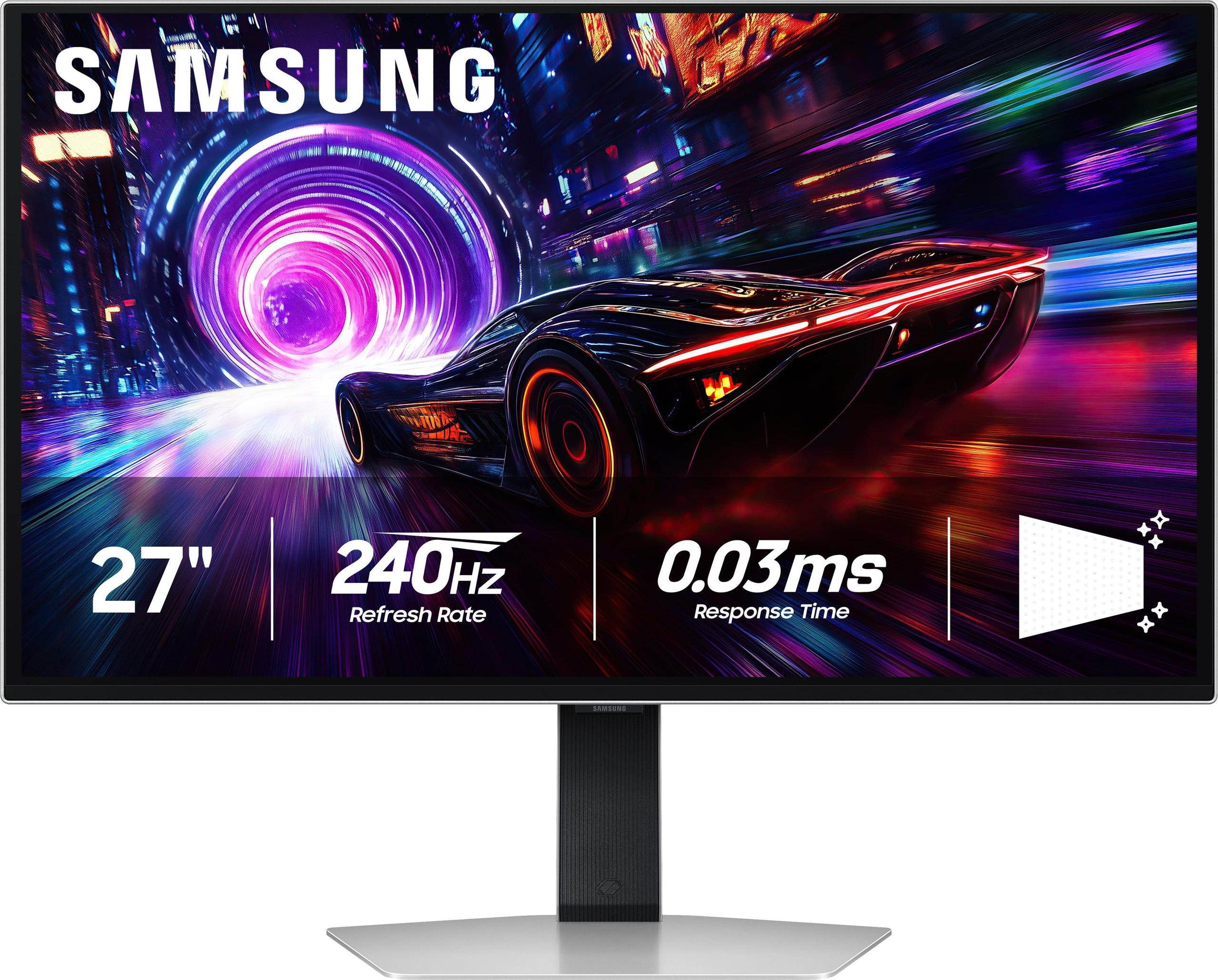
The gaming monitor landscape has transformed dramatically over the past few years. What once was a simple choice between "fast" and "pretty" has evolved into a complex decision involving panel technologies, refresh rates, and resolutions that would have seemed impossible just a decade ago. Today, we're comparing two monitors that represent fundamentally different philosophies: the Alienware 27 QHD 180Hz Gaming Monitor and the Samsung 27" Odyssey OLED G8 4K UHD 240Hz Gaming Monitor.
These aren't just incremental upgrades over older models—they represent the current state of the art in gaming displays, each taking a different approach to what makes the "perfect" gaming monitor.
Before diving into specifics, it's worth understanding what separates gaming monitors from regular displays. Gaming monitors prioritize three key elements: refresh rate (how many times per second the screen updates), response time (how quickly pixels can change color), and input lag (the delay between your action and seeing it on screen).
Traditional monitors might update 60 times per second (60Hz), but modern gaming displays can refresh 180Hz, 240Hz, or even higher. This means smoother motion and more responsive gameplay, especially in fast-paced games where every millisecond matters.
The two monitors we're examining launched in recent years—the Alienware arriving as part of the 2023-2024 generation of high-refresh 1440p displays, while the Samsung represents the cutting edge of OLED gaming technology from 2024-2025. Since their releases, both have established themselves as leaders in their respective categories, though they target distinctly different users.
The Alienware 27 QHD 180Hz Gaming Monitor uses what's called a "Fast IPS" panel—essentially a refined version of the IPS (In-Plane Switching) technology that's been the backbone of quality displays for years. IPS panels are known for their wide viewing angles and consistent colors, but historically, they've been slower than other panel types. The "Fast IPS" designation means Samsung has optimized the liquid crystal response times to compete with faster panel technologies.
This monitor runs at 2560x1440 resolution, commonly called QHD or 1440p. This resolution hits what many consider the sweet spot for gaming—significantly sharper than 1080p without the massive performance demands of 4K. At 27 inches, this resolution provides about 109 pixels per inch, delivering crisp visuals without making text and interface elements uncomfortably small.
The 180Hz refresh rate represents a meaningful step up from the common 144Hz standard. While the jump from 60Hz to 144Hz is immediately noticeable, the difference between 144Hz and 180Hz is more subtle but still meaningful for competitive gaming. The monitor offers multiple response time modes: 4ms (Fast) for the best image quality, 2ms (Super Fast) for balanced performance, and 1ms (Extreme) for maximum speed at the cost of some visual artifacts.
The Samsung 27" Odyssey OLED G8 takes an entirely different approach using QD-OLED (Quantum Dot Organic Light-Emitting Diode) technology. Unlike traditional LCD panels that use a backlight, OLED pixels produce their own light. This fundamental difference allows for true black levels—when a pixel is "off," it produces no light at all, creating infinite contrast ratios that make images pop with unprecedented depth.
The "QD" part stands for Quantum Dot, a Samsung innovation that uses tiny semiconductor particles to enhance color reproduction. This combination delivers colors that are both more accurate and more vivid than traditional displays.
Running at 4K resolution (3840x2160) with a 240Hz refresh rate, this monitor pushes the boundaries of what's currently possible. At 166 pixels per inch, text and images are incredibly sharp—approaching the clarity of printed material. The 0.03ms response time is essentially instantaneous, eliminating motion blur even in the fastest-moving scenes.
The resolution difference between these monitors is substantial and affects everything from gaming performance to productivity use. The Alienware's 1440p resolution requires your graphics card to render about 3.7 million pixels per frame. The Samsung's 4K resolution demands 8.3 million pixels—more than twice the workload.
In practical terms, this means you can achieve high frame rates on the Alienware with mid-range graphics cards like an RTX 4070 or RX 7800 XT. To fully utilize the Samsung's 4K 240Hz capability, you'll need top-tier hardware—think RTX 4080/4090 or RX 7900 XTX territory.
However, the visual difference is undeniable. The Samsung delivers text that's razor-sharp and game details that are simply not visible at lower resolutions. Fine textures in games like Cyberpunk 2077 or Red Dead Redemption 2 come alive in ways that lower resolutions can't match.
Both monitors excel in motion performance, but they achieve it differently. The Alienware's 180Hz provides smooth motion that's particularly noticeable coming from 60Hz or even 144Hz displays. Camera panning in first-person shooters feels fluid, and fast-moving objects maintain their clarity.
The Samsung's 240Hz takes this further, offering motion smoothness that borders on surreal. Combined with the near-instantaneous 0.03ms response time, moving objects appear almost frozen in clarity. This level of performance is overkill for many users but transformative for competitive gamers who need every advantage.
The key difference lies in motion resolution—how much detail you can see in moving objects. The Samsung maintains sharp detail even in rapid motion, while the Alienware may show slight softening in extreme situations, though it's rarely noticeable in normal gaming.
This is where the technology difference becomes most apparent. The Alienware's Fast IPS panel delivers good color reproduction, covering 95% of the DCI-P3 color space and 99% of sRGB. Colors are vibrant and accurate, with wide viewing angles that maintain consistency whether you're sitting directly in front or viewing from the side.
However, like all LCD panels, it suffers from limited contrast. The 1000:1 contrast ratio means that blacks appear as dark gray, and bright highlights can't truly shine without affecting shadow detail. HDR content looks better than on standard monitors but doesn't provide the dramatic impact that OLED can deliver.
The Samsung changes everything. With true black levels, colors have a depth and richness that's immediately noticeable. HDR content transforms from a subtle enhancement to a genuinely different viewing experience. Bright explosions in games don't wash out dark areas, and nighttime scenes reveal shadow details while maintaining inky blacks.
The quantum dot enhancement takes color reproduction to near-perfect levels, covering essentially the entire DCI-P3 color space. This makes the Samsung suitable not just for gaming but for professional content creation where color accuracy matters.
For competitive gaming—think Counter-Strike 2, Valorant, or Apex Legends—both monitors excel but serve different needs. The Alienware provides the high refresh rates that competitive players demand while being achievable with reasonable hardware. Most competitive games aren't graphically demanding, so maintaining 180+ FPS at 1440p is realistic with mid-range systems.
The Samsung's offers even higher refresh rates, but the 4K resolution might be counterproductive in competitive gaming. Many professional players actually prefer lower resolutions for larger enemy visibility, making the Alienware potentially better suited for serious competitive play.
For immersive single-player experiences, the Samsung pulls ahead significantly. Games like The Witcher 3, Horizon Zero Dawn, or any title with rich visual detail benefit enormously from both the 4K resolution and OLED's superior contrast. The difference in visual impact is substantial—shadows have depth, bright areas truly pop, and overall image quality approaches what you'd see in a high-end movie theater.
The Alienware still provides excellent visuals for single-player gaming, with the 1440p resolution offering a good balance between detail and performance. However, once you've experienced OLED's infinite contrast, LCD panels can feel somewhat flat in comparison.
While primarily gaming monitors, both can serve double duty for movie and TV watching. The Samsung is particularly impressive here, with its OLED technology providing cinema-quality contrast and color reproduction. HDR movies look spectacular, with highlight details that LCD simply can't match.
The 27-inch size might feel small for dedicated movie watching compared to larger TVs, but for desktop viewing or smaller rooms, both monitors work well. The Samsung's 4K resolution ensures you're getting full detail from 4K streaming content, while the Alienware will upscale lower resolution content reasonably well.
At the time of writing, the pricing difference between these monitors is substantial. The Alienware typically costs roughly one-third of the Samsung, making it one of the best value propositions in high-refresh gaming monitors.
For the Alienware, you're getting 90% of the high-end gaming experience at a fraction of the cost. It pairs well with mid-range systems and should remain relevant for 3-5 years, especially as games continue to optimize for 1440p resolution.
The Samsung commands premium pricing but offers technology that should remain cutting-edge for 5-7 years. If you're building a high-end system and plan to keep it for many years, the investment makes more sense. The OLED technology provides benefits that go beyond gaming, making it valuable for content creation, movie watching, and general computer use.
OLED technology comes with one significant caveat: potential burn-in. This occurs when static images (like taskbars, game HUDs, or logos) remain on screen for extended periods, potentially leaving permanent ghost images. Modern OLED panels have numerous protective features—pixel shifting, automatic brightness adjustment, and static element detection—that minimize this risk significantly.
Samsung provides a 3-year warranty that covers burn-in under normal usage conditions, suggesting confidence in their protective measures. However, users who leave their monitors on constantly with static content should consider this factor carefully.
Both monitors include adaptive sync technology, which synchronizes the display's refresh rate with your graphics card's output. This eliminates screen tearing (where you see partial frames) and stuttering (where frame timing is inconsistent). The Alienware supports FreeSync, G-SYNC Compatible, and VESA AdaptiveSync, while the Samsung includes FreeSync Premium Pro and G-SYNC Compatible support.
Input lag—the delay between your action and seeing the result—is excellent on both monitors. The Alienware maintains sub-5ms input lag, while the Samsung achieves sub-1ms performance, though the difference is unlikely to be noticeable for most users.
The decision between these monitors ultimately comes down to your priorities, budget, and current hardware.
Choose the Alienware 27 QHD 180Hz Gaming Monitor if you want the best balance of performance and value. It's ideal for gamers with mid-range systems who want high refresh rate gaming without breaking the bank. The 1440p resolution is currently the sweet spot for gaming, providing sharp visuals without excessive hardware demands. This monitor will satisfy the vast majority of gamers and provide excellent performance for both competitive and single-player gaming.
Choose the Samsung 27" Odyssey OLED G8 if you're building a premium system and want the absolute best image quality available. The combination of 4K resolution, 240Hz refresh rate, and OLED technology creates a gaming experience that's genuinely transformative. However, you'll need top-tier hardware to fully utilize its capabilities, and the premium pricing reflects its cutting-edge technology.
For most users, the Alienware represents the smarter purchase—it provides exceptional gaming performance at a reasonable price point and works well with current mid-range hardware. The Samsung is for enthusiasts who want to experience the future of display technology and have the budget and hardware to support it.
Both monitors represent excellent choices within their intended markets. The Alienware democratizes high-refresh gaming, while the Samsung pushes the boundaries of what's possible. Your choice should align with your performance needs, budget constraints, and long-term gaming plans.
| Alienware 27 QHD 180Hz Gaming Monitor | Samsung 27" Odyssey OLED G8 4K UHD 240Hz Gaming Monitor |
|---|---|
| Resolution - Higher resolution means sharper visuals but requires more GPU power | |
| 2560 x 1440 (QHD) - Sweet spot for performance | 3840 x 2160 (4K) - Maximum detail, needs high-end GPU |
| Panel Technology - Determines contrast, colors, and viewing experience | |
| Fast IPS - Proven reliability, good colors, wide viewing angles | QD-OLED - Perfect blacks, infinite contrast, premium color accuracy |
| Refresh Rate - Higher rates provide smoother motion in fast games | |
| 180Hz - Excellent for competitive gaming, achievable with mid-range GPUs | 240Hz - Best-in-class smoothness, requires top-tier hardware to maximize |
| Response Time - Lower is better for eliminating motion blur | |
| 1ms-4ms (adjustable modes) - Very good motion clarity | 0.03ms - Virtually eliminates all motion blur |
| HDR Support - Enhanced contrast and brightness for supported content | |
| VESA DisplayHDR 400 - Basic HDR improvement | VESA DisplayHDR True Black 400 - Transformative OLED HDR experience |
| Color Coverage - Percentage of color spaces the display can reproduce | |
| 95% DCI-P3, 99% sRGB - Very good for gaming and productivity | Near-perfect DCI-P3 coverage - Excellent for gaming and content creation |
| Contrast Ratio - Difference between brightest whites and darkest blacks | |
| 1000:1 (typical LCD) - Good but limited black levels | 1,000,000:1 (true blacks) - Infinite contrast creates depth and realism |
| Adaptive Sync - Eliminates screen tearing and stuttering | |
| G-SYNC Compatible, FreeSync, VESA AdaptiveSync | FreeSync Premium Pro, G-SYNC Compatible |
| Connectivity - Ports available for different devices | |
| 2x HDMI 2.1, 1x DisplayPort 1.4, USB 3.2 hub | HDMI 2.1, DisplayPort, limited USB connectivity |
| Ergonomics - Adjustability for comfort during long sessions | |
| Full adjustment (height, tilt, swivel, pivot) | Limited adjustment (height, tilt only) |
| Burn-in Risk - Potential for permanent image retention | |
| No risk - LCD technology immune to burn-in | Minimal risk with 3-year warranty coverage including burn-in |
| Target GPU Requirements - Hardware needed for optimal performance | |
| RTX 4060 Ti/4070, RX 7700 XT and up | RTX 4080/4090, RX 7900 XTX for full 4K 240Hz |
| Best Use Cases - Where each monitor excels | |
| Competitive gaming, balanced performance/value, productivity | Premium gaming, content creation, HDR media, future-proofing |
The Alienware 27 QHD 180Hz Gaming Monitor is generally better for competitive gaming. Its 1440p resolution allows mid-range GPUs to consistently hit high frame rates, and many competitive players prefer the larger target visibility that comes with lower resolutions. The 180Hz refresh rate provides excellent smoothness for esports titles, and you can actually achieve those frame rates without needing a top-tier graphics card.
The primary difference is resolution and panel technology. The Alienware uses a 1440p Fast IPS panel focused on balanced performance, while the Samsung 27" Odyssey OLED G8 features 4K OLED technology for maximum image quality. The Samsung offers superior contrast and color reproduction but requires significantly more GPU power to drive effectively.
The Alienware 27 QHD 180Hz Gaming Monitor provides significantly better value for most users. It delivers about 90% of high-end gaming performance while requiring much less expensive hardware to run optimally. The Samsung offers cutting-edge technology but at a premium price that's roughly three times higher.
For the Alienware, a mid-range GPU like RTX 4070 or RX 7800 XT will work excellently. However, the Samsung 27" Odyssey OLED G8 really demands top-tier hardware like RTX 4080/4090 or RX 7900 XTX to fully utilize its 4K 240Hz capabilities. Using a weaker GPU with the Samsung means you won't experience its full potential.
The Samsung 27" Odyssey OLED G8 excels for immersive single-player gaming. Its OLED technology provides true blacks, infinite contrast, and exceptional HDR performance that makes games visually stunning. The 4K resolution also reveals fine details in game worlds that aren't visible at lower resolutions, creating a more cinematic experience.
OLED panels like the Samsung can potentially experience burn-in if static images remain on screen for extended periods. However, modern OLED monitors include protective features like pixel shifting and automatic brightness adjustment. Samsung also provides a 3-year warranty covering burn-in under normal usage, indicating confidence in their technology.
The Samsung 27" Odyssey OLED G8 offers superior color accuracy with near-perfect DCI-P3 coverage and quantum dot enhancement. While the Alienware provides very good color reproduction covering 95% DCI-P3 and 99% sRGB, it can't match the color depth and accuracy of OLED technology.
Both monitors work well for productivity, but with different strengths. The Alienware 27 QHD 180Hz Gaming Monitor offers excellent ergonomics with full height, tilt, swivel, and pivot adjustments. The Samsung provides incredibly sharp 4K text that's great for detailed work, though it has more limited ergonomic adjustments.
The Samsung 27" Odyssey OLED G8 is significantly better for home theater use. Its OLED technology provides cinema-quality contrast with true blacks and vibrant highlights. The 4K resolution ensures you get full detail from streaming content, and HDR movies look spectacular with depth that LCD panels simply cannot match.
The difference between the Alienware's 180Hz and Samsung's 240Hz is noticeable but not dramatic for most users. Both provide smooth gaming experiences well beyond standard 60Hz or 144Hz monitors. The 240Hz advantage is most apparent to competitive esports players who need every possible edge in fast-paced games.
The Samsung 27" Odyssey OLED G8 is more future-proof with its 4K resolution and cutting-edge OLED technology, likely remaining relevant for 5-7 years. The Alienware should provide excellent performance for 3-5 years and offers better immediate value. Your choice depends on whether you prioritize long-term specs or current price-to-performance ratio.
For the Alienware 27 QHD 180Hz Gaming Monitor, an RTX 4070, RTX 4060 Ti, or RX 7800 XT will handle most games at high settings while reaching the 180Hz target. The Samsung requires more powerful hardware like RTX 4080/4090 or RX 7900 XTX to achieve high frame rates at 4K resolution and truly utilize its 240Hz capability.
We've done our best to create useful and informative comparisons to help you decide what product to buy. Our research uses advanced automated methods to create this comparison and perfection is not possible - please contact us for corrections or questions. These are the sites we've researched in the creation of this article: bestbuy.com - bestbuy.com - youtube.com - dell.com - tweaktown.com - dell.com - rtings.com - manuals.plus - tomshardware.com - displayspecifications.com - youtube.com - youtube.com - displayspecifications.com - dell.com - dellstore.com - ebay.com - rtings.com - tomsguide.com - tomshardware.com - youtube.com - ign.com - youtube.com - pcvarge.com - youtube.com - youtube.com - versus.com - bestbuy.com - samsung.com - samsung.com - displayspecifications.com - samsung.com - hardforum.com - publicsector.shidirect.com - forums.thefpsreview.com - samsung.com - rtings.com - samsung.com - samsung.com

Privacy Policy
Terms and Conditions - Affiliate Policy
Home Security
© Copyright 2008-2026.
11816 Inwood Rd #1211, Dallas, TX 75244