









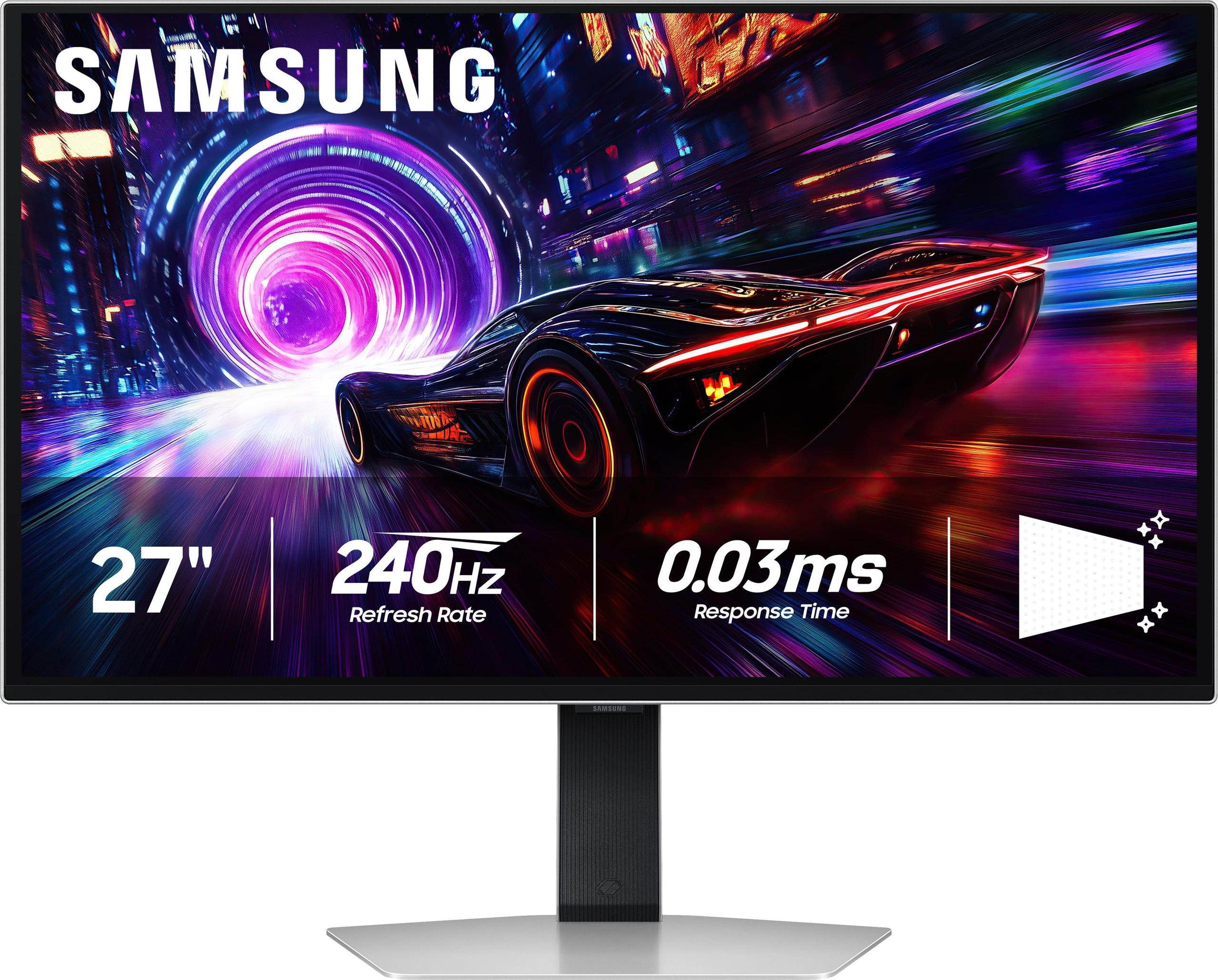
When you're shopping for a premium 27-inch 4K gaming monitor, you're essentially choosing between two fundamentally different display technologies that have shaped the high-end monitor market. The Acer Nitro XV275K P3 represents the Mini LED approach, while the Samsung 27" Odyssey OLED G8 showcases cutting-edge OLED technology. Both arrived on the market around 2023-2024, but they take dramatically different paths to deliver exceptional gaming experiences.
The 27-inch 4K category has become the sweet spot for serious gamers and content creators. At this size, you get incredibly sharp visuals with 163 pixels per inch – that's dense enough to make text crystal clear for work while providing stunning detail in games. Unlike massive 32-inch or ultrawide monitors that can overwhelm smaller desks, 27-inch displays fit comfortably in most setups while still offering enough screen real estate for immersive gaming.
The core difference between these monitors lies in how they create images. The Acer Nitro XV275K P3 uses an IPS (In-Plane Switching) LCD panel with Mini LED backlighting – think of it as thousands of tiny LEDs arranged in 576 zones behind the screen, each capable of dimming independently. This creates much better contrast than traditional monitors because dark areas can actually get darker while bright areas stay brilliant.
The Samsung Odyssey OLED G8, on the other hand, uses Quantum Dot OLED technology where each individual pixel produces its own light. When a pixel needs to be black, it simply turns off completely, creating perfect blacks that LCD panels can't match. The quantum dot layer enhances color production, making colors more vibrant and accurate than standard OLED panels.
Since 2023, both technologies have matured significantly. Mini LED has become more affordable and refined, with better dimming algorithms that reduce the "blooming" effect (unwanted light spill around bright objects). OLED technology has addressed burn-in concerns through better thermal management and pixel-shifting techniques, making it more practical for desktop use where static elements like taskbars could potentially cause permanent image retention.
Here's where the Samsung OLED G8 flexes its muscles. Its 240Hz refresh rate means the screen updates 240 times per second, compared to the Acer XV275K P3's 160Hz. For competitive gaming, especially in fast-paced shooters like Valorant or Counter-Strike, those extra frames per second can make the difference between landing a shot and missing it entirely.
The response time difference is even more dramatic. The Samsung monitor boasts a 0.03ms gray-to-gray response time – that's virtually instantaneous. The Acer comes in at 1ms, which is still excellent but not quite at the bleeding edge. In practical terms, this means the Samsung will have virtually zero motion blur or ghosting, while the Acer might show tiny amounts in extremely fast-moving scenes.
Variable refresh rate (VRR) technology works on both monitors, synchronizing the display's refresh rate with your graphics card to eliminate screen tearing – that jarring visual artifact where part of the screen shows one frame while another part shows the next. Both support AMD FreeSync and work with NVIDIA's G-Sync Compatible mode, though the Samsung has slightly broader compatibility.
Input lag – the delay between pressing a button and seeing the result on screen – is crucial for competitive gaming. The Samsung OLED G8 has virtually no input lag due to its OLED technology, giving you the most immediate response possible. The Acer XV275K P3 performs excellently at high refresh rates but shows increased input lag when running at 60Hz, which could be noticeable if you're gaming on consoles that can't always maintain high frame rates.
This is where the technology differences create the most dramatic real-world impact. The Acer Nitro XV275K P3 can push up to 1000 nits of brightness – bright enough to deliver punchy HDR highlights even in well-lit rooms. When you're watching an HDR movie or playing games like Horizon Zero Dawn with stunning sunsets, those bright moments really pop off the screen.
The Samsung OLED G8 is limited to around 250 nits, which might sound disappointing until you experience OLED's perfect blacks in person. Instead of relying on brightness alone for impact, OLED creates drama through contrast. When a scene shows stars against space or car headlights in darkness, the blacks are truly black – not the dark gray you get with LCD panels.
For home theater use, this creates an interesting dilemma. If your setup is in a bright living room with lots of windows, the Acer's superior brightness gives you more flexibility. But if you have a dedicated dark room or can control lighting, the Samsung's infinite contrast ratio creates a more cinematic experience that rivals high-end TVs.
Both monitors excel in color reproduction, but in different ways. The Samsung OLED G8 leverages quantum dot technology to produce incredibly vibrant and accurate colors, covering 99% of the DCI-P3 color space that's used for most modern content and games. The colors have a lifelike quality that's immediately apparent.
The Acer XV275K P3 takes a more professional approach, covering 99% of Adobe RGB – a color space that's crucial for photo and video editing. It comes factory-calibrated with Delta E accuracy under 2, meaning colors are extremely accurate out of the box. For content creators, this precision is invaluable.
The Acer's 576-zone Mini LED array creates impressive local dimming, but it's not perfect. You might notice some blooming around bright objects on dark backgrounds – imagine watching movie credits with white text on black, and seeing faint gray halos around the letters. It's much better than traditional monitors, but not quite at OLED levels.
The Samsung OLED completely eliminates blooming since each pixel controls itself. This creates incredibly clean images, especially in dark scenes. Horror games and atmospheric titles like The Last of Us benefit enormously from this precision.
The Samsung OLED G8 showcases the elegance possible with OLED technology – it's remarkably thin with a premium metal finish and customizable RGB lighting that can sync with your games. However, the stand is somewhat basic, offering height and tilt adjustment but lacking the swivel and pivot options that many users appreciate.
The Acer XV275K P3 is noticeably thicker due to its Mini LED backlight array, but it compensates with superior ergonomics. The stand provides full adjustment including 150mm of height adjustment, 25-degree swivel in each direction, and even portrait mode rotation. For users who spend long hours at their desks, these adjustments can significantly impact comfort.
Modern connectivity becomes crucial when you're investing in a premium monitor. The Acer XV275K P3 excels here with comprehensive port selection including two HDMI 2.1 ports, DisplayPort 1.4, and USB-C with 90W power delivery. This USB-C connection is particularly valuable for laptop users – you can connect your laptop with a single cable that handles video, data, and charging simultaneously.
The monitor also includes a USB hub with multiple USB-A ports, essentially turning it into a desktop docking station. For professionals who switch between gaming and work, this flexibility is incredibly convenient.
The Samsung OLED G8 takes a more minimalist approach with HDMI 2.1 and USB-C connectivity, but lacks the comprehensive hub functionality. It focuses on core gaming features rather than workplace versatility.
At the time of writing, the Acer XV275K P3 typically costs roughly half the price of the Samsung OLED G8, making it one of the best values in premium gaming monitors. You're getting exceptional Mini LED technology, professional-grade color accuracy, and solid gaming performance at a price point that was unthinkable just a few years ago.
The Samsung commands a significant premium for its cutting-edge OLED technology and ultimate gaming performance. For enthusiasts and competitive gamers where every millisecond matters, this premium can be justified. The question becomes whether the 240Hz refresh rate and perfect blacks are worth roughly doubling your investment.
Longevity considerations favor the Acer in some ways. Mini LED technology doesn't suffer from burn-in risks, so you can leave static elements on screen without worry. The Samsung OLED includes burn-in protection features and warranty coverage, but OLED panels do have theoretical longevity concerns with heavy desktop use.
For serious esports players, the Samsung OLED G8 is the clear choice. The 240Hz refresh rate and 0.03ms response time provide tangible advantages in competitive games. Professional gamers often describe the difference as making targets feel "easier to track" during rapid movements.
The Acer XV275K P3 edges ahead for creative professionals. Its superior brightness makes color-critical work possible in various lighting conditions, while the factory calibration and broad color gamut support ensure accurate results. The lack of burn-in risk makes it safer for workflows involving static editing interfaces.
This is where personal preferences and room setup become crucial. If you primarily game in a controlled lighting environment and want the ultimate visual experience, the Samsung OLED creates truly stunning visuals. But if you need versatility for bright rooms or extended work sessions, the Acer provides more practical flexibility.
For dedicated home theater setups, the Samsung OLED G8 creates a more cinematic experience with its perfect blacks and infinite contrast. However, the Acer's higher brightness can be preferable in living room setups where ambient light control isn't perfect.
The choice between these monitors ultimately depends on your priorities and budget. The Acer Nitro XV275K P3 represents exceptional value, delivering high-end features at a more accessible price point. It's ideal for users who want premium gaming performance without compromising on professional capabilities or longevity concerns.
The Samsung Odyssey OLED G8 targets enthusiasts willing to pay significantly more for the absolute best gaming experience and visual quality. If you're building a high-end gaming setup and budget isn't the primary constraint, the Samsung delivers performance that's genuinely best-in-class.
Consider your primary use case, room lighting, and budget constraints. Both monitors represent significant improvements over older LCD technology, but they excel in different areas. The Mini LED approach offers practical advantages and excellent value, while OLED provides the ultimate in image quality and gaming responsiveness at a premium price point.
Either choice will provide years of exceptional gaming and viewing experiences – the question is whether you prioritize value and versatility or ultimate performance and visual quality.
| Acer Nitro XV275K P3 27" Mini LED 4K UHD Gaming Monitor | Samsung 27" Odyssey OLED G8 4K UHD 240Hz Gaming Monitor |
|---|---|
| Display Technology - Determines contrast, brightness capabilities, and longevity | |
| IPS LCD with 576-zone Mini LED backlighting | Quantum Dot OLED (QD-OLED) with per-pixel lighting |
| Refresh Rate - Critical for competitive gaming and motion smoothness | |
| 160Hz (excellent for most gaming) | 240Hz (best-in-class for esports) |
| Response Time - Affects motion blur and ghosting in fast scenes | |
| 1ms GtG (very good, minimal artifacts) | 0.03ms GtG (virtually instantaneous) |
| Peak Brightness - Determines HDR impact and bright room usability | |
| 1,000 nits (excellent for HDR and bright rooms) | 250 nits (requires controlled lighting) |
| Contrast Ratio - How deep blacks appear and overall image depth | |
| 100,000,000:1 dynamic (good local dimming) | Infinite (perfect blacks, no blooming) |
| Color Gamut Coverage - Important for accurate colors in games and content | |
| 99% Adobe RGB, 98% DCI-P3 (professional-grade) | 99% DCI-P3 (excellent gaming colors) |
| HDR Certification - Indicates quality of high dynamic range content | |
| VESA DisplayHDR 1000 (bright HDR highlights) | VESA DisplayHDR True Black 400 (perfect blacks) |
| Connectivity - Affects compatibility with devices and workflows | |
| 2x HDMI 2.1, DP 1.4, USB-C with 90W PD, USB hub | HDMI 2.1, USB-C (basic connectivity) |
| Ergonomics - Important for long gaming sessions and desk setup | |
| Full adjustment: height, tilt, swivel, pivot | Basic: height and tilt only |
| Burn-in Risk - Long-term durability concern for desktop use | |
| None (Mini LED is burn-in immune) | Potential risk despite protection features |
| Anti-Glare Performance - Affects usability in various lighting conditions | |
| Standard anti-glare coating | Advanced glare-free technology (54% less reflective) |
| Warranty Coverage - Protection for your investment | |
| 3 years standard | 3 years including burn-in protection |
| Target User - Who benefits most from each approach | |
| Gamers wanting bright HDR and professional color work | Competitive gamers prioritizing ultimate performance |
The Samsung 27" Odyssey OLED G8 is superior for competitive gaming due to its 240Hz refresh rate and 0.03ms response time. This provides ultra-smooth motion and virtually eliminates input lag, giving you a competitive edge in fast-paced games like CS2 or Valorant. The Acer Nitro XV275K P3 offers excellent 160Hz gaming performance but can't match the Samsung's esports-level responsiveness.
The Acer Nitro XV275K P3 uses Mini LED backlighting with 576 dimming zones behind an LCD panel, delivering bright visuals up to 1000 nits. The Samsung OLED G8 uses self-illuminating pixels that can turn completely off for perfect blacks and infinite contrast. Mini LED excels in bright rooms, while OLED provides superior contrast in controlled lighting conditions.
The Acer Nitro XV275K P3 is significantly better for bright rooms thanks to its 1000-nit peak brightness compared to the Samsung OLED G8's 250-nit limitation. If your gaming setup is near windows or in a well-lit room, the Acer will maintain better visibility and HDR impact throughout the day.
The Acer Nitro XV275K P3 is better suited for professional work with its 99% Adobe RGB coverage, factory calibration, and no burn-in risk from static editing interfaces. While the Samsung OLED G8 offers excellent color accuracy, its lower brightness and potential burn-in concerns make it less ideal for extended professional use.
The Acer Nitro XV275K P3 provides exceptional value, typically costing significantly less while delivering Mini LED technology, excellent color accuracy, and solid gaming performance. The Samsung OLED G8 commands a premium for cutting-edge OLED technology and 240Hz performance, making it worthwhile only for users prioritizing ultimate gaming performance.
The Acer Nitro XV275K P3 has no burn-in risk due to its Mini LED LCD technology, making it worry-free for desktop use with static elements. The Samsung OLED G8 includes burn-in protection features and warranty coverage, but OLED panels can potentially develop image retention over time with heavy desktop use involving static UI elements.
This depends on your room setup. The Acer Nitro XV275K P3 delivers brighter, more impactful HDR highlights with its 1000-nit capability and DisplayHDR 1000 certification. The Samsung OLED G8 offers superior contrast with perfect blacks and no blooming, creating more cinematic visuals in dark environments despite lower peak brightness.
The Acer Nitro XV275K P3 provides comprehensive connectivity including 2x HDMI 2.1, DisplayPort 1.4, USB-C with 90W power delivery, and a built-in USB hub for laptop docking. The Samsung OLED G8 offers basic but modern connectivity with HDMI 2.1 and USB-C, focusing on core gaming features rather than workplace versatility.
The Acer Nitro XV275K P3 offers superior ergonomics with full height, tilt, swivel, and pivot adjustments, making it more comfortable for long gaming sessions and easier to position perfectly. The Samsung OLED G8 provides only basic height and tilt adjustment, which may limit optimal positioning in some setups.
Yes, both monitors support variable refresh rate technology. The Acer Nitro XV275K P3 features AMD FreeSync Premium Pro and works with NVIDIA G-Sync Compatible mode. The Samsung OLED G8 also supports FreeSync Premium Pro with broader VRR compatibility, ensuring smooth, tear-free gaming on both AMD and NVIDIA graphics cards.
The Samsung OLED G8 excels for console gaming with its HDMI 2.1 support and superior motion clarity, though the Acer XV275K P3 shows increased input lag at 60Hz which could affect some console games. Both support 4K 120Hz gaming on PS5 and Xbox Series X, but the Samsung provides a more responsive experience overall.
Both can work for home theater applications. The Samsung OLED G8 provides a more cinematic experience with perfect blacks and infinite contrast, similar to high-end OLED TVs. The Acer Nitro XV275K P3 offers better brightness for rooms with ambient light but may show some blooming in dark movie scenes. Consider your room lighting and viewing distance when choosing between them.
We've done our best to create useful and informative comparisons to help you decide what product to buy. Our research uses advanced automated methods to create this comparison and perfection is not possible - please contact us for corrections or questions. These are the sites we've researched in the creation of this article: bestbuy.com - rtings.com - reviewed.com - displayninja.com - youtube.com - displayninja.com - youtube.com - dpreview.com - acer.com - buy.bluum.com - shi.com - camcor.com - newegg.com - provantage.com - displayspecifications.com - colamco.com - displayspecifications.com - walmart.com - bestbuy.com - rtings.com - tomsguide.com - tomshardware.com - youtube.com - ign.com - youtube.com - pcvarge.com - youtube.com - youtube.com - versus.com - bestbuy.com - samsung.com - samsung.com - displayspecifications.com - samsung.com - hardforum.com - publicsector.shidirect.com - forums.thefpsreview.com - samsung.com - rtings.com - samsung.com - samsung.com

Privacy Policy
Terms and Conditions - Affiliate Policy
Home Security
© Copyright 2008-2026.
11816 Inwood Rd #1211, Dallas, TX 75244