














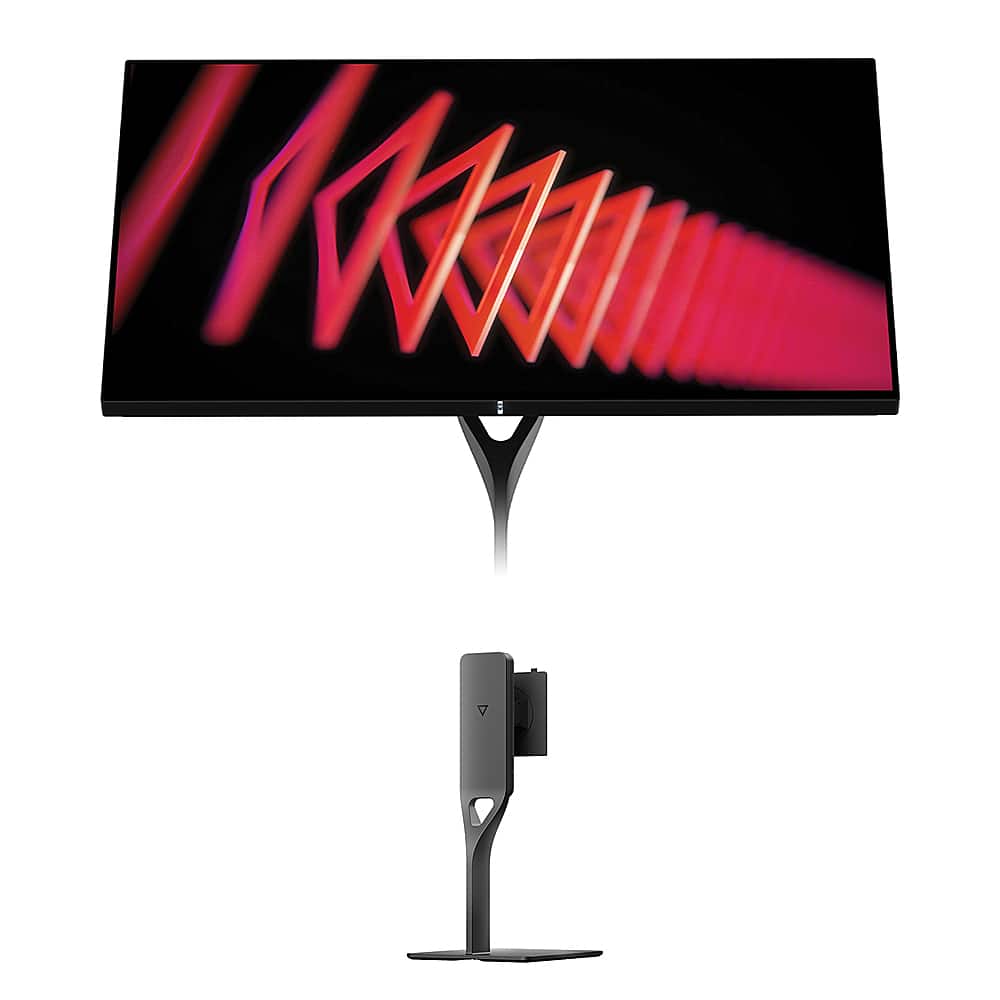
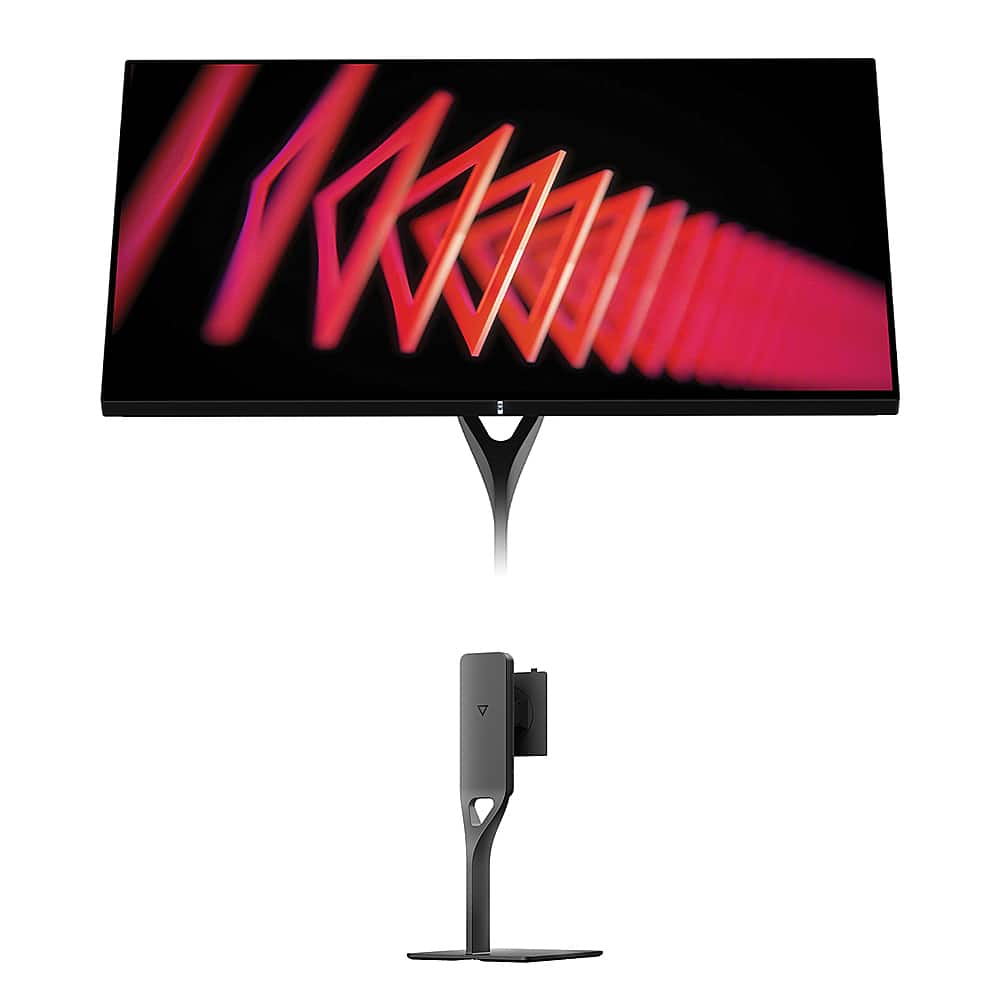
Choosing the right gaming monitor in 2024 feels a bit like picking between a sports car and a luxury sedan—both will get you where you're going, but they take very different approaches. Today we're comparing two monitors that represent distinct philosophies in gaming display technology: the Alienware 27 QHD 180Hz Gaming Monitor, which prioritizes speed above all else, and the Dough Spectrum One 27-Inch 4K 144Hz Gaming Monitor with Gorilla Glass, which focuses on premium visual quality and versatility.
Both monitors arrived in 2024, but they couldn't be more different in their approach to delivering great gaming experiences. The gaming monitor landscape has evolved dramatically over the past few years, with manufacturers finally solving many of the traditional trade-offs between resolution, refresh rate, and color quality that plagued earlier displays.
Gaming monitors today fall into several distinct categories, each optimized for different priorities. High refresh rate QHD displays like the Alienware target competitive gamers who need every possible frame per second and the lowest input lag. Meanwhile, 4K premium displays like the Dough Spectrum One cater to users who want exceptional visual fidelity for both gaming and professional work.
The core tension in gaming monitors remains the same: resolution versus refresh rate. Higher resolutions mean more pixels to push, which requires more graphics processing power and typically limits how high the refresh rate can go. QHD resolution (2560×1440 pixels) sits in a sweet spot where modern graphics cards can still achieve high frame rates, while 4K (3840×2160 pixels) demands significantly more GPU horsepower but delivers unmatched detail and screen real estate.
Panel technology matters enormously too. Both monitors use IPS (In-Plane Switching) panels, which offer wide viewing angles and good color reproduction, but the implementation details make all the difference. Response time—how quickly pixels can change from one color to another—directly impacts motion clarity in games. Adaptive sync technologies like G-SYNC and FreeSync eliminate screen tearing by synchronizing the monitor's refresh rate with your graphics card's output.
The Alienware 27 QHD 180Hz Gaming Monitor represents the competitive gaming philosophy taken to its logical conclusion. At 180Hz refresh rate over DisplayPort, it can display 180 unique frames per second when your graphics card can keep up. This creates incredibly smooth motion, especially in fast-paced shooters and racing games where every millisecond counts.
What makes this particularly interesting is the variable response time options. Most monitors lock you into one response time setting, but the Alienware offers three choices: 4ms for best image quality, 2ms for balanced performance, or 1ms for absolute speed with some potential visual artifacts. This flexibility lets you tune the display based on what you're playing—use the slower, cleaner setting for single-player adventures and switch to maximum speed for competitive online matches.
The Dough Spectrum One takes a completely different approach. Instead of chasing the highest possible refresh rate, it focuses on delivering exceptional image quality through unique materials and careful engineering. The edge-to-edge Corning Gorilla Glass surface is practically unheard of in desktop monitors—it's the same technology that protects smartphone screens, but here it creates a glossy, vibrant display surface that makes colors pop in ways traditional monitor coatings can't match.
Perhaps more importantly, each Dough Spectrum One unit receives individual factory calibration to achieve a Delta E of 0.6 or better. Delta E measures color accuracy—values under 1.0 are considered professional-grade accurate, and values under 2.0 are generally imperceptible to the human eye. This means the monitor displays colors exactly as content creators intended, whether you're gaming or working on professional projects.
When it comes to pure gaming performance, these monitors excel in different areas. The Alienware dominates in competitive scenarios where high frame rates translate directly to gaming advantages. In first-person shooters, the 180Hz refresh rate means you see new information every 5.6 milliseconds instead of every 6.9 milliseconds at 144Hz. That difference might sound tiny, but in competitive gaming where reaction times matter, those extra frames can mean spotting an enemy first or landing a crucial shot.
The variable refresh rate support on both monitors eliminates screen tearing, but they handle it slightly differently. The Alienware supports AMD FreeSync and NVIDIA G-SYNC Compatible modes across its full refresh range, plus VESA AdaptiveSync for broader compatibility. The Dough Spectrum One goes further with FreeSync Premium Pro certification, which includes automatic HDR switching and low framerate compensation.
Console gaming reveals where each monitor's strengths lie. The Alienware can handle PS5 and Xbox Series X gaming at QHD resolution with variable refresh rates up to 144Hz over HDMI 2.1. This works well since current consoles often target 120Hz in performance modes, and QHD resolution means games are more likely to hit those high frame rates consistently.
The Dough Spectrum One shines for console gaming in a different way. Its 4K resolution matches the native output of current-generation consoles, and the HDMI 2.1 connections support full 4K gaming at 120Hz. This means you get the full visual experience developers intended, with every pixel and detail preserved. Games like Spider-Man: Miles Morales or Horizon Forbidden West look absolutely stunning at native 4K resolution.
Visual quality separates these monitors more dramatically than gaming performance. The Alienware delivers good color reproduction with 95% DCI-P3 coverage and DisplayHDR 400 certification. DCI-P3 is a wide color gamut used in digital cinema, so 95% coverage means the monitor can display most of the colors you see in movies and games. DisplayHDR 400 certification indicates basic HDR support with peak brightness around 400 nits—enough to make highlights noticeably brighter than standard content.
The Dough Spectrum One operates in a different league entirely. With 98% DCI-P3 and 100% sRGB coverage, plus that factory calibration, it delivers professional-grade color accuracy. The DisplayHDR 600 certification means peak brightness reaches 750 nits with 16-zone local dimming in HDR mode. Local dimming allows different areas of the screen to dim independently, creating deeper blacks and more realistic contrast in HDR content.
The Gorilla Glass surface on the Dough Spectrum One deserves special attention. Traditional monitor anti-glare coatings reduce reflections but also slightly dull colors and reduce perceived sharpness. The glossy Gorilla Glass eliminates this trade-off—colors appear more vibrant and text looks sharper because there's no coating interfering with light transmission. The downside is increased reflection in bright environments, so room lighting becomes more important.
From our research into user experiences, the visual difference is immediately apparent when comparing the monitors side by side. The Dough Spectrum One consistently receives praise for image quality that rivals expensive reference monitors, while the Alienware earns recognition for solid gaming-focused visuals without the premium price tag.
Build quality reflects each monitor's target audience clearly. The Alienware includes a fully adjustable stand with height, tilt, swivel, and pivot adjustments. The construction feels solid and gaming-focused, with Alienware's distinctive design language and three-year warranty backing. It's designed to be a complete package that works well in most gaming setups without additional accessories.
The Dough Spectrum One takes a more modular approach. The monitor itself features premium materials and construction—the Gorilla Glass surface feels substantial and the overall build quality exceeds typical gaming monitors. However, the stand is sold separately, which increases total cost but allows users to choose exactly the mounting solution they prefer. The aluminum construction and minimalist design target users who prioritize aesthetics and customization.
One area where the monitors differ significantly is port selection and connectivity. The Alienware provides standard gaming connectivity with DisplayPort 1.4 and dual HDMI 2.1 ports, plus USB hub functionality for connecting peripherals.
The Dough Spectrum One goes much further with versatility. The USB-C port supports DisplayPort Alt Mode with 100W power delivery, meaning you can connect a laptop with a single cable for video, data, and charging. This transforms the monitor into a proper docking station for laptop users, making it equally valuable for work and play.
For home theater applications, these monitors serve different purposes. The Alienware works well as a large desktop display for gaming and media consumption, but QHD resolution means you're not getting the full detail available in 4K streaming content and UHD Blu-rays.
The Dough Spectrum One excels as a home theater display. Native 4K resolution displays streaming content and UHD discs at full quality, while the glossy Gorilla Glass surface enhances perceived contrast and color saturation similar to high-end TVs. The DisplayHDR 600 certification provides decent HDR performance for movies and shows, though it's not quite at the level of dedicated home theater displays.
Both monitors lack built-in speakers, which is typical for gaming-focused displays but means you'll need separate audio solutions for home theater use.
Value comparison requires considering total cost of ownership and intended use cases. At the time of writing, the Alienware positions itself as a premium gaming monitor at a relatively accessible price point, especially considering it includes the stand and comprehensive warranty support from Dell.
The Dough Spectrum One commands a significant premium, particularly when factoring in the separately-sold stand. However, the unique Gorilla Glass surface, factory calibration, and professional-grade color accuracy justify the higher cost for users who need those capabilities.
Long-term considerations favor different approaches. The Alienware offers excellent gaming performance that should remain relevant as long as you're primarily gaming at QHD resolution. The high refresh rate provides future-proofing for competitive gaming, and QHD resolution extends your graphics card's effective lifespan.
The Dough Spectrum One provides different long-term value through versatility and visual quality. 4K resolution ensures compatibility with future content and gaming developments, while the professional color accuracy makes it valuable for creative work beyond gaming. The USB-C docking capability adds significant utility for users with laptops.
Based on user feedback and reviews, reliability differs between these monitors. The Alienware benefits from Dell's established support infrastructure and generally receives positive feedback for long-term reliability. Users report consistent performance and responsive customer service when issues arise.
The Dough Spectrum One presents a more complex picture. The hardware quality generally receives high marks, but some users report firmware quirks and slower customer support response times. Dough is a smaller company with less established support infrastructure compared to Dell, which factors into the overall ownership experience.
The decision between these monitors ultimately depends on your primary use cases and priorities. Choose the Alienware 27 QHD 180Hz Gaming Monitor if you're primarily focused on competitive gaming performance. The 180Hz refresh rate provides a genuine advantage in fast-paced games, and the QHD resolution offers an excellent balance of visual quality and performance demands on your graphics card. It's also the better choice if you want proven reliability and comprehensive support included in the purchase price.
The Dough Spectrum One 27-Inch 4K 144Hz Gaming Monitor makes sense for users who need versatility beyond gaming. If you do creative work, frequently connect laptops, or want the absolute best visual quality available, the premium features justify the higher cost. Console gamers who want full 4K resolution and the best possible image quality should also lean toward this option.
For most competitive PC gamers, especially those playing esports titles like Counter-Strike, Valorant, or Apex Legends, the Alienware provides better value and performance. The higher refresh rate directly translates to competitive advantages, and QHD resolution ensures your graphics card can actually deliver those high frame rates consistently.
For content creators, professionals, and gamers who prioritize visual experience over maximum performance, the Dough Spectrum One delivers capabilities you simply can't find elsewhere. The combination of 4K resolution, factory calibration, and unique Gorilla Glass surface creates a display that excels at everything from professional photo editing to cinematic gaming experiences.
Both monitors represent excellent execution of their respective design philosophies. Your choice should align with whether you prioritize competitive gaming performance or premium visual quality and versatility. Either way, you're getting a significant upgrade over older gaming monitors and displays that force you to choose between resolution, refresh rate, and color quality.
| Alienware 27 QHD 180Hz Gaming Monitor | Dough Spectrum One 27-Inch 4K 144Hz Gaming Monitor Gorilla Glass |
|---|---|
| Resolution & Pixel Density - Higher resolution means sharper text and more screen real estate, but requires more GPU power | |
| 2560×1440 (QHD) - Sweet spot for gaming performance | 3840×2160 (4K) - Professional-grade sharpness, 163 PPI |
| Refresh Rate - Higher refresh rates provide smoother motion and competitive gaming advantages | |
| 180Hz (DisplayPort) / 144Hz (HDMI) - Excellent for esports | 144Hz - Great for most gaming, sufficient for 4K gaming |
| Response Time - Lower response times reduce motion blur in fast-paced games | |
| 1ms-4ms (selectable) - Variable overdrive settings | 1ms GTG - Consistent fast response |
| Panel Technology - IPS provides wide viewing angles and good colors, but surface treatment affects image quality | |
| Fast IPS with anti-glare coating - Practical for various lighting | Nano-IPS with glossy Gorilla Glass - Superior color vibrancy, more reflective |
| Color Accuracy & Gamut - Important for content creation and realistic gaming visuals | |
| 95% DCI-P3, good gaming colors | 98% DCI-P3, 100% sRGB, Delta E ≤0.6 factory calibration - Professional grade |
| HDR Performance - Better HDR provides more realistic lighting and contrast in supported content | |
| DisplayHDR 400 (400 nits peak) - Basic HDR enhancement | DisplayHDR 600 (750 nits peak, 16-zone dimming) - Noticeable HDR improvement |
| Connectivity - More versatile connections support different devices and use cases | |
| 2× HDMI 2.1, 1× DisplayPort 1.4, USB hub | 2× HDMI 2.1, 1× DisplayPort 1.4, USB-C with 100W power delivery - Laptop docking capability |
| Adaptive Sync - Eliminates screen tearing and stuttering for smoother gaming | |
| AMD FreeSync, NVIDIA G-SYNC Compatible, VESA AdaptiveSync | AMD FreeSync Premium Pro, NVIDIA G-SYNC Compatible, VESA AdaptiveSync |
| Ergonomics & Stand - Adjustability affects long-term comfort during extended use | |
| Fully adjustable stand included (height, tilt, swivel, pivot) | VESA mount compatible, stand sold separately - Premium materials when purchased |
| Target Use Case - Understanding the intended audience helps determine best fit | |
| Competitive gaming, esports, high refresh rate priority | Content creation, premium gaming, laptop docking, visual quality priority |
| Console Gaming Compatibility - Important for PS5/Xbox Series X users wanting optimal performance | |
| QHD 120-144Hz with VRR - Good performance mode support | Native 4K 120Hz with VRR - Full console resolution support |
| Build Quality & Warranty - Affects long-term reliability and support experience | |
| Dell's established support, 3-year warranty, proven reliability | Premium materials, newer company with mixed support feedback, 3-year warranty |
The Alienware 27 QHD 180Hz Gaming Monitor is superior for competitive gaming due to its higher 180Hz refresh rate and variable response time options (1ms-4ms). The extra refresh rate provides smoother motion and potential competitive advantages in esports titles. The QHD resolution also allows graphics cards to maintain higher frame rates more consistently than 4K.
The Alienware monitor uses QHD (2560×1440) resolution, while the Dough Spectrum One features 4K (3840×2160). 4K provides significantly sharper text and more screen real estate with 163 pixels per inch, but requires more GPU power. QHD offers a good balance of sharpness and performance for gaming.
The Dough Spectrum One 27-Inch 4K 144Hz Gaming Monitor offers superior color accuracy with 98% DCI-P3 coverage, 100% sRGB, and factory calibration achieving Delta E ≤0.6. This makes it suitable for professional work. The Alienware provides good gaming colors with 95% DCI-P3 but isn't professionally calibrated.
Yes, both monitors support console gaming. The Alienware handles QHD gaming up to 144Hz with variable refresh rate support. The Dough Spectrum One provides native 4K gaming at 120Hz, matching the full resolution output of current-generation consoles for maximum visual fidelity.
The Dough Spectrum One excels for professional use with its 4K resolution, factory color calibration, and USB-C docking capability with 100W power delivery. The higher pixel density and professional-grade color accuracy make it ideal for photo editing, video work, and design tasks alongside gaming.
The Dough Spectrum One features edge-to-edge Corning Gorilla Glass with anti-reflective coating, providing superior scratch resistance and enhanced color vibrancy compared to traditional monitor coatings. This creates a glossy, premium surface that makes colors appear more vivid, though it can be more reflective in bright environments.
The Alienware 27 QHD 180Hz Gaming Monitor typically offers better value for pure gaming, including a fully adjustable stand and established warranty support. The Dough Spectrum One commands a premium for its unique features and materials, but the stand is sold separately, increasing total cost.
Neither the Alienware nor the Dough Spectrum One includes built-in speakers. Both focus on display performance rather than audio, so you'll need separate speakers or headphones for sound. This is common among gaming-focused monitors.
The Dough Spectrum One offers superior HDR with DisplayHDR 600 certification, 750 nits peak brightness, and 16-zone local dimming. The Alienware provides basic HDR with DisplayHDR 400 certification and 400 nits peak brightness, suitable for gaming enhancement but not professional HDR work.
Both monitors support laptop connectivity, but the Dough Spectrum One 27-Inch 4K 144Hz Gaming Monitor excels with USB-C connectivity featuring 100W power delivery. This allows single-cable connection for video, data, and laptop charging. The Alienware requires separate video and power cables for laptop use.
The Alienware 27 QHD 180Hz Gaming Monitor benefits from Dell's established support infrastructure and generally receives positive reliability feedback. The Dough Spectrum One offers excellent hardware quality but comes from a smaller company with less established support, though both include 3-year warranties.
For home theater applications, the Dough Spectrum One is better suited with its native 4K resolution for streaming content and UHD Blu-rays, plus superior HDR performance. The glossy Gorilla Glass surface enhances perceived contrast similar to TVs. The Alienware works for media consumption but doesn't display 4K content at full resolution.
We've done our best to create useful and informative comparisons to help you decide what product to buy. Our research uses advanced automated methods to create this comparison and perfection is not possible - please contact us for corrections or questions. These are the sites we've researched in the creation of this article: bestbuy.com - bestbuy.com - youtube.com - dell.com - tweaktown.com - dell.com - rtings.com - manuals.plus - tomshardware.com - displayspecifications.com - youtube.com - youtube.com - displayspecifications.com - dell.com - dellstore.com - ebay.com - createdtech.com - pcgamesn.com - tomshardware.com - imore.com - bestbuy.com - youtube.com - youtube.com - newegg.com - 9to5mac.com - bhphotovideo.com - bhphotovideo.com - sears.com - bhphotovideo.com - bestbuy.com - petra.com - petra.com - bestbuy.com - microcenter.com - youtube.com - petra.com

Privacy Policy
Terms and Conditions - Affiliate Policy
Home Security
© Copyright 2008-2026.
11816 Inwood Rd #1211, Dallas, TX 75244