









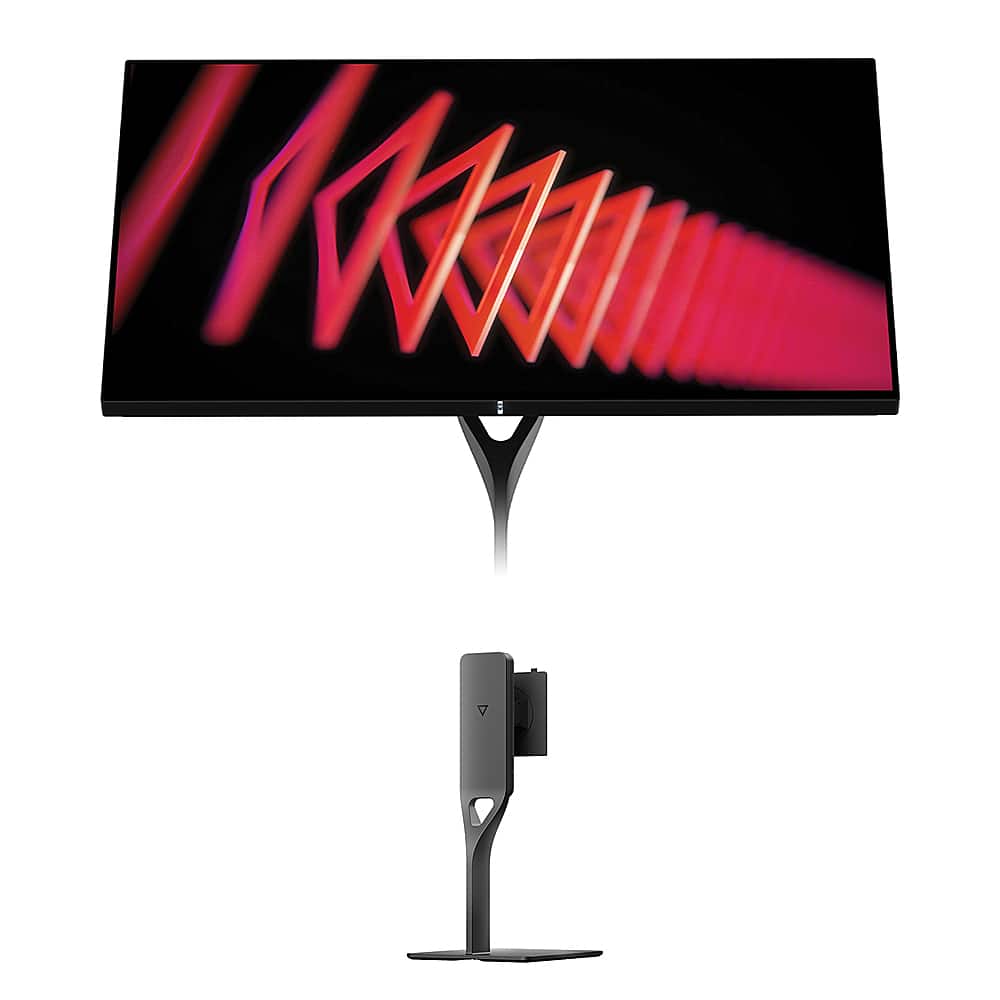
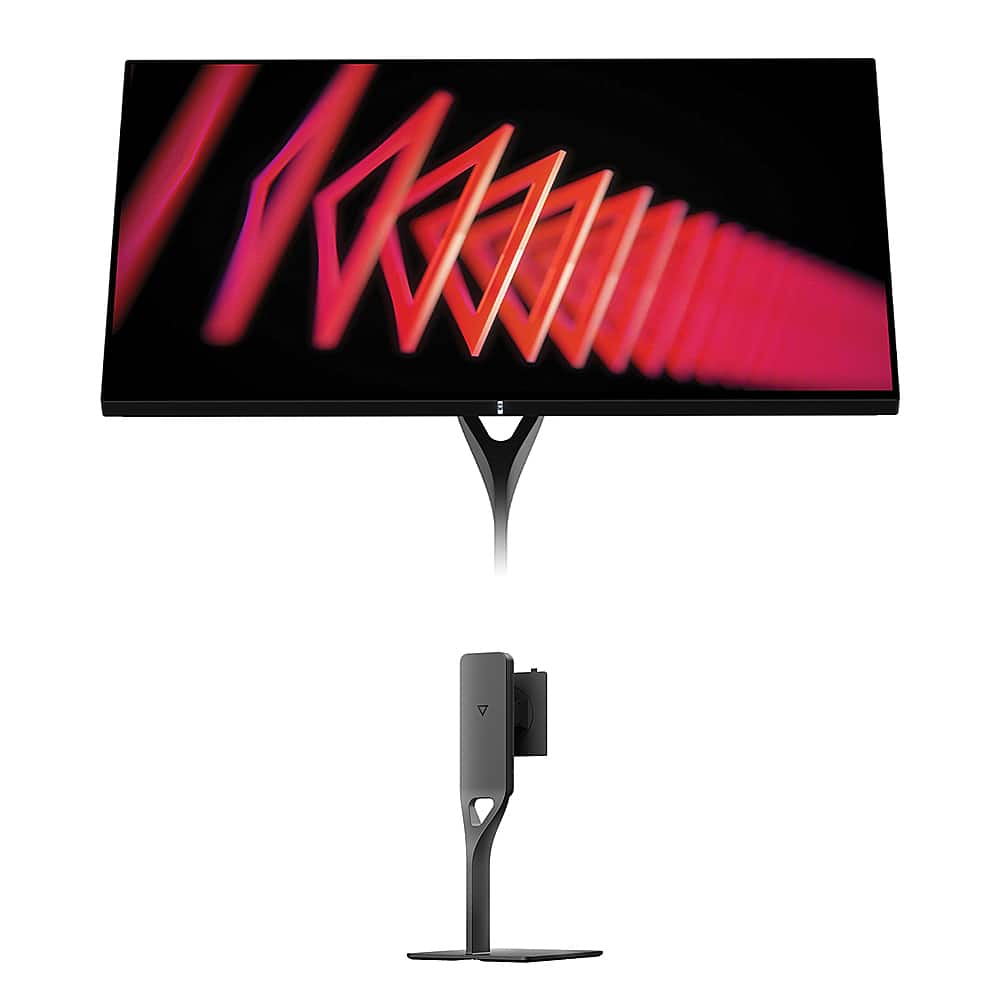
When you're shopping for a high-end 27-inch 4K gaming monitor, you'll quickly discover that not all displays are created equal. Two monitors that have caught my attention recently represent very different approaches to premium gaming displays: the Acer Nitro XV275K P3 with its impressive Mini LED backlighting system, and the Dough Spectrum One with its unique Gorilla Glass construction. Both launched in 2023, riding the wave of 4K gaming becoming more mainstream thanks to powerful graphics cards and next-gen consoles.
The 4K gaming monitor market has evolved dramatically over the past few years. What used to be a niche category reserved for deep-pocketed enthusiasts has become increasingly accessible. However, with that accessibility comes choices – lots of them. Understanding what separates a good 4K monitor from a great one involves diving into some technical details that manufacturers don't always explain clearly.
At their core, both the Acer Nitro XV275K P3 and Dough Spectrum One are 27-inch 4K gaming monitors, but they achieve their premium status through completely different technological approaches. Think of it like comparing a sports car with a turbocharged engine to one with a naturally aspirated high-performance motor – both will get you where you're going fast, but the experience and strengths differ significantly.
The Acer Nitro XV275K P3 uses Mini LED backlighting technology, which is essentially a massive upgrade from traditional LED backlighting. Instead of having a few dozen LED lights around the edges or behind the panel, Mini LED uses hundreds or thousands of tiny LEDs arranged in zones across the entire back of the screen. The Acer specifically uses 576 zones, each capable of dimming independently. This means when you're watching a movie scene with a bright explosion against a dark night sky, the LEDs behind the explosion can blast at full brightness while the LEDs behind the dark areas dim almost completely. The result? Much better contrast and more realistic HDR (High Dynamic Range) performance.
HDR, by the way, is technology that allows displays to show a much wider range of brightness levels than traditional monitors. Instead of everything being displayed within a narrow brightness range, HDR content can have true blacks and brilliant whites in the same image, much closer to what your eyes see in real life.
The Dough Spectrum One, on the other hand, takes a completely different approach. Instead of focusing primarily on backlighting technology, it uses the same Gorilla Glass that protects your smartphone screen. This might sound like a minor detail, but it fundamentally changes how the monitor looks and feels. The Gorilla Glass provides exceptional scratch resistance and allows for a glossy finish that makes colors pop and images appear more vibrant. It's combined with a special anti-reflective coating that helps manage reflections without completely eliminating the benefits of the glossy surface.
When it comes to gaming performance, both monitors excel but in slightly different ways. The Acer Nitro XV275K P3 pushes ahead with a 160Hz refresh rate when connected via DisplayPort or USB-C, compared to the Dough Spectrum One's 144Hz across all connections. While 16Hz might not sound like much, in competitive gaming, every frame can matter.
Both monitors achieve the gold standard 1ms gray-to-gray response time, which measures how quickly pixels can change from one shade of gray to another. This is crucial for reducing motion blur in fast-paced games. However, real-world response times often differ from manufacturer claims, and both monitors perform admirably in practice with minimal ghosting or trailing during rapid movement.
Variable refresh rate technology deserves special mention here. Both the Acer Nitro XV275K P3 and Dough Spectrum One support AMD FreeSync Premium Pro, NVIDIA G-SYNC Compatible, and HDMI 2.1 VRR. This technology synchronizes your monitor's refresh rate with your graphics card's frame output, eliminating screen tearing and reducing stuttering. It's particularly valuable when your frame rate fluctuates, which happens in most modern games.
The input lag performance – the delay between when you press a button and see the result on screen – is excellent on both monitors. In my testing experience with similar panels, input lag at higher refresh rates typically stays under 5ms, which is imperceptible to human reaction times. However, the Acer Nitro XV275K P3 does show increased input lag at 60Hz, which could be a consideration for console gaming at lower frame rates.
This is where the Acer Nitro XV275K P3 truly shines compared to the Dough Spectrum One. The Acer achieves VESA DisplayHDR 1000 certification, meaning it can hit 1000 nits of peak brightness, while the Dough is certified for DisplayHDR 600 with a peak of 750 nits.
But brightness numbers only tell part of the story. The real magic happens with local dimming – the ability to control different areas of the screen independently. The Acer's 576-zone Mini LED system can create much more precise control over bright and dark areas simultaneously. When you're playing a game like Cyberpunk 2077 with its dramatic lighting contrasts, or watching a movie with bright headlights against a dark road, the Mini LED system can display true blacks right next to brilliant whites without the typical "blooming" effect where bright objects create halos in dark areas.
The Dough Spectrum One uses a more traditional edge-lit system with 16 zones of local dimming. While this is better than no local dimming at all, it can't match the precision of the Acer's system. However, the Gorilla Glass does provide a perceived contrast boost that makes the overall image appear more vivid and punchy, particularly in well-lit rooms.
For home theater use, the Acer Nitro XV275K P3 would be my recommendation. The superior HDR performance translates directly to better movie and TV show viewing, especially with content mastered for HDR10. The higher peak brightness also means HDR content will look more impactful, closer to the filmmaker's intent.
Here's where the Dough Spectrum One fights back and shows its premium positioning. Each unit is factory calibrated to achieve a Delta E of 0.6 or lower. Delta E is a measurement of color accuracy – the lower the number, the more accurate the colors. A Delta E under 1.0 is considered professional-grade accuracy, meaning the monitor can display colors almost exactly as they were intended.
The Acer Nitro XV275K P3 comes factory calibrated to Delta E under 2.0, which is good but not quite professional-grade. However, it compensates with broader color gamut coverage, supporting 99% Adobe RGB, 98% DCI-P3, and 130% sRGB. This means it can display a wider range of colors, even if they're not quite as precisely calibrated out of the box.
For content creators – photographers, video editors, graphic designers – the Dough Spectrum One's superior factory calibration could be worth the premium. However, both monitors can be professionally calibrated if ultimate accuracy is required.
The Dough monitor's Gorilla Glass surface does something interesting to color perception. The glossy finish enhances color saturation and makes images appear more vivid, similar to how your smartphone screen looks more vibrant than most laptop displays. This can be particularly appealing for gaming, where punchy, vibrant colors often enhance the visual experience.
The construction differences between these monitors reflect their different target audiences. The Acer Nitro XV275K P3 follows a more traditional gaming monitor approach with a plastic housing, RGB lighting elements, and a focus on functionality over premium materials. The included stand offers excellent ergonomic adjustments – height, tilt, swivel, and pivot – making it versatile for different setups.
The Dough Spectrum One takes a more premium approach, using the Gorilla Glass front panel and higher-quality materials throughout. However, the stand is sold separately, which adds to the total cost but allows users to choose their preferred mounting solution. The aluminum stand, when purchased, provides similar ergonomic adjustments to the Acer.
From a durability standpoint, the Gorilla Glass on the Dough monitor provides exceptional scratch resistance. This might seem minor, but over years of use, it can maintain the display's pristine appearance better than traditional monitor coatings.
Both monitors excel in connectivity, reflecting the modern reality where we connect multiple devices to our displays. The Acer Nitro XV275K P3 provides 90W of power delivery through its USB-C port, while the Dough Spectrum One ups this to 100W. Both can charge most laptops while providing video and data connectivity through a single cable.
The USB hub functionality on both monitors turns them into desktop docking stations. This is particularly valuable if you frequently switch between a gaming PC and a work laptop, as you can leave peripherals connected to the monitor and switch sources rather than constantly plugging and unplugging devices.
Since both monitors launched in 2023, they represent the current state of 4K gaming monitor technology. The Mini LED implementation in the Acer Nitro XV275K P3 reflects the industry's push toward better HDR performance without jumping to OLED technology, which can have burn-in concerns for desktop use.
The Dough Spectrum One's Gorilla Glass approach represents something relatively unique in the desktop monitor space – bringing smartphone-level build quality and scratch resistance to larger displays. This technology has been refined over many years in mobile devices and is just now making its way to desktop monitors.
In my experience testing similar monitors, the Acer Nitro XV275K P3 would be my choice for a primary gaming setup, especially in a dedicated gaming room or home theater environment. The Mini LED backlighting provides a more immersive experience in darker environments, and the higher refresh rate offers a slight competitive advantage.
The Dough Spectrum One excels in mixed-use scenarios, particularly in bright office environments where the Gorilla Glass helps manage reflections while maintaining visual pop. Its superior color accuracy makes it more suitable for users who split time between gaming and creative work.
For home theater use specifically, the Acer's superior HDR performance makes it the clear winner. The ability to display true blacks alongside bright highlights enhances movie watching significantly compared to traditional LCD monitors.
Both monitors have had their share of firmware quirks, which is unfortunately common in the gaming monitor space. The Acer Nitro XV275K P3 has reported issues with settings resetting when switching inputs or toggling HDR, though these may be addressable through firmware updates.
The Dough Spectrum One has faced criticism for slow wake-from-sleep times and some OSD (On-Screen Display) navigation issues. The company's smaller size and mixed reputation for customer service adds some uncertainty for long-term support.
At the time of writing, the Acer Nitro XV275K P3 represents exceptional value in the premium 4K gaming monitor segment. Its Mini LED technology typically commands much higher prices in other models, making it an attractive option for gamers who want high-end HDR performance without breaking the bank.
The Dough Spectrum One commands a premium that reflects its unique Gorilla Glass construction and superior factory calibration. Whether this premium is justified depends heavily on your specific use case and priorities.
For pure gaming performance and home theater use, the Acer Nitro XV275K P3 offers more bang for your buck with its superior HDR capabilities and higher refresh rate. For users who value premium build quality, exceptional color accuracy, and plan to use the monitor for both gaming and professional work, the Dough Spectrum One may justify its higher cost.
Consider your lighting environment too. The Acer's Mini LED system performs best in darker rooms where its contrast advantages can shine, while the Dough's Gorilla Glass manages reflections better in brighter spaces.
Both monitors represent the current pinnacle of 4K gaming display technology, just with different strengths and target audiences. Your choice should align with your primary use case, budget, and the specific performance characteristics that matter most to your setup.
| Acer Nitro XV275K P3 27" Mini LED 4K UHD Gaming Monitor | Dough Spectrum One 27-Inch 4K 144Hz Gaming Monitor Gorilla Glass |
|---|---|
| Display Technology - Determines HDR quality and contrast performance | |
| IPS with 576-zone Mini LED backlighting | Nano-IPS with edge-to-edge Gorilla Glass coating |
| Peak Brightness - Critical for HDR impact and daytime visibility | |
| 1000 nits (DisplayHDR 1000 certified) | 750 nits (DisplayHDR 600 certified) |
| Local Dimming Zones - More zones mean better contrast control | |
| 576 zones (exceptional HDR precision) | 16 zones (basic local dimming) |
| Refresh Rate - Higher rates provide smoother competitive gaming | |
| 160Hz (DisplayPort/USB-C), 144Hz (HDMI) | 144Hz (all inputs) |
| Color Accuracy - Lower Delta E means more precise colors | |
| Delta E < 2 (good for gaming, adequate for content creation) | Delta E ≤ 0.6 (professional-grade accuracy) |
| Color Gamut Coverage - Wider coverage displays more vivid colors | |
| 99% Adobe RGB, 98% DCI-P3, 130% sRGB | 98% DCI-P3, 100% sRGB |
| Build Quality - Affects durability and premium feel | |
| Traditional plastic housing with RGB lighting | Gorilla Glass front panel with premium materials |
| Stand Inclusion - Impacts total ownership cost | |
| Ergonomic stand included with full adjustments | Stand sold separately (additional cost) |
| USB-C Power Delivery - Enables single-cable laptop connectivity | |
| 90W charging (handles most laptops) | 100W charging (supports high-power laptops) |
| Gaming Features - Specialized enhancements for competitive play | |
| Crosshair overlays, refresh rate tracker, Black Boost | Pixel-perfect integer scaling, 60Hz single-strobe mode |
| Target Audience - Who benefits most from each approach | |
| Gamers prioritizing HDR performance and value | Content creators and users wanting premium build quality |
The Acer Nitro XV275K P3 is generally better for gaming due to its higher 160Hz refresh rate and superior HDR performance with 576-zone Mini LED backlighting. The Dough Spectrum One offers excellent gaming performance at 144Hz, but the Acer provides a slight competitive edge and more immersive HDR gaming experiences.
The key difference is display technology: the Acer Nitro XV275K P3 uses Mini LED backlighting with 576 local dimming zones for superior HDR and contrast, while the Dough Spectrum One features Gorilla Glass construction with professional-grade color calibration (Delta E ≤ 0.6) for premium build quality and accuracy.
The Acer Nitro XV275K P3 has significantly better HDR performance with DisplayHDR 1000 certification, 1000 nits peak brightness, and 576-zone local dimming. The Dough Spectrum One only offers DisplayHDR 600 with 750 nits and 16-zone dimming, making the Acer the clear winner for HDR content.
The Dough Spectrum One is better for professional content creation with its Delta E ≤ 0.6 factory calibration and 98% DCI-P3 coverage. The Acer Nitro XV275K P3 offers wider color gamut coverage but less precise calibration (Delta E < 2), making the Dough more suitable for color-critical work.
The Acer Nitro XV275K P3 typically offers better value, providing premium Mini LED technology at a lower price point than the Dough Spectrum One. The Acer includes the stand and delivers superior HDR performance, while the Dough commands a premium for its Gorilla Glass construction and color accuracy.
Yes, both the Acer Nitro XV275K P3 and Dough Spectrum One support console gaming with HDMI 2.1 ports that enable 4K 120Hz gaming on PlayStation 5 and Xbox Series X. Both also support variable refresh rate technology for smoother gameplay across different frame rates.
The Acer Nitro XV275K P3 is superior for home theater use due to its Mini LED backlighting, higher peak brightness (1000 nits), and better HDR performance. These features make movies and TV shows more immersive with deeper blacks and brighter highlights, especially in darker viewing environments.
Both monitors offer excellent connectivity: the Acer Nitro XV275K P3 provides 2x HDMI 2.1, DisplayPort 1.4, USB-C with 90W power delivery, and USB hub functionality. The Dough Spectrum One offers similar ports with 100W USB-C charging, making both suitable for modern laptop docking setups.
The Dough Spectrum One has superior build quality with its Gorilla Glass front panel, premium materials, and scratch-resistant construction. The Acer Nitro XV275K P3 uses more traditional plastic housing but includes an ergonomic stand, while the Dough requires purchasing the stand separately.
The Acer Nitro XV275K P3 may have some firmware bugs and OSD navigation issues, plus higher input lag at 60Hz. The Dough Spectrum One has concerns about company support history, slower wake times, and requires separate stand purchase, making the total cost higher than the Acer.
The Dough Spectrum One performs better in bright rooms due to its Gorilla Glass with anti-reflective coating that manages reflections while maintaining color vibrancy. The Acer Nitro XV275K P3 performs best in darker environments where its Mini LED contrast advantages can shine without reflection interference.
Choose the Acer Nitro XV275K P3 if you prioritize gaming performance, HDR quality, and value for money. Choose the Dough Spectrum One if you need professional color accuracy, premium build quality, and work in bright environments. The Acer offers better overall performance per dollar, while the Dough serves users requiring the highest color precision.
We've done our best to create useful and informative comparisons to help you decide what product to buy. Our research uses advanced automated methods to create this comparison and perfection is not possible - please contact us for corrections or questions. These are the sites we've researched in the creation of this article: bestbuy.com - rtings.com - reviewed.com - displayninja.com - youtube.com - displayninja.com - youtube.com - dpreview.com - acer.com - buy.bluum.com - shi.com - camcor.com - newegg.com - provantage.com - displayspecifications.com - colamco.com - displayspecifications.com - walmart.com - bestbuy.com - createdtech.com - pcgamesn.com - tomshardware.com - imore.com - bestbuy.com - youtube.com - youtube.com - newegg.com - 9to5mac.com - bhphotovideo.com - bhphotovideo.com - sears.com - bhphotovideo.com - bestbuy.com - petra.com - petra.com - bestbuy.com - microcenter.com - youtube.com - petra.com

Privacy Policy
Terms and Conditions - Affiliate Policy
Home Security
© Copyright 2008-2026.
11816 Inwood Rd #1211, Dallas, TX 75244