







Gaming monitors have evolved dramatically over the past few years, but choosing the right one can feel overwhelming. Today we're comparing two monitors that couldn't be more different: the ultra-budget Sceptre E275W-FW100T and the premium HP Omen 27k. These represent opposite ends of the gaming monitor spectrum, and understanding their differences will help you make the right choice for your setup and budget.
Before diving into specifics, let's break down what actually matters in a gaming monitor. Refresh rate is how many times per second your screen updates the image—higher numbers mean smoother motion. Response time measures how quickly pixels can change colors, with lower numbers reducing ghosting (that trailing effect behind moving objects). Adaptive sync technologies like FreeSync and G-Sync eliminate screen tearing by matching your monitor's refresh rate to your graphics card's output.
Panel technology matters too. VA panels use crystals that align vertically, creating excellent contrast but sometimes suffering from viewing angle issues. IPS panels maintain consistent colors from all angles but typically have lower contrast ratios. These technical differences translate to real-world viewing experiences that can make or break your gaming sessions.
The Sceptre E275W-FW100T, released around 2021-2022, targets budget-conscious gamers who want more than a basic 60Hz display without breaking the bank. At the time of writing, it costs roughly what you'd spend on a nice dinner for two—making it one of the most affordable 27-inch gaming monitors available.
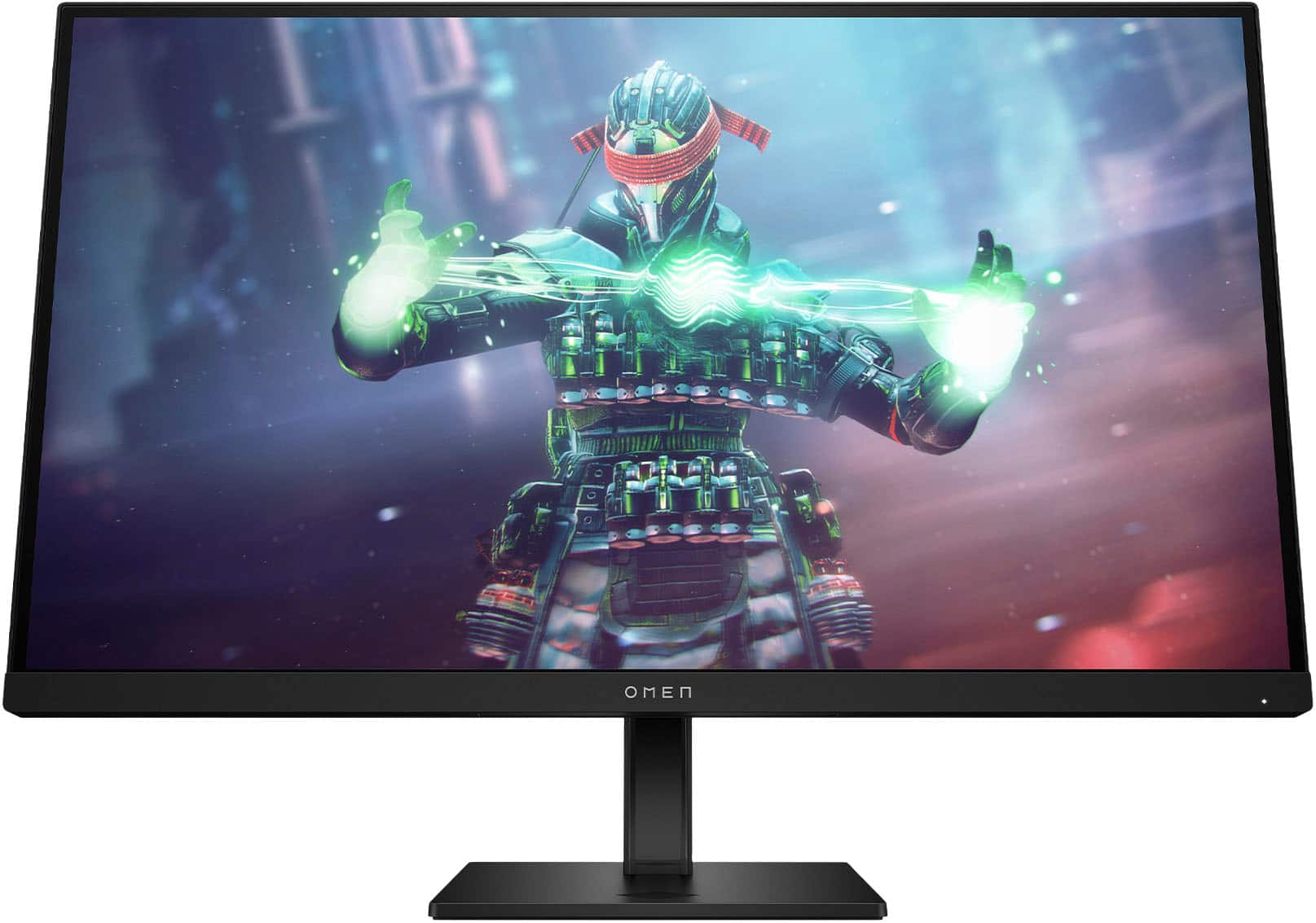
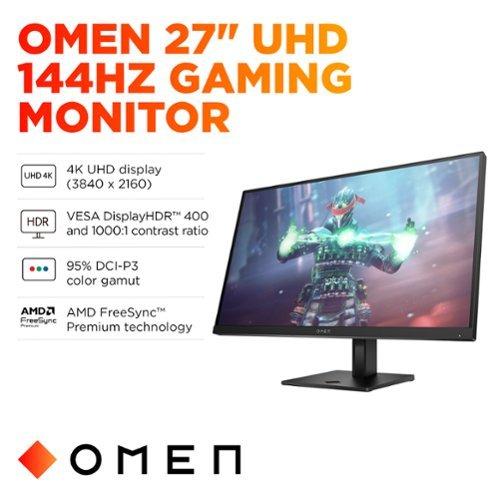
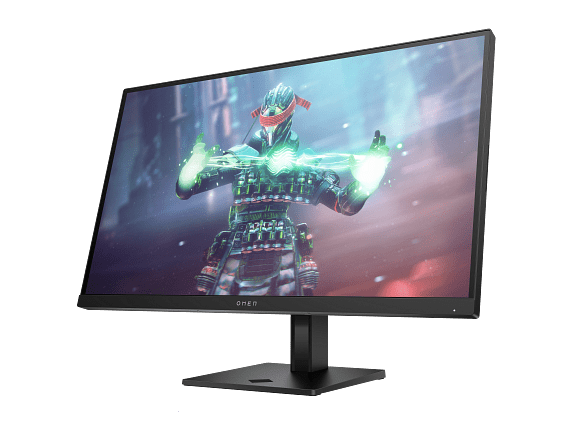
The HP Omen 27k, launched in 2023, represents HP's push into the premium gaming space. It costs several times more than the Sceptre but delivers specifications that would have been unthinkable at any price just five years ago. The 4K gaming monitor market has matured significantly since 2020, with prices dropping while performance has improved dramatically.
The most obvious difference between these monitors is resolution, but the impact goes beyond simple numbers. The Sceptre E275W-FW100T delivers 1920x1080 pixels across 27 inches, resulting in roughly 82 pixels per inch. While this was perfectly acceptable on 24-inch monitors, stretching Full HD across 27 inches creates a noticeable softness, especially in text and fine details.
I've found that 1080p on a 27-inch monitor becomes most apparent during productivity work. Reading documents or browsing the web can feel less crisp than you'd expect. However, in fast-paced gaming, this softness becomes less noticeable as your attention focuses on action rather than pixel-peeping.
The HP Omen 27k quadruples the pixel count with its 3840x2160 4K resolution, achieving 163 pixels per inch. This creates genuinely sharp imagery where individual pixels disappear completely. Text looks printed rather than pixelated, and game textures reveal details you'd never notice on 1080p displays.
The Sceptre monitor uses VA (Vertical Alignment) technology, which excels at producing deep blacks thanks to its impressive 3,000:1 contrast ratio. This means the difference between the darkest and brightest areas of the screen is much more dramatic than typical displays. In dark games or movies, you'll notice how true blacks enhance the atmosphere and immersion.
However, VA panels have quirks. Colors can shift slightly when viewed from angles, and some users report minor ghosting in very fast motion. The gamma curve (how the monitor handles brightness transitions) can also shift depending on your viewing position, though this is subtle during normal use.
The HP Omen 27k chooses IPS technology, sacrificing some contrast for consistency and color accuracy. Its 1,000:1 native contrast ratio means blacks appear more gray than the Sceptre, but the trade-off brings perfect viewing angles and more accurate colors. The monitor covers 99% of the sRGB color space and 95% of DCI-P3, making it suitable for photo editing and content creation alongside gaming.
Here's where these monitors diverge completely. The Sceptre E275W-FW100T offers no HDR (High Dynamic Range) support whatsoever. While this might seem like a major limitation, most budget HDR implementations are so poor they're barely worth mentioning anyway.
The HP Omen 27k includes VESA DisplayHDR 400 certification with actual zone dimming technology. Unlike many monitors that slap HDR labels on basic displays, this implementation uses eight separate LED zones to brighten or dim different screen areas independently. While not as sophisticated as high-end mini-LED displays with hundreds of zones, it creates noticeable improvements in HDR content, making bright explosions pop while maintaining shadow detail.
The Sceptre monitor jumps from the standard 60Hz to 100Hz, providing a meaningful improvement in motion smoothness. This 67% increase in refresh rate makes fast-paced games feel more fluid, and competitive players will notice reduced input lag. The 5ms gray-to-gray response time (how long pixels take to change colors) keeps ghosting minimal, though some trailing may appear in extremely fast motion.
The HP Omen 27k pushes further with 144Hz refresh rate and a true 1ms response time with overdrive enabled. Overdrive artificially accelerates pixel transitions but can introduce artifacts if set too aggressively. HP's implementation includes five overdrive levels, letting you fine-tune the balance between speed and visual quality—a feature typically found on expensive gaming monitors.
Both monitors support adaptive sync technologies, but their implementations differ significantly. The Sceptre E275W-FW100T includes AMD FreeSync operating from 48-100Hz. This means your graphics card and monitor communicate to match refresh rates, eliminating screen tearing when frame rates fluctuate.
The HP Omen 27k supports both FreeSync Premium and G-Sync compatibility, operating from 55-144Hz. It's also VESA ClearMR 5000 certified, indicating superior motion clarity performance. This wider compatibility means it works optimally with both AMD and NVIDIA graphics cards, while the broader sync range handles more varied frame rate scenarios.
For esports titles like Counter-Strike or Valorant that run easily at high frame rates, the Sceptre monitor performs admirably. Its 100Hz refresh rate provides competitive advantages over 60Hz displays, and most graphics cards can maintain consistent frame rates at 1080p resolution.
Modern AAA games tell a different story. The HP Omen 27k reveals incredible detail in games like Cyberpunk 2077 or Red Dead Redemption 2, but driving 4K at high frame rates requires serious graphics card horsepower. A RTX 4070 or better is really the minimum for enjoying 4K gaming, making this monitor a future-focused investment.
The Sceptre E275W-FW100T provides essential connectivity with two HDMI 2.0 ports and one DisplayPort 1.2 connection. This covers most users' needs for connecting a PC and gaming console, though the lack of USB ports means no convenient hub for peripherals.
The HP Omen 27k goes all-out with connectivity. Beyond DisplayPort 1.4 and multiple HDMI ports (including HDMI 2.1 for next-gen consoles), it adds USB-C with video support and a full USB 3.2 hub. The standout feature is the built-in KVM switch, which lets you control multiple connected devices with one keyboard and mouse—incredibly useful for users switching between work laptops and gaming PCs.
The Sceptre monitor keeps things simple with a tilt-only stand and basic plastic construction. At under eight pounds, it's lightweight but feels somewhat flimsy compared to premium monitors. The design is functional rather than inspiring, though it includes VESA mounting compatibility for aftermarket arms.
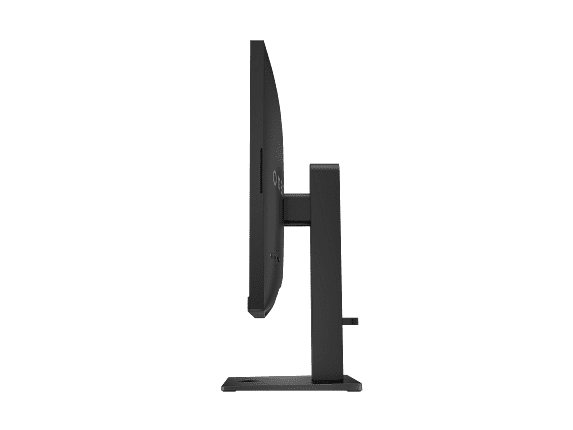
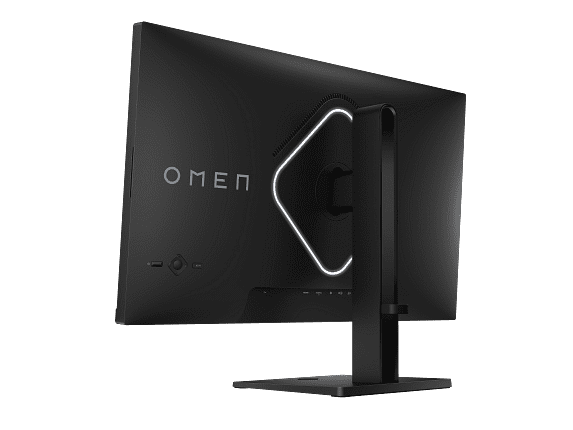
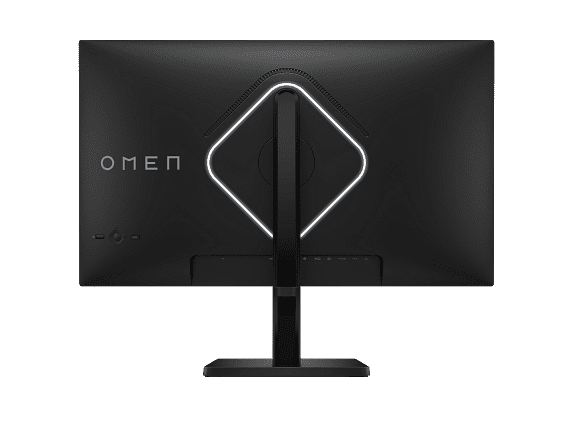
The HP Omen 27k feels substantial at nearly 17 pounds, with a metal-core stand and premium construction throughout. The fully adjustable stand provides height, tilt, and pivot adjustments, while subtle RGB lighting adds gaming flair without being obnoxious. The internal power supply eliminates external power bricks, contributing to the cleaner setup.
At the time of writing, the Sceptre E275W-FW100T costs roughly what many people spend on a single video game. For this incredibly low price, you're getting features that were premium just five years ago: a 27-inch screen, 100Hz refresh rate, and adaptive sync support. It's genuinely impressive value that makes 100Hz gaming accessible to nearly everyone.
The monitor excels as a secondary display, budget gaming setup, or starter monitor for new PC builders. If you're upgrading from a basic 60Hz display or building your first gaming PC, the performance jump will be immediately noticeable. The VA panel's high contrast also makes it surprisingly good for movies and dark room gaming.
The HP Omen 27k costs several times more than the Sceptre, but you're paying for fundamentally different capabilities. The 4K resolution alone provides four times the pixels, while the IPS panel, comprehensive connectivity, and premium build quality justify the higher price for users who value these features.
This monitor makes sense for serious gamers with high-end graphics cards, content creators who need color accuracy, or users wanting a single display that excels at everything. The KVM functionality alone saves desk space and cable management headaches for users juggling multiple devices.
Both monitors can serve entertainment purposes, but with different strengths. The Sceptre E275W-FW100T benefits from its VA panel's superior contrast ratio, making movies and dark content more immersive. The high contrast helps compensate for the lower resolution when viewing from typical couch distances.
The HP Omen 27k delivers genuine 4K detail and functional HDR that enhances supported content. Its HDMI 2.1 support means perfect compatibility with PlayStation 5 and Xbox Series X at 4K 120Hz. However, the IPS panel's lower contrast becomes more apparent in dark room viewing compared to VA technology.
For dedicated home theater use, neither monitor is ideal—TVs offer better features and value at these sizes. However, for desk setups that pull double duty for gaming and entertainment, both can serve admirably.
Based on extensive research into user experiences and professional reviews, the most critical performance characteristics depend heavily on your use case. For competitive gaming, refresh rate and input lag matter most—both monitors deliver here, though the HP Omen 27k has clear advantages.
For immersive single-player gaming, resolution and visual quality take precedence. The Sceptre E275W-FW100T provides decent 1080p gaming with excellent contrast, while the HP Omen 27k delivers stunning 4K detail that transforms how games look and feel.
Color accuracy becomes crucial for content creation. The Sceptre monitor offers adequate sRGB coverage for basic photo work, but the HP Omen's wide color gamut and factory calibration make it suitable for professional tasks.
Choose the Sceptre E275W-FW100T if you're working with a tight budget but still want meaningful gaming improvements over basic 60Hz displays. It's perfect for students, casual gamers, or anyone building their first gaming setup. The VA panel's excellent contrast makes it surprisingly good for entertainment, and the 100Hz refresh rate provides genuine competitive advantages in esports titles.
The HP Omen 27k makes sense for enthusiasts who want cutting-edge performance and have the graphics hardware to utilize 4K gaming. If you're a content creator, serious gamer, or someone who values premium build quality and comprehensive features, the higher price delivers genuine value.
Consider your graphics card carefully—the Sceptre monitor works well with mid-range cards that struggle with 4K, while the HP Omen 27k really demands high-end hardware to shine. There's no point paying for 4K gaming if your graphics card can't deliver playable frame rates at that resolution.
Ultimately, both monitors succeed at their intended purposes. The Sceptre E275W-FW100T democratizes higher refresh rate gaming, while the HP Omen 27k delivers premium performance for users who demand the best. Your budget, graphics hardware, and intended use cases should guide your decision between these fundamentally different approaches to gaming display technology.
| Sceptre 27-inch Gaming Monitor E275W-FW100T | HP Omen 27k 4K UHD 144Hz Gaming Monitor |
|---|---|
| Resolution & Pixel Density - Determines image sharpness and detail clarity | |
| 1920x1080 Full HD (81 PPI - noticeable softness on 27") | 3840x2160 4K UHD (163 PPI - razor-sharp text and images) |
| Panel Technology - Affects contrast, viewing angles, and color accuracy | |
| VA panel (3,000:1 contrast, deeper blacks, limited viewing angles) | IPS panel (1,000:1 contrast, consistent colors, 178° viewing angles) |
| Refresh Rate - Higher numbers mean smoother motion in games | |
| 100Hz (significant improvement over 60Hz for competitive gaming) | 144Hz (premium smoothness, requires powerful graphics card) |
| Response Time - Lower numbers reduce ghosting behind moving objects | |
| 5ms GtG (minor ghosting in fast motion, adequate for casual gaming) | 1ms GtG with overdrive (minimal ghosting, excellent for competitive play) |
| Color Performance - Important for accurate visuals and content creation | |
| 100% sRGB, 280 nits brightness (good for basic use) | 99% sRGB + 95% DCI-P3, 400+ nits (professional-grade accuracy) |
| HDR Support - Enhances contrast and brightness in compatible content | |
| None (no HDR capability) | VESA DisplayHDR 400 with 8-zone dimming (functional HDR improvement) |
| Adaptive Sync - Eliminates screen tearing for smooth gameplay | |
| AMD FreeSync (48-100Hz range, works with AMD cards) | G-Sync Compatible + FreeSync Premium (55-144Hz, works with all cards) |
| Connectivity - Determines what devices you can connect | |
| 2x HDMI 2.0, 1x DisplayPort 1.2, headphone jack (basic connections) | HDMI 2.1 + 2.0, DisplayPort 1.4, USB-C, USB hub (comprehensive options) |
| Special Features - Added convenience and functionality | |
| Tilt-only stand, basic speakers, FPS/RTS game modes | KVM switch, full ergonomic stand, RGB lighting, premium speakers |
| Build Quality - Affects durability and desk presence | |
| 7.2 lbs lightweight plastic (budget construction but VESA compatible) | 16.6 lbs premium build (metal-core stand, internal power supply) |
| Graphics Card Requirements - Hardware needed for optimal performance | |
| Mid-range cards (GTX 1660, RX 580) handle 1080p easily | High-end cards (RTX 4070+) required for 4K gaming performance |
| Best Use Cases - Who should consider each monitor | |
| Budget gamers, secondary displays, esports at 1080p, students | Serious gamers, content creators, 4K gaming, professional work |
The biggest difference is resolution and target audience. The Sceptre E275W-FW100T is a budget-friendly 1080p monitor with 100Hz refresh rate, while the HP Omen 27k is a premium 4K monitor with 144Hz refresh rate. The HP Omen delivers four times more pixels and costs significantly more, targeting serious gamers with high-end graphics cards.
Both monitors offer advantages for competitive gaming. The Sceptre E275W-FW100T provides 100Hz refresh rate at 1080p, which most graphics cards can easily maintain for consistent high frame rates. The HP Omen 27k offers 144Hz and 1ms response time for even smoother motion, but requires a powerful GPU to reach high frame rates at 4K resolution.
Yes, both work with gaming consoles. The Sceptre E275W-FW100T connects via HDMI and provides good 1080p gaming for older consoles. The HP Omen 27k includes HDMI 2.1 support, making it ideal for PlayStation 5 and Xbox Series X gaming at 4K 120Hz, fully utilizing next-gen console capabilities.
Picture quality depends on your priorities. The Sceptre E275W-FW100T uses a VA panel with superior 3,000:1 contrast ratio, delivering deeper blacks and better dark room viewing. The HP Omen 27k offers much sharper 4K resolution, wider color gamut, and HDR support, providing more detailed and vibrant images overall.
The Sceptre E275W-FW100T works well with mid-range graphics cards like GTX 1660 or RX 580, as 1080p gaming is less demanding. The HP Omen 27k really needs a high-end card like RTX 4070 or better to enjoy 4K gaming at decent frame rates. Your graphics card capability should heavily influence your choice.
For entertainment, the Sceptre E275W-FW100T excels in dark rooms due to its VA panel's superior contrast and deeper blacks. The HP Omen 27k offers much sharper 4K detail and functional HDR support, making it better for high-quality streaming content and bright room viewing, despite lower contrast ratios.
The Sceptre E275W-FW100T provides basic connectivity with 2x HDMI 2.0 and 1x DisplayPort, plus a headphone jack. The HP Omen 27k offers comprehensive connectivity including HDMI 2.1, DisplayPort 1.4, USB-C, and a USB hub, plus a built-in KVM switch for controlling multiple devices.
Value depends on your budget and needs. The Sceptre E275W-FW100T provides exceptional value for budget-conscious users, offering 100Hz gaming at an ultra-low price point. The HP Omen 27k costs significantly more but delivers premium 4K performance, comprehensive features, and superior build quality that justify the price for serious users.
The Sceptre E275W-FW100T handles basic office tasks but text appears somewhat soft due to lower pixel density on the 27-inch screen. The HP Omen 27k excels for productivity with crystal-clear 4K text, accurate colors for photo editing, and comprehensive connectivity options including USB-C for laptops.
Both monitors include built-in speakers for convenience. The Sceptre E275W-FW100T has basic 2x2W speakers suitable for system sounds and casual use. The HP Omen 27k features slightly more powerful 2x3W speakers with better sound quality, though external speakers are still recommended for serious gaming or entertainment.
The Sceptre E275W-FW100T uses lightweight plastic construction with a tilt-only stand, prioritizing affordability over premium materials. The HP Omen 27k features substantial build quality with a metal-core stand, full ergonomic adjustments, internal power supply, and subtle RGB lighting for a more premium desk presence.
Your choice between the Sceptre E275W-FW100T and HP Omen 27k depends on your graphics card and budget. If you have a mid-range GPU and limited budget, 1080p high refresh rate gaming offers excellent performance. If you own a high-end graphics card and want cutting-edge visuals, 4K gaming provides stunning detail that transforms the gaming experience.
We've done our best to create useful and informative comparisons to help you decide what product to buy. Our research uses advanced automated methods to create this comparison and perfection is not possible - please contact us for corrections or questions. These are the sites we've researched in the creation of this article: pcvarge.com - walmart.com - cubed.run - productchart.com - displayninja.com - target.com - youtube.com - versus.com - youtube.com - youtube.com - sceptre.com - sceptre.com - tomshardware.com - windowscentral.com - digitaltrends.com - youtube.com - hp.com - youtube.com - hp.com - hp.com - displayspecifications.com - files.bbystatic.com - newegg.com - hp.com - hp.com - hp.com - hp.com - target.com - files.bbystatic.com - displayspecifications.com

Privacy Policy
Terms and Conditions - Affiliate Policy
Home Security
© Copyright 2008-2026.
11816 Inwood Rd #1211, Dallas, TX 75244