







The gaming monitor market has exploded in recent years, creating a massive gap between budget-friendly options and premium displays. Two monitors perfectly illustrate this divide: the Sceptre E275W-FW100T at around $100 and the Dough Spectrum One at nearly $1,000. While both are 27-inch gaming monitors, they represent completely different philosophies about what a gaming display should be.
Understanding this comparison isn't just about picking between two products—it's about understanding what you actually need from a gaming monitor and whether premium features justify their cost. At the time of writing, the price difference between these monitors is roughly 900%, making this one of the most dramatic value comparisons in the gaming monitor space.
Gaming monitors have evolved dramatically since 2020. What used to be a simple choice between 60Hz and 144Hz displays has become a complex decision involving resolution, panel technology, HDR support, and connectivity options. The pandemic gaming boom pushed manufacturers to fill every price point, creating distinct tiers that serve very different audiences.
The most important considerations when choosing a gaming monitor today include refresh rate (how many times per second the screen updates), resolution (the number of pixels displayed), panel technology (which affects colors and contrast), and response time (how quickly pixels change color). Each of these factors impacts both gaming performance and visual quality in different ways.
For competitive gaming, refresh rate and response time matter most. For single-player adventures and media consumption, resolution and color accuracy take priority. Understanding where your priorities lie is crucial for making the right choice.
The Sceptre E275W-FW100T, released in 2024, represents what happens when manufacturers strip away premium features to hit aggressive price targets. At roughly $100, it offers 1920×1080 (Full HD) resolution, a 100Hz refresh rate, and a VA panel—specifications that would have been considered solid mid-range just a few years ago.
The monitor uses VA (Vertical Alignment) panel technology, which sits between the two more common types you'll encounter: IPS and TN. VA panels excel at producing deep blacks because they can block light more effectively than IPS panels, resulting in a contrast ratio of 3,000:1. This means the difference between the darkest and brightest parts of the image is much more pronounced, making dark scenes in games look more realistic.
However, VA panels have trade-offs. They typically have slower response times than TN panels and can show slight color shifts when viewed from the side. The Sceptre E275W-FW100T claims a 1ms response time, but real-world testing suggests it's closer to 5ms, which can cause ghosting—faint trails behind moving objects in fast-paced games.
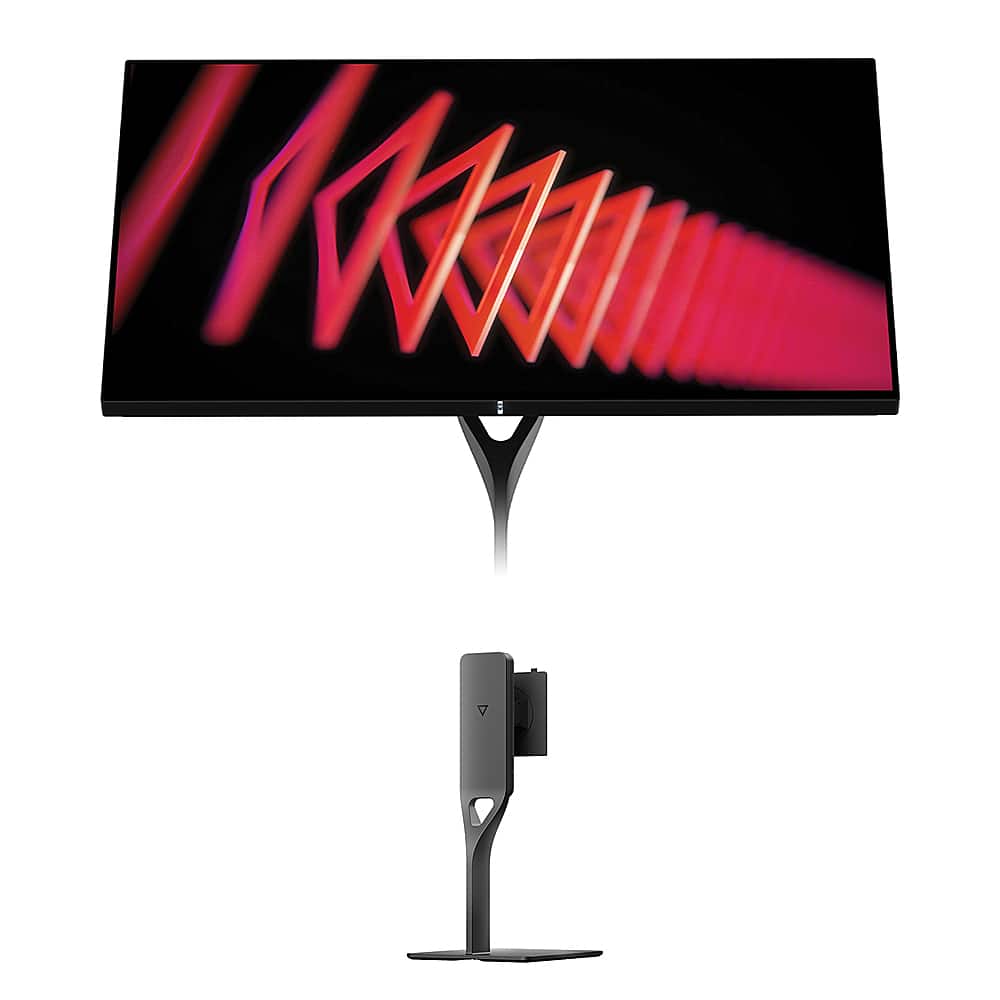
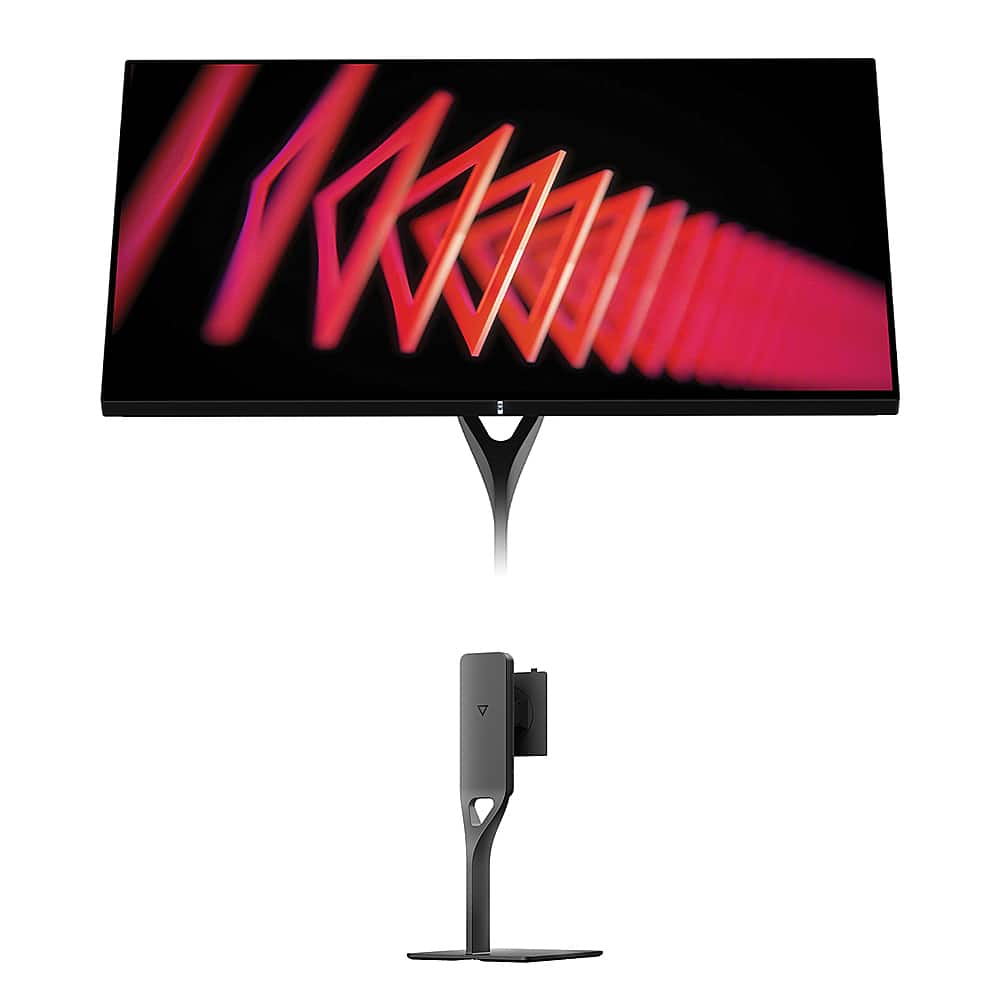
At the opposite end of the spectrum, the Dough Spectrum One represents the cutting edge of monitor technology. Released in the past couple of years, it features 4K resolution (3840×2160), a 144Hz refresh rate, and perhaps most uniquely, an edge-to-edge Corning Gorilla Glass screen—the same material that protects your smartphone.
The Gorilla Glass implementation is genuinely revolutionary for desktop monitors. Most gaming displays use either matte coatings that reduce glare but make colors look slightly washed out, or traditional glossy screens that reflect too much ambient light. The Dough Spectrum One's Gorilla Glass with DXC (Diamond Extreme Coating) creates a glossy finish that maintains vibrant colors while significantly reducing reflections.
This monitor uses Nano-IPS technology, an enhanced version of IPS (In-Plane Switching) panels that offers wider viewing angles and better color reproduction than VA or TN panels. The trade-off is typically lower contrast ratios, but the Gorilla Glass coating helps the Dough Spectrum One achieve contrast that approaches more expensive OLED displays.
The resolution difference between these monitors is enormous. The Sceptre E275W-FW100T delivers about 82 pixels per inch (PPI), while the Dough Spectrum One achieves 163 PPI—exactly double the pixel density.
This difference is immediately noticeable, especially for text and fine details. At 27 inches, 1080p resolution means individual pixels are large enough that you can see them if you sit close to the screen. This isn't necessarily problematic for gaming—many competitive players actually prefer lower resolutions because they're easier to drive at high frame rates—but it does impact the overall visual experience.
The 4K resolution of the Dough Spectrum One creates incredibly sharp visuals where individual pixels disappear entirely. Text looks crisp, game textures show fine details, and the overall image quality approaches what you'd see on a high-end smartphone or tablet.
However, 4K gaming requires significantly more graphics processing power. A graphics card that easily maintains 100+ fps at 1080p might struggle to hit 60fps at 4K in demanding games. This makes the Sceptre E275W-FW100T more forgiving for budget gaming builds, while the Dough Spectrum One demands a high-end GPU to realize its full potential.
Both monitors exceed the standard 60Hz refresh rate, but in different ways. The Sceptre E275W-FW100T's 100Hz represents a meaningful improvement over basic displays, providing noticeably smoother motion in games and reducing input lag—the delay between your actions and seeing results on screen.
The Dough Spectrum One's 144Hz takes this further, offering motion smoothness that competitive gamers consider essential. The difference between 100Hz and 144Hz is less dramatic than the jump from 60Hz to 100Hz, but it's still perceptible, especially in fast-paced games like first-person shooters or racing games.
More important than raw refresh rate is motion clarity—how well the monitor handles fast movement without blur or ghosting. Based on our research of expert reviews, the Sceptre E275W-FW100T shows noticeable ghosting in demanding scenarios due to its slower actual response time. The Dough Spectrum One delivers much cleaner motion with minimal artifacts, making it better suited for competitive gaming.
Both monitors support adaptive sync technologies (AMD FreeSync and NVIDIA G-SYNC Compatible) that synchronize the display's refresh rate with your graphics card's output. This eliminates screen tearing—horizontal lines that appear when the monitor and GPU fall out of sync—without the input lag penalty of traditional V-Sync.
Color reproduction is where these monitors diverge most dramatically. The Sceptre E275W-FW100T covers 100% of the sRGB color space, which is the standard for web content and most games. This provides adequate color accuracy for gaming and general use, though it won't satisfy users doing photo editing or other color-critical work.
The Dough Spectrum One covers both 100% of sRGB and 98% of the wider DCI-P3 color space used in modern HDR content. More importantly, each unit is factory-calibrated to achieve a Delta E of 0.6—a measurement of color accuracy where lower numbers indicate more precise colors. A Delta E under 1.0 is considered professional-grade accuracy.
HDR (High Dynamic Range) support is another key differentiator. The Sceptre E275W-FW100T lacks HDR entirely, while the Dough Spectrum One is VESA DisplayHDR 600 certified. HDR allows displays to show brighter highlights and darker shadows simultaneously, creating more realistic and impactful visuals in supported games and movies.
The Dough Spectrum One's HDR implementation includes 16-zone local dimming, which selectively dims parts of the screen to improve contrast. While this isn't as advanced as the hundreds or thousands of zones found in premium TVs, it still provides a noticeable improvement over monitors without local dimming.
These monitors reflect completely different approaches to construction and aesthetics. The Sceptre E275W-FW100T prioritizes functionality over form, with a basic plastic construction that's sturdy enough for daily use but clearly cost-optimized. The included stand provides tilt adjustment but lacks height or swivel adjustments, though VESA mounting compatibility allows for third-party stands.
The Dough Spectrum One takes a premium approach, with the Gorilla Glass screen being the standout feature. This isn't just about looks—Gorilla Glass is significantly more scratch-resistant than standard monitor coatings and provides better optical clarity. The monitor doesn't include a stand, requiring a separate $99 purchase, but this modular approach allows users to choose their preferred ergonomic solution.
The Gorilla Glass deserves special attention because it's virtually unique in the desktop monitor market. Having used glossy laptop screens and smartphones with similar coatings, the visual impact is undeniable. Colors appear more saturated, blacks look deeper, and the overall image has a clarity that matte screens can't match. However, glossy screens do reflect ambient light, which can be distracting in bright rooms.
Connection options reveal another layer of the value difference. The Sceptre E275W-FW100T provides basic but adequate connectivity: two HDMI 2.0 ports and one DisplayPort 1.2. This covers most gaming scenarios and allows for multiple device connections. The inclusion of built-in 2-watt speakers is convenient for basic audio needs.
The Dough Spectrum One offers significantly more advanced connectivity, including two HDMI 2.1 ports that support 4K at 120Hz from gaming consoles like the PlayStation 5 and Xbox Series X. The standout feature is USB-C with 100W power delivery, which enables single-cable connectivity with laptops—providing video, data, and charging through one connection.
The USB-C docking capability transforms the Dough Spectrum One into a desktop hub. You can connect a laptop with a single cable while having access to multiple USB-A ports for peripherals, creating a clean and functional workspace. This feature alone can justify much of the price premium for professionals who frequently switch between desktop and laptop workflows.
For gaming in living room or home theater setups, these monitors serve different purposes. The Sceptre E275W-FW100T works well as a dedicated gaming display at a desk but lacks the resolution and HDR support that make content consumption truly enjoyable on a big screen.
The Dough Spectrum One is much better suited for dual-purpose use as both a gaming monitor and entertainment display. The 4K resolution matches modern streaming content, while HDR support provides the dynamic range that makes movies and HDR games more immersive. The glossy Gorilla Glass screen particularly excels in darker viewing environments where reflections are less problematic.
However, both monitors are ultimately designed for desktop use rather than living room gaming. At 27 inches, they're smaller than most people prefer for couch gaming, and neither offers the smart TV features or integrated streaming apps found in modern televisions.
The Sceptre E275W-FW100T makes sense for specific users and scenarios. Students building their first gaming setup will appreciate the dramatic upgrade over basic 60Hz displays without breaking their budget. It's also excellent for office productivity, offering more screen real estate than typical 24-inch displays while maintaining sharp text at normal viewing distances.
For competitive gaming on a budget, the 100Hz refresh rate and AMD FreeSync support provide meaningful advantages over standard monitors. While it won't match the motion clarity of premium displays, it's perfectly adequate for casual competitive play and single-player gaming. The high contrast VA panel actually makes dark games like horror titles more immersive than many IPS monitors.
The Dough Spectrum One targets a completely different audience. Serious gamers with high-end graphics cards will appreciate the 4K 144Hz combination, especially in single-player games where visual quality matters more than competitive advantages. Content creators and professionals benefit from the factory calibration and wide color gamut support.
The monitor's unique features particularly appeal to users with modern laptops or handheld gaming devices. The USB-C docking makes it an ideal desktop solution for MacBook users or professionals who travel frequently. Gaming handheld enthusiasts find the single-cable connection perfect for devices like the Steam Deck.
These monitors represent two valid but incompatible philosophies. The Sceptre E275W-FW100T proves that you don't need to spend a fortune to improve your gaming experience meaningfully. At roughly $100, it delivers genuine gaming monitor features that make it a smart upgrade from basic displays.
The Dough Spectrum One demonstrates what's possible when cost isn't the primary constraint. The combination of 4K resolution, 144Hz refresh rate, factory calibration, and Gorilla Glass creates a display that excels at everything from competitive gaming to professional content creation.
Choose the Sceptre E275W-FW100T if you're budget-conscious, satisfied with 1080p gaming, or building a secondary setup where cost efficiency matters most. Choose the Dough Spectrum One if you have a high-end gaming system, value premium materials and construction, or need professional-grade color accuracy.
The nearly 900% price difference between these monitors isn't arbitrary—it reflects fundamentally different target markets and feature sets. Both monitors succeed at serving their intended audiences, making this less about which is "better" and more about which better matches your needs, budget, and priorities.
At the time of writing, both monitors represent strong value propositions within their respective categories. The gaming monitor market continues evolving rapidly, but these two displays effectively illustrate the extremes of what's currently available and help define what different price points can deliver.
| Sceptre E275W-FW100T | Dough Spectrum One |
|---|---|
| Resolution - Determines sharpness and detail level | |
| 1920×1080 Full HD (adequate for gaming, less sharp text) | 3840×2160 4K (crisp text, detailed visuals, needs powerful GPU) |
| Refresh Rate - Affects motion smoothness and competitive gaming | |
| 100Hz (solid upgrade over 60Hz, good for casual gaming) | 144Hz (premium gaming performance, noticeable in fast-paced games) |
| Panel Technology - Impacts colors, contrast, and viewing angles | |
| VA panel with 3,000:1 contrast (deep blacks, some viewing angle shifts) | Nano-IPS with Gorilla Glass (wide viewing angles, vibrant colors) |
| Response Time - Critical for motion clarity and ghosting | |
| 5ms actual GtG (noticeable ghosting in fast scenes) | 1ms GtG (minimal motion blur, excellent for competitive gaming) |
| Color Accuracy - Important for content creation and visual quality | |
| 100% sRGB (adequate for gaming and general use) | 98% DCI-P3, factory calibrated ΔE≤0.6 (professional-grade accuracy) |
| HDR Support - Enhances contrast and visual impact | |
| No HDR support | VESA DisplayHDR 600 with 16-zone local dimming |
| Brightness - Affects visibility in different lighting conditions | |
| 280 nits (suitable for normal lighting) | 750 nits peak (excellent for bright rooms and HDR content) |
| Connectivity - Determines device compatibility and future-proofing | |
| 2× HDMI 2.0, 1× DisplayPort 1.2 | 2× HDMI 2.1, 1× DisplayPort 1.4, USB-C with 100W power delivery |
| Build Quality and Design - Reflects durability and premium feel | |
| Basic plastic construction with tilt-only stand included | Gorilla Glass screen, no stand included (premium materials, modular design) |
| Adaptive Sync - Reduces screen tearing and stuttering | |
| AMD FreeSync 48-100Hz range | FreeSync Premium Pro, G-SYNC Compatible, wider compatibility |
| USB Hub and Docking - Modern workflow convenience | |
| None (basic audio jack only) | Full USB-C docking with multiple ports (laptop single-cable solution) |
| Target Use Cases - Who benefits most from each option | |
| Budget gaming, office work, casual use, multi-monitor setups | High-end gaming, content creation, professional work, laptop docking |
The Dough Spectrum One is significantly better for gaming with its 4K resolution, 144Hz refresh rate, and 1ms response time. However, the Sceptre E275W-FW100T offers solid gaming performance at 100Hz for budget-conscious gamers who don't need premium features.
The primary difference is resolution and price tier. The Sceptre E275W-FW100T offers 1080p Full HD at a budget price point, while the Dough Spectrum One delivers 4K resolution with premium features like Gorilla Glass and professional color accuracy at a much higher cost.
The Sceptre E275W-FW100T works well with mid-range graphics cards since 1080p is easier to drive. The Dough Spectrum One requires a high-end graphics card to fully utilize its 4K 144Hz capabilities in demanding games.
The Dough Spectrum One has superior color accuracy with factory calibration achieving Delta E ≤ 0.6 and 98% DCI-P3 coverage, making it suitable for professional work. The Sceptre E275W-FW100T covers 100% sRGB, which is adequate for gaming and general use.
Both work for console gaming, but the Dough Spectrum One is better suited with its HDMI 2.1 ports supporting 4K 120Hz from PlayStation 5 and Xbox Series X. The Sceptre E275W-FW100T supports consoles but is limited to 1080p resolution.
For basic office work, the Sceptre E275W-FW100T provides good value. However, the Dough Spectrum One excels for professional productivity with its 4K resolution making text incredibly sharp and its USB-C docking capability for laptops.
Only the Dough Spectrum One supports HDR with VESA DisplayHDR 600 certification and 16-zone local dimming. The Sceptre E275W-FW100T lacks HDR support entirely.
The Sceptre E275W-FW100T includes 2× HDMI 2.0 and 1× DisplayPort 1.2 ports. The Dough Spectrum One offers more advanced connectivity with 2× HDMI 2.1, DisplayPort 1.4, and USB-C with 100W power delivery for single-cable laptop connections.
For competitive gaming, the Dough Spectrum One provides superior performance with its 144Hz refresh rate and 1ms response time. However, many competitive players prefer the Sceptre E275W-FW100T's 1080p resolution because it's easier to maintain high frame rates.
The Dough Spectrum One is excellent for movies with its 4K resolution, HDR support, and Gorilla Glass providing vibrant colors. The Sceptre E275W-FW100T is adequate for casual viewing but lacks the resolution and HDR for premium movie experiences.
The Dough Spectrum One's Gorilla Glass screen is unique among desktop monitors, providing superior scratch resistance and optical clarity compared to standard monitor coatings. This glossy finish delivers more vibrant colors and deeper contrast, though it may show reflections in bright rooms.
Value depends on your needs and budget. The Sceptre E275W-FW100T offers exceptional value for budget-conscious users seeking basic gaming improvements. The Dough Spectrum One provides excellent value for enthusiasts and professionals who need premium features and are willing to invest in long-term performance.
We've done our best to create useful and informative comparisons to help you decide what product to buy. Our research uses advanced automated methods to create this comparison and perfection is not possible - please contact us for corrections or questions. These are the sites we've researched in the creation of this article: pcvarge.com - walmart.com - cubed.run - productchart.com - displayninja.com - target.com - youtube.com - versus.com - youtube.com - youtube.com - sceptre.com - sceptre.com - createdtech.com - pcgamesn.com - tomshardware.com - imore.com - bestbuy.com - youtube.com - youtube.com - newegg.com - 9to5mac.com - bhphotovideo.com - bhphotovideo.com - sears.com - bhphotovideo.com - bestbuy.com - petra.com - petra.com - bestbuy.com - microcenter.com - youtube.com - petra.com

Privacy Policy
Terms and Conditions - Affiliate Policy
Home Security
© Copyright 2008-2026.
11816 Inwood Rd #1211, Dallas, TX 75244