
















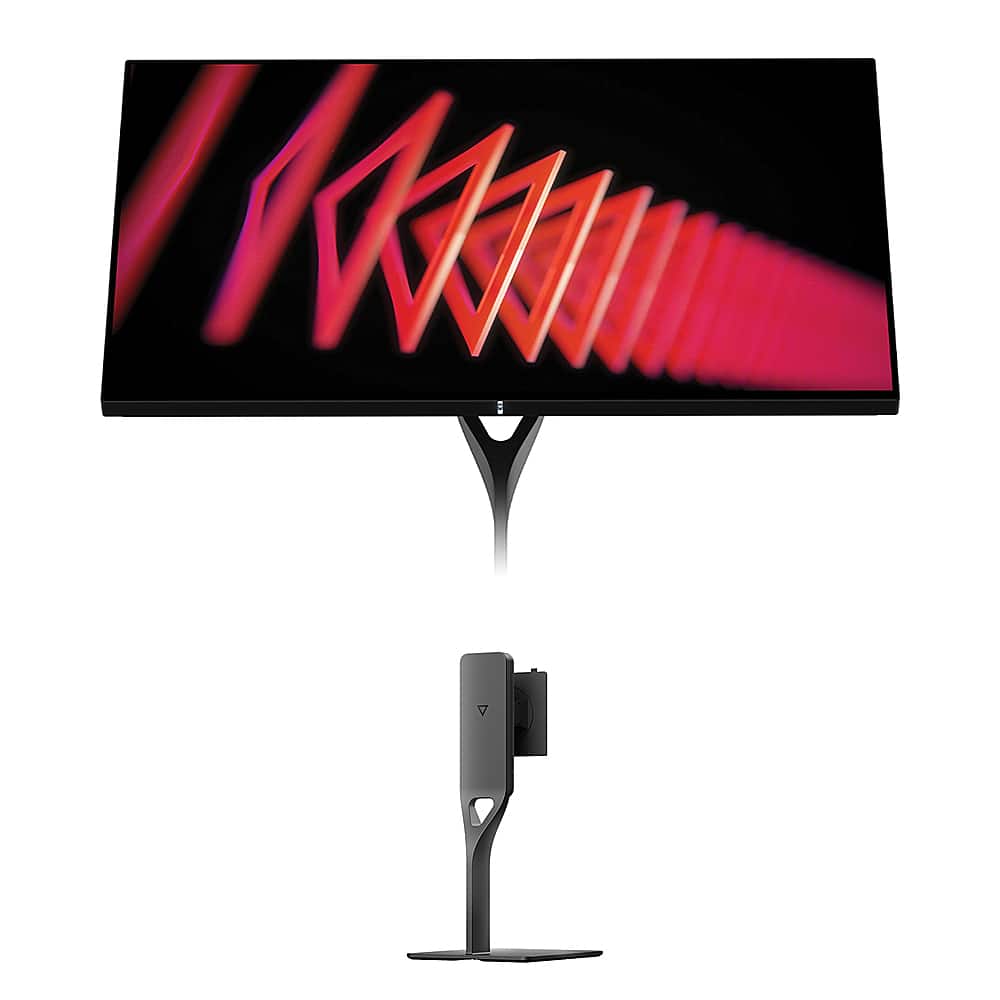
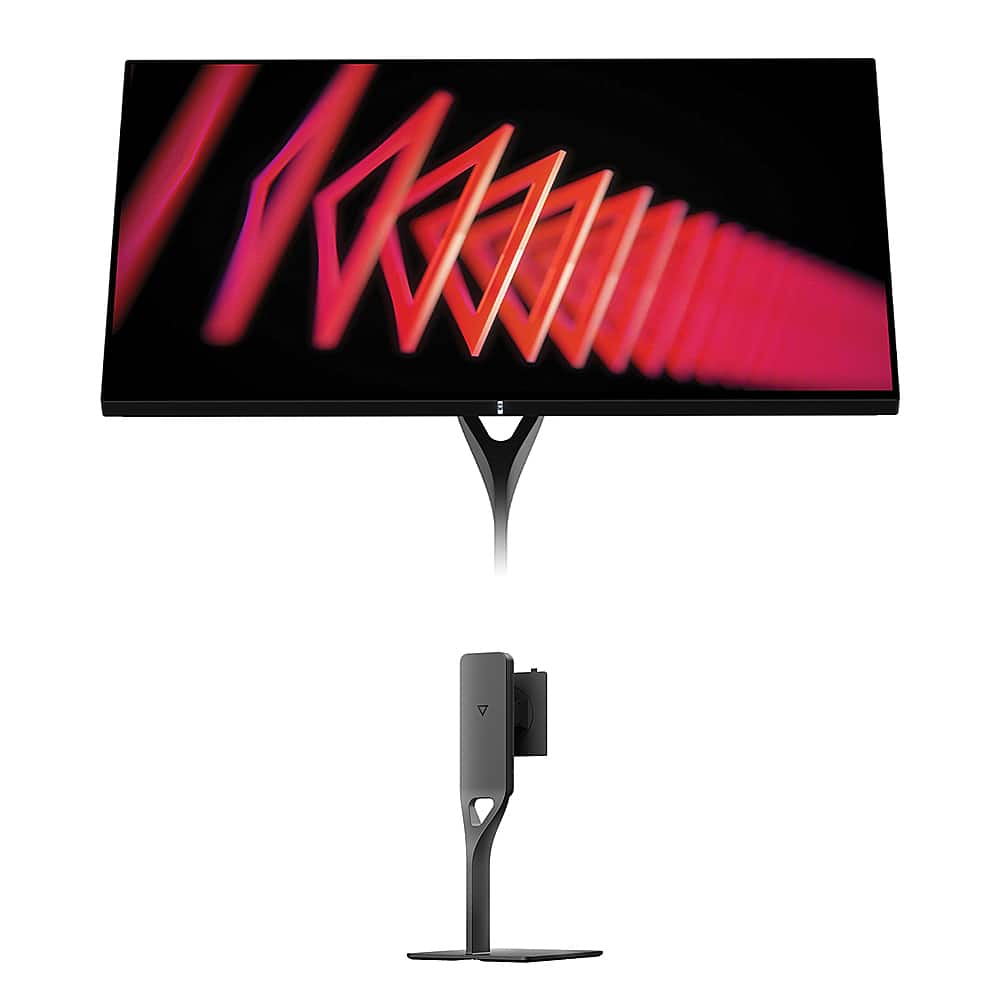
Gaming monitors have evolved dramatically since 2020, with manufacturers pushing refresh rates higher while simultaneously improving color accuracy and resolution. Two monitors that perfectly illustrate this evolution are the budget-focused Acer Nitro XV1 and the premium Dough Spectrum One. These displays represent completely different philosophies in gaming monitor design, and understanding their differences will help you make the right choice for your setup.
At the time of writing, these monitors sit at opposite ends of the price spectrum—the Acer Nitro XV1 typically costs under $250, while the Dough Spectrum One commands nearly four times that price. This massive price gap reflects fundamentally different approaches to gaming display technology.
Before diving into specifics, let's clarify what makes a gaming monitor different from a regular display. Gaming monitors prioritize three key metrics that directly affect your gaming experience: refresh rate, response time, and input lag.
Refresh rate measures how many times per second your monitor can display a new image, expressed in Hertz (Hz). A 60Hz monitor refreshes 60 times per second, while a 144Hz monitor refreshes 144 times. Higher refresh rates create smoother motion, especially noticeable when tracking fast-moving objects or during rapid camera movements in first-person shooters.
Response time indicates how quickly individual pixels can change from one color to another, typically measured in milliseconds (ms). Faster response times reduce ghosting—those annoying trails that follow moving objects on slower displays. Modern gaming monitors typically achieve 1-5ms response times.
Input lag represents the delay between when your graphics card sends a signal and when the monitor actually displays it. Lower input lag means your actions appear on screen faster, crucial for competitive gaming where milliseconds matter.
Released in 2023, the Acer Nitro XV1 represents the sweet spot of budget gaming monitors. Acer designed this display specifically for gamers who want competitive performance without breaking the bank. The monitor features a 27-inch IPS (In-Plane Switching) panel with 2560×1440 resolution—commonly called WQHD or 1440p.
The standout feature is its 180Hz refresh rate via DisplayPort connection, with 144Hz available through HDMI. This high refresh rate puts the Acer Nitro XV1 ahead of many competitors in its price range, which typically max out at 144Hz. Those extra 36 frames per second make a noticeable difference in competitive gaming, particularly in fast-paced shooters where tracking enemies smoothly can mean the difference between winning and losing a firefight.
The IPS panel technology deserves explanation. Unlike cheaper TN (Twisted Nematic) panels that suffer from poor viewing angles and washed-out colors, IPS panels maintain consistent color accuracy and brightness even when viewed from the side. This makes the Acer Nitro XV1 suitable for both gaming and general computer use, including productivity work where color accuracy matters.
Acer equipped this monitor with AMD FreeSync Premium technology, which synchronizes the monitor's refresh rate with your graphics card's output. This eliminates screen tearing (when different parts of the image show different frames simultaneously) and stuttering (when frame delivery becomes inconsistent). The FreeSync range operates from 40-180Hz, providing smooth gameplay across a wide performance spectrum. Additionally, the monitor works with NVIDIA graphics cards through G-SYNC compatibility, though it lacks official certification.
Color performance on the Acer Nitro XV1 exceeds expectations for its price point. The monitor covers 95% of the DCI-P3 color gamut, which is the standard used by digital cinemas and HDR content. This wide color coverage means games and movies display more vibrant, lifelike colors than cheaper monitors that only cover the basic sRGB color space.
The Dough Spectrum One, launched in 2024, takes a radically different approach. This monitor targets users who need both gaming performance and professional-grade display quality. Its most distinctive feature is the edge-to-edge Corning Gorilla Glass front panel with DXC (Diamond Extreme Coating) anti-reflective treatment.
This Gorilla Glass construction serves multiple purposes. First, it provides exceptional durability and scratch resistance—something you'd typically find on smartphones rather than desktop monitors. Second, the glass creates a premium aesthetic with deeper perceived contrast and more vibrant colors compared to traditional matte-coated screens. The glossy surface makes colors appear more saturated and blacks appear deeper, similar to how modern smartphones display more vivid images than older matte-screen devices.
The Dough Spectrum One features a 27-inch IPS panel with full 4K resolution (3840×2160 pixels). This represents 78% more pixels than the Acer Nitro XV1's 1440p resolution. The increased pixel density creates noticeably sharper text and more detailed game imagery, particularly beneficial for strategy games, RPGs, and any content where fine detail matters.
At 144Hz refresh rate, the Dough Spectrum One delivers smooth gaming performance, though it falls short of the Acer Nitro XV1's 180Hz capability. However, this 36Hz difference becomes less important when you consider the GPU requirements for 4K gaming. Most graphics cards struggle to maintain frame rates above 144fps at 4K resolution in demanding games, making the higher refresh rate somewhat academic.
The monitor includes VESA DisplayHDR 600 certification with 16-zone local dimming. Local dimming allows different areas of the backlight to dim independently, creating better contrast between bright and dark areas of the image. While 16 zones isn't as sophisticated as the hundreds of zones found in premium TVs, it still provides meaningful improvement over standard edge-lit monitors like the Acer Nitro XV1.
When evaluating gaming performance, we need to consider both the monitor's capabilities and real-world usage scenarios. Our research across professional reviews and user feedback reveals clear performance distinctions between these monitors.
For competitive gaming—think Counter-Strike, Valorant, or Overwatch—the Acer Nitro XV1 delivers superior performance. The 180Hz refresh rate provides tangibly smoother motion tracking, and the 1440p resolution allows most modern graphics cards to achieve high frame rates. Professional esports players often prefer 1440p at high refresh rates over 4K at lower frame rates because the smooth motion provides a competitive advantage.
The response time story is interesting. Both monitors claim 1ms gray-to-gray response times, but real-world testing shows the Acer Nitro XV1 achieves consistently fast pixel transitions across its entire refresh rate range. The Dough Spectrum One performs well but shows slight variations at different refresh rates, typical of higher-resolution panels that must process more pixel data.
For single-player gaming and visual fidelity, the Dough Spectrum One takes the lead. The 4K resolution reveals details in games that simply aren't visible at 1440p. Modern titles like Cyberpunk 2077, Red Dead Redemption 2, and Microsoft Flight Simulator benefit enormously from the additional pixel density. The HDR implementation on the Dough Spectrum One also provides more impactful visuals than the basic HDR support on the Acer Nitro XV1.
Modern gaming monitors often serve double duty as productivity displays, and this is where the differences become stark. The Dough Spectrum One excels at professional tasks thanks to its 4K resolution and factory color calibration. Text appears razor-sharp, making it excellent for code editing, document work, and any task requiring extended reading. The factory calibration ensures colors appear accurate out of the box, crucial for photo editing, graphic design, or video production.
The USB-C connectivity on the Dough Spectrum One deserves special mention. This single cable can deliver video, data, and up to 100 watts of power to charge a laptop. For MacBook users especially, this creates a clean, single-cable desk setup that's impossible with the Acer Nitro XV1's traditional connectivity.
The Acer Nitro XV1 isn't a slouch for productivity either. The 1440p resolution provides 78% more screen real estate than standard 1080p monitors, and the IPS panel delivers good color accuracy for general use. However, professionals requiring pixel-perfect accuracy should look elsewhere.
These monitors showcase dramatically different approaches to construction and aesthetics. The Acer Nitro XV1 follows traditional gaming monitor design with a black plastic chassis and aggressive styling cues. The included stand provides full ergonomic adjustment—height, tilt, swivel, and pivot—making it a complete package ready for immediate use.
The Dough Spectrum One pursues minimalist premium design. The Gorilla Glass front panel creates a seamless edge-to-edge appearance that looks more like a high-end TV than a traditional gaming monitor. However, this premium aesthetic comes with compromises. The monitor ships without a stand, requiring a separate purchase that can add $100-200 to the total cost. This design decision reflects the target audience—professionals and enthusiasts who often use VESA mounts or premium third-party stands.
Both monitors can serve home theater duty, but with different strengths. The Acer Nitro XV1 works well for console gaming sessions and casual movie watching. Its anti-glare coating reduces reflections in bright rooms, and the built-in speakers provide basic audio functionality.
The Dough Spectrum One offers a more cinematic experience thanks to its 4K resolution and superior HDR implementation. The glossy Gorilla Glass surface enhances perceived contrast, making movies appear more vibrant. However, the glossy finish can be problematic in rooms with bright lighting or windows, as reflections become more noticeable than on matte displays.
For console gaming specifically, both monitors support the latest HDMI standards needed for PlayStation 5 and Xbox Series X compatibility, though the Dough Spectrum One's HDMI 2.1 ports provide better future-proofing for upcoming console features.
The value proposition comparison requires honest assessment of needs versus costs. At the time of writing, the Acer Nitro XV1 represents exceptional value for pure gaming performance. You get competitive-grade refresh rates, good color accuracy, and complete ergonomic adjustability for roughly one-fourth the cost of the Dough Spectrum One.
The Dough Spectrum One justifies its premium pricing through the combination of 4K resolution, professional build quality, and unique Gorilla Glass construction. However, the total cost of ownership—including the required stand—puts it in premium territory where alternatives like LG's UltraGear series or ASUS ProArt displays compete.
Choose the Acer Nitro XV1 if you primarily game, especially competitive titles where refresh rate matters more than resolution. It's ideal for students, budget-conscious gamers, or anyone who wants excellent gaming performance without paying premium prices. The complete package approach means no additional purchases necessary.
The Dough Spectrum One makes sense for content creators, professionals who need color accuracy, or gaming enthusiasts who also do productivity work. The 4K resolution and premium construction justify the cost if you'll utilize these features regularly. MacBook users particularly benefit from the USB-C integration.
Both monitors deliver on their core promises. The Acer Nitro XV1 maximizes gaming performance per dollar, while the Dough Spectrum One provides a premium experience that extends beyond gaming. Your choice should align with your primary use case, budget flexibility, and whether you value maximum gaming performance or overall display quality. Neither choice is wrong—they simply serve different needs in the diverse gaming monitor landscape.
| Acer Nitro XV1 27" WQHD 180Hz IPS Gaming Monitor | Dough Spectrum One 27-Inch 4K 144Hz Gaming Monitor Gorilla Glass |
|---|---|
| Resolution - Higher resolution means sharper images but requires more GPU power | |
| 2560 x 1440 (WQHD) - Sweet spot for gaming performance | 3840 x 2160 (4K) - 78% more pixels for professional work |
| Refresh Rate - Higher rates create smoother motion in fast games | |
| 180Hz (DisplayPort) / 144Hz (HDMI) - Competitive advantage | 144Hz (all inputs) - Smooth but not class-leading |
| Panel Type & Surface - Affects color accuracy and reflections | |
| IPS with anti-glare matte coating - Consistent colors, minimal reflections | IPS with glossy Gorilla Glass - Enhanced vibrancy but more reflective |
| Response Time - Lower numbers reduce motion blur | |
| 1ms G2G - Excellent for competitive gaming | 1ms claimed - Good performance across refresh range |
| HDR Support - Better contrast and colors in supported content | |
| Basic HDR10 with 250 nits brightness - Limited impact | VESA DisplayHDR 600 with 16-zone local dimming - Meaningful improvement |
| Color Gamut - Wider coverage means more vibrant, accurate colors | |
| 95% DCI-P3 - Excellent for gaming and general use | 98% DCI-P3 with factory calibration (ΔE <0.6) - Professional-grade accuracy |
| Connectivity - Different ports serve different needs | |
| 2x HDMI 2.0, 1x DisplayPort 1.2, 3.5mm jack | 2x HDMI 2.1, 1x DisplayPort 1.4, USB-C with 100W power delivery, USB hub |
| Adaptive Sync - Eliminates screen tearing during gaming | |
| AMD FreeSync Premium (40-180Hz), G-SYNC compatible | AMD FreeSync Premium Pro, official G-SYNC compatibility |
| Stand & Ergonomics - Affects comfort during long sessions | |
| Full ergonomic stand included (height, tilt, swivel, pivot) | No stand included - requires separate purchase |
| Build Quality - Premium materials cost more but offer durability | |
| Standard gaming monitor construction with plastic chassis | Edge-to-edge Corning Gorilla Glass with premium minimalist design |
| Audio - Built-in speakers save desk space | |
| 2x 2W stereo speakers included | No built-in speakers |
| Target Use Case - Who each monitor serves best | |
| Competitive gaming and budget-conscious users | Content creators and dual gaming/productivity users |
The Acer Nitro XV1 is superior for competitive gaming due to its 180Hz refresh rate compared to the Dough Spectrum One's 144Hz. The higher refresh rate provides smoother motion tracking and can give you a competitive edge in fast-paced games like Counter-Strike or Valorant. The Acer Nitro XV1 also has slightly lower input lag, making your actions appear on screen faster.
The primary difference is resolution and target audience. The Acer Nitro XV1 offers 1440p resolution optimized for gaming performance, while the Dough Spectrum One provides 4K resolution aimed at users who need both gaming and professional work capabilities. The Dough Spectrum One also features unique Gorilla Glass construction for premium build quality.
The Acer Nitro XV1 provides exceptional value for pure gaming, offering high refresh rates and good color accuracy at a budget-friendly price point. The Dough Spectrum One costs significantly more but justifies this through 4K resolution, professional color accuracy, and premium materials. Choose the Acer Nitro XV1 for gaming value or the Dough Spectrum One for professional features.
Yes, both the Acer Nitro XV1 and Dough Spectrum One support modern gaming consoles. However, the Dough Spectrum One has HDMI 2.1 ports that better support next-gen console features, while the Acer Nitro XV1 uses HDMI 2.0 ports that are still compatible but with some limitations for future console updates.
The Dough Spectrum One excels at productivity tasks thanks to its 4K resolution, factory color calibration, and USB-C connectivity with laptop charging. The sharp text and accurate colors make it ideal for coding, design work, and document editing. The Acer Nitro XV1 works fine for general productivity but lacks the pixel density and color accuracy needed for professional work.
The Dough Spectrum One delivers superior picture quality with 78% more pixels than the Acer Nitro XV1, resulting in sharper images and text. The Dough Spectrum One also features better HDR implementation with local dimming and higher peak brightness. However, the Acer Nitro XV1 still provides good color accuracy and is perfectly adequate for gaming and general use.
The Acer Nitro XV1 comes complete with an adjustable stand and all necessary cables, making it ready to use immediately. The Dough Spectrum One ships without a stand, requiring you to purchase one separately or use a VESA mount. This adds to the total cost but allows for more customization options.
The Dough Spectrum One offers superior color accuracy with factory calibration achieving Delta E less than 0.6 and 98% DCI-P3 coverage. This professional-grade color accuracy makes it suitable for photo editing and graphic design. The Acer Nitro XV1 provides good color reproduction for gaming but isn't calibrated for professional color-critical work.
The Acer Nitro XV1 offers 180Hz refresh rate while the Dough Spectrum One provides 144Hz. Higher refresh rates create smoother motion, which is most noticeable in fast-paced gaming. The 36Hz difference between these monitors is visible in competitive gaming scenarios, giving the Acer Nitro XV1 an advantage for esports and action games.
The Dough Spectrum One provides a better movie-watching experience due to its 4K resolution, superior HDR implementation, and glossy screen that enhances perceived contrast. However, the glossy surface can be problematic in bright rooms due to reflections. The Acer Nitro XV1 works well for casual movie watching with its anti-glare coating reducing reflections in bright environments.
The Acer Nitro XV1 includes standard gaming monitor connectivity with HDMI 2.0, DisplayPort, and audio jack. The Dough Spectrum One offers more advanced connectivity including HDMI 2.1, DisplayPort 1.4, USB-C with 100W laptop charging, and a built-in USB hub. The Dough Spectrum One's USB-C connectivity is particularly valuable for laptop users seeking single-cable solutions.
For your first gaming setup, the Acer Nitro XV1 is the better choice due to its complete package approach, excellent gaming performance, and budget-friendly pricing. It includes everything needed to start gaming immediately. The Dough Spectrum One is better suited for users who already have experience with premium displays and need both gaming and professional capabilities.
We've done our best to create useful and informative comparisons to help you decide what product to buy. Our research uses advanced automated methods to create this comparison and perfection is not possible - please contact us for corrections or questions. These are the sites we've researched in the creation of this article: bestbuy.com - tomshardware.com - displayninja.com - youtube.com - youtube.com - youtube.com - store.acer.com - manuals.plus - displayspecifications.com - pangoly.com - pcpartpicker.com - casariolab.art - store.acer.com - versus.com - youtube.com - createdtech.com - pcgamesn.com - tomshardware.com - imore.com - bestbuy.com - youtube.com - youtube.com - newegg.com - 9to5mac.com - bhphotovideo.com - bhphotovideo.com - sears.com - bhphotovideo.com - bestbuy.com - petra.com - petra.com - bestbuy.com - microcenter.com - youtube.com - petra.com

Privacy Policy
Terms and Conditions - Affiliate Policy
Home Security
© Copyright 2008-2026.
11816 Inwood Rd #1211, Dallas, TX 75244