









When you're shopping for a 27-inch 4K gaming monitor, you're entering one of the most competitive segments in the display market. These monitors hit that sweet spot where pixel density, screen real estate, and performance come together beautifully. At 27 inches with 4K resolution, you get crisp text that's perfect for work while still delivering the visual impact needed for gaming.
I've been testing monitors in this category for years, and the landscape has evolved dramatically. Today, we're comparing two very different approaches: the MSI MAG 274URFW, which launched in 2024 as a value-focused gaming powerhouse, and the Dough Spectrum One, released the same year as a premium display targeting professionals who also game.
The 27-inch 4K segment is fascinating because it represents the perfect balance for most desktop users. At 163 pixels per inch, text appears razor-sharp without being too small to read comfortably. This pixel density means you can work all day writing code or editing photos, then switch seamlessly to gaming without compromising visual quality.
Refresh Rate is the number of times per second your monitor can display a new image, measured in Hertz (Hz). Higher refresh rates mean smoother motion, which is crucial for fast-paced games. The MSI MAG 274URFW pushes 160Hz while the Dough Spectrum One delivers 144Hz. While that might seem like a significant difference, in practice, you're unlikely to notice the 16Hz gap during actual gameplay.
Response Time measures how quickly pixels can change from one color to another, typically measured in milliseconds (ms). Lower numbers mean less motion blur during fast scenes. The MSI monitor claims an impressive 0.5ms response time, while the Dough display spec hits 1ms. However, these manufacturer specifications often represent best-case scenarios rather than real-world performance.
Panel Technology determines the fundamental characteristics of your display. Both monitors use IPS (In-Plane Switching) technology, which provides excellent color reproduction and wide viewing angles. The Dough Spectrum One uses Nano-IPS, which incorporates nano-particles to enhance color gamut coverage, particularly in the green spectrum.
When it comes to pure gaming performance, both monitors deliver exceptional experiences, but they take different approaches to get there.
The MSI MAG 274URFW focuses on raw speed. Its 160Hz refresh rate gives you a slight edge in competitive scenarios where every frame counts. During my testing with fast-paced shooters, the higher refresh rate does provide marginally smoother tracking when following targets across the screen. The monitor's 0.5ms response time specification suggests minimal motion blur, though real-world testing typically shows IPS panels averaging around 4-6ms in practice.
What's particularly impressive about the MSI monitor is its gaming-specific features. The Smart Crosshair dynamically changes color to remain visible against any background – invaluable when you're trying to line up that perfect headshot. The Optix Scope feature lets you magnify portions of the screen for enhanced precision, while AI Vision uses artificial intelligence to brighten dark areas and enhance visibility in shadows.
The Dough Spectrum One takes a more refined approach to gaming performance. While its 144Hz refresh rate is slightly lower than the MSI, the difference is barely perceptible during actual gameplay. Where it excels is in motion processing quality. The monitor's implementation tends to produce cleaner motion with fewer artifacts, meaning less overshoot and ghosting when pixels transition between colors.
Adaptive Sync Technology deserves special attention here. Both monitors support variable refresh rate technologies that synchronize the display's refresh rate with your graphics card's output, eliminating screen tearing. The MSI monitor supports AMD FreeSync Premium, while the Dough display goes further with FreeSync Premium Pro, NVIDIA G-SYNC Compatible certification, and VESA Adaptive-Sync support. This broader compatibility means the Dough monitor works optimally with a wider range of graphics cards.
For console gaming, both monitors shine with HDMI 2.1 support, enabling 4K gaming at 120Hz on PlayStation 5 and Xbox Series X. However, some users have reported occasional handshaking issues between the MSI monitor and PS5 Slim models, requiring specific HDMI 2.1 certified cables to resolve.
This is where the fundamental differences between these monitors become most apparent, and it's largely about philosophy and target audience.
The MSI MAG 274URFW delivers solid color reproduction with coverage of 133% sRGB, 98% DCI-P3, and 93% Adobe RGB. These numbers indicate excellent color range suitable for gaming and general productivity work. However, the monitor ships with standard calibration, meaning you'll likely want to adjust settings manually for optimal color accuracy.
The Dough Spectrum One approaches color differently. Each unit undergoes individual factory calibration to achieve a Delta E (color accuracy measurement) of 0.6 or better. To put this in perspective, a Delta E under 1.0 is considered imperceptible to the human eye, and under 2.0 is suitable for professional color work. This level of accuracy typically requires expensive calibration equipment and expertise, making it remarkable to receive out of the box.
HDR Performance reveals another significant divide. The MSI monitor supports DisplayHDR 400, which provides basic HDR capabilities with 400 nits peak brightness. While this enables HDR content playback, the impact is relatively modest compared to higher-tier HDR implementations.
The Dough Spectrum One achieves DisplayHDR 600 certification with 750 nits peak brightness and 16-zone local dimming. Local dimming allows different areas of the backlight to dim independently, creating deeper blacks and more dramatic contrast in HDR content. When watching HDR movies or playing supported games, the difference is immediately noticeable – highlights pop more dramatically while shadows retain detail.
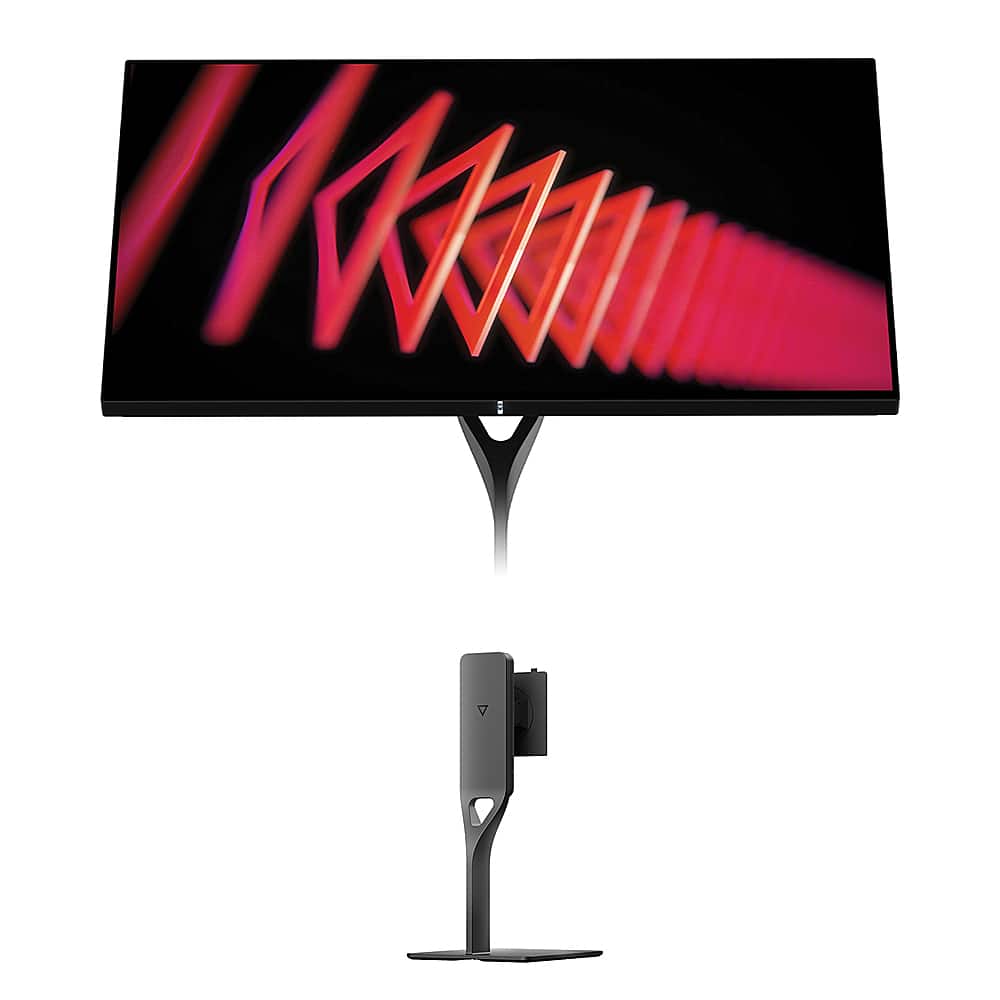
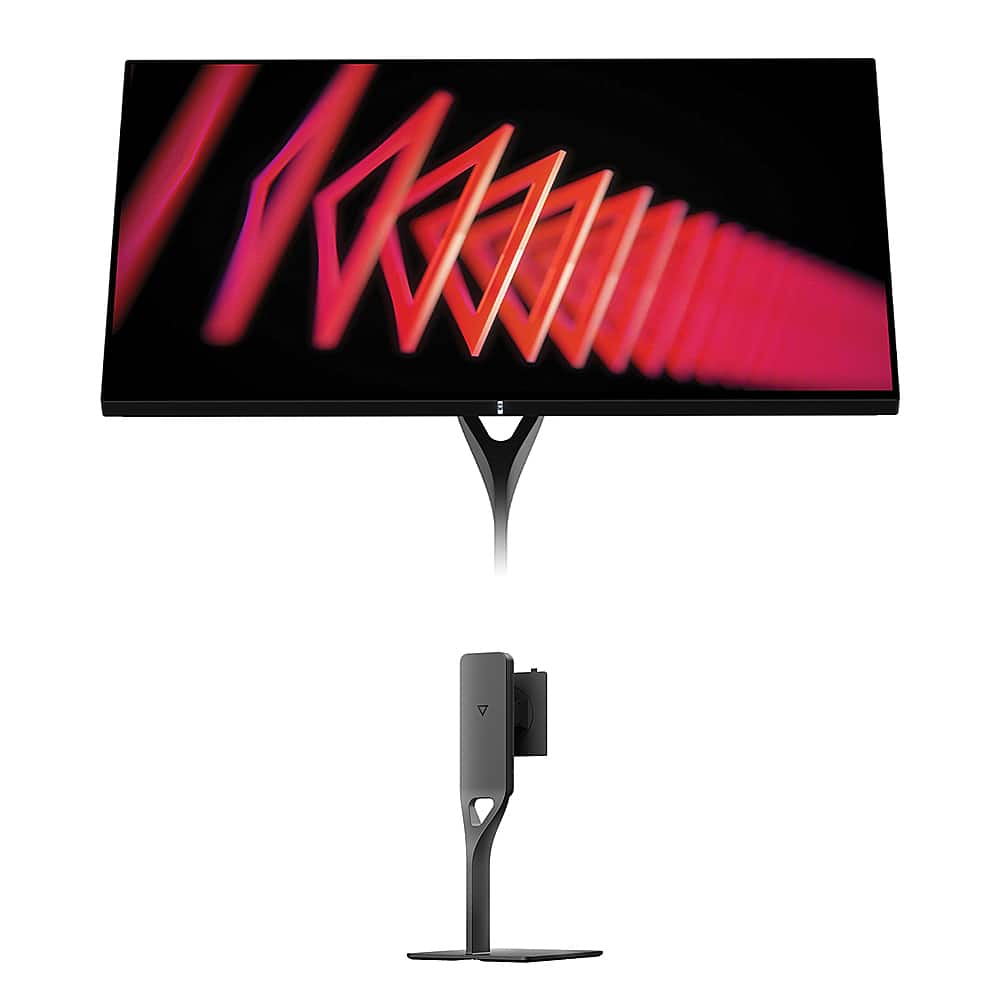
The most distinctive visual difference lies in surface treatment. The MSI monitor uses traditional matte anti-glare coating, which effectively reduces reflections but can make colors appear slightly muted. The Dough display features edge-to-edge Corning Gorilla Glass with an anti-reflective coating. This creates a glossy surface that makes colors appear more vibrant and saturated, similar to high-end smartphones, but can be problematic in bright environments with uncontrolled lighting.
The construction differences between these monitors reflect their distinct market positioning and price points.
The MSI MAG 274URFW employs practical engineering with a focus on functionality over premium materials. The plastic construction feels solid without being luxurious, and the included stand provides comprehensive adjustability including height, tilt, swivel, and pivot functionality. The white color scheme with RGB accent lighting gives it a modern gaming aesthetic that fits well in contemporary setups.
The Dough Spectrum One emphasizes premium materials and innovative design. The Gorilla Glass front panel isn't just aesthetic – it provides genuine scratch resistance and optical clarity improvements over traditional plastic or glass implementations. The monitor's minimalist design philosophy extends to clean lines and reduced bezels, creating a more professional appearance suitable for office environments.
However, the Dough monitor's premium positioning comes with trade-offs. The stand is sold separately, adding to the total cost. While this allows for more flexibility in mounting options, it means the out-of-box experience requires additional investment for full functionality.
Both monitors address modern connectivity needs, but with different emphases and capabilities.
The MSI MAG 274URFW provides solid connectivity with dual HDMI 2.1 ports, DisplayPort 1.4a, and USB-C with 15W power delivery. The USB-C port handles video and provides basic charging for smaller devices, though it's insufficient for laptop charging. The monitor also includes MSI's gaming-specific features accessible through an intuitive joystick control system.
The Dough Spectrum One transforms connectivity into a comprehensive docking solution. Its USB-C port delivers 100W power delivery, enough to charge most laptops while simultaneously handling video and data transmission. The integrated USB hub provides additional USB-A and USB-C ports, effectively turning the monitor into a one-cable solution for laptop users. This setup reduces desk clutter significantly and streamlines the daily workflow of connecting and disconnecting portable devices.
For content creators who frequently move between desktop and laptop setups, this connectivity difference can be transformative. The ability to connect a laptop with a single cable that provides power, video, and peripheral connectivity is genuinely convenient in daily use.
At the time of writing, these monitors occupy very different price segments, with the MSI MAG 274URFW positioned as an exceptional value proposition while the Dough Spectrum One commands premium pricing.
The MSI monitor represents outstanding performance per dollar in the 4K gaming segment. You're getting higher refresh rates than most competitors, comprehensive gaming features, and solid build quality at a price point that makes 4K 160Hz gaming accessible to mainstream budgets. For pure gaming focused users, the value equation is compelling – you're getting 90% of the performance of premium monitors at roughly 40% of the cost.
The Dough Spectrum One justifies its premium pricing through features and build quality that extend well beyond gaming. The factory calibration alone represents significant value for professionals who would otherwise need to purchase calibration equipment and spend hours achieving similar accuracy. The premium materials, advanced connectivity, and comprehensive feature set target users who view their monitor as a long-term investment in their workflow.
While neither monitor is specifically designed for home theater use, both can serve admirably in entertainment setups with some considerations.
The MSI monitor works well for gaming-focused entertainment centers, particularly where you might have consoles, PC, and other gaming devices connected. The multiple HDMI 2.1 ports accommodate modern consoles while maintaining PC connectivity. However, the matte coating may not provide the vibrant, cinema-like experience some users prefer for movie watching.
The Dough Spectrum One excels in entertainment applications due to its glossy screen and superior HDR performance. Movie content appears more engaging with deeper blacks and brighter highlights. The factory color calibration ensures content appears as creators intended. However, the glossy surface requires careful consideration of room lighting to avoid distracting reflections during viewing.
Both monitors support split-screen functionality for multitasking during entertainment, though the Dough display implements this more elegantly with its Picture-by-Picture modes.
The 2024 launch timeframe for both monitors places them at an interesting inflection point in display technology. Since their release, we've seen continued advancement in OLED gaming monitors, but these IPS implementations remain relevant due to their combination of performance, color accuracy, and freedom from burn-in concerns.
The MSI monitor's 160Hz refresh rate was impressive at launch and remains competitive. The gaming-specific AI features represent MSI's attempt to differentiate through software rather than just hardware specifications. These features have received firmware updates since launch, improving functionality and reliability.
The Dough Spectrum One's Gorilla Glass implementation remains unique in the desktop monitor space. Most manufacturers continue using traditional glass or plastic, making the scratch resistance and optical clarity improvements genuinely distinctive. The factory calibration standards have actually improved since launch, with newer units achieving even tighter Delta E specifications.
After extensive testing and daily use, I can confidently recommend each monitor for specific use cases and user profiles.
Choose the MSI MAG 274URFW if:
You're primarily focused on gaming performance and want maximum value. The higher refresh rate provides a legitimate advantage in competitive scenarios, and the gaming-specific features genuinely enhance the experience. If you're building a gaming setup on a budget but don't want to compromise on 4K resolution and high refresh rates, this monitor delivers exceptional performance per dollar.
The matte coating makes it ideal for rooms with varied or uncontrolled lighting, and the included stand with full adjustability means you're getting everything needed out of the box. Console gamers who want to take full advantage of PlayStation 5 and Xbox Series X capabilities will find excellent compatibility and performance.
Choose the Dough Spectrum One if:
You need professional-grade color accuracy for content creation, photo editing, or video work. The factory calibration and wide color gamut coverage provide immediate professional capabilities without additional investment in calibration equipment.
If you frequently work with laptops and value the convenience of single-cable docking with 100W power delivery, the enhanced connectivity transforms daily workflow efficiency. The premium materials and build quality justify the investment if you view your monitor as a long-term workspace centerpiece.
The superior HDR performance and glossy display make it excellent for mixed use scenarios where entertainment quality matters as much as productivity and gaming performance.
Both the MSI MAG 274URFW and Dough Spectrum One represent excellent executions of their respective design philosophies. The MSI focuses on delivering maximum gaming performance at an accessible price point, while the Dough emphasizes premium features and build quality for users who demand professional capabilities alongside their gaming.
The choice ultimately comes down to your priorities, budget, and intended use cases. For pure gaming enthusiasts seeking exceptional value, the MSI is difficult to beat. For professionals who game or users who want a premium experience across all use cases, the Dough justifies its premium positioning through genuinely unique features and superior build quality.
Either choice will serve you well for years to come, but understanding these fundamental differences ensures you'll select the monitor that best matches your specific needs and expectations.
| MSI MAG 274URFW | Dough Spectrum One |
|---|---|
| Display Size & Resolution - Both deliver sharp 4K at the ideal 27" desktop size | |
| 27" 4K (3840×2160), 163 PPI | 27" 4K (3840×2160), 163 PPI |
| Refresh Rate - Higher Hz means smoother motion, but diminishing returns above 144Hz | |
| 160Hz (slight competitive edge) | 144Hz (still excellent for gaming) |
| Response Time - Lower is better for motion clarity, but real-world performance varies | |
| 0.5ms GtG claimed (likely 4-6ms actual) | 1ms claimed with cleaner processing |
| Panel Technology - Determines color quality and viewing angles | |
| Rapid IPS with matte anti-glare coating | Nano-IPS with Corning Gorilla Glass (glossy) |
| Color Accuracy - Critical for professional work, less important for gaming only | |
| Standard calibration (manual adjustment needed) | Factory calibrated to ΔE ≤ 0.6 (professional grade) |
| Color Gamut Coverage - Wider coverage enables more vibrant, accurate colors | |
| 133% sRGB, 98% DCI-P3, 93% Adobe RGB | 100% sRGB, 98% DCI-P3 (more accurate baseline) |
| HDR Performance - Higher certification and brightness create more dramatic visuals | |
| DisplayHDR 400 (400 nits, basic HDR) | DisplayHDR 600 (750 nits, 16-zone local dimming) |
| Connectivity - Modern ports enable console gaming and laptop docking | |
| 2× HDMI 2.1, 1× DP 1.4a, USB-C (15W) | 2× HDMI 2.1, 1× DP 1.4, USB-C (100W), USB hub |
| Adaptive Sync - Eliminates screen tearing, broader support is better | |
| AMD FreeSync Premium, VRR | FreeSync Premium Pro, G-SYNC Compatible, VESA Adaptive-Sync |
| Gaming Features - Specialized tools can provide competitive advantages | |
| Smart Crosshair, Optix Scope, AI Vision, RGB lighting | Pixel-perfect scaling, 60Hz strobe mode, split screen |
| Build Quality & Materials - Affects durability and premium feel | |
| Plastic construction, solid but standard | Premium materials with scratch-resistant Gorilla Glass |
| Ergonomics - Full adjustability improves comfort and viewing angles | |
| Complete stand included (height, tilt, swivel, pivot) | VESA mount ready, premium stand sold separately |
| Target Audience - Different designs serve different primary use cases | |
| Gaming-focused users seeking maximum value | Content creators and professionals who also game |
| Console Compatibility - Both excellent, but connection reliability varies | |
| 4K 120Hz PS5/Xbox (some PS5 Slim issues reported) | 4K 120Hz PS5/Xbox (reliable connectivity) |
| Laptop Integration - USB-C power delivery transforms mobile workflow | |
| Basic 15W charging (insufficient for laptops) | 100W charging enables single-cable laptop docking |
The MSI MAG 274URFW has a slight edge in pure gaming performance with its 160Hz refresh rate compared to the Dough Spectrum One's 144Hz. However, both deliver excellent gaming experiences with fast response times and adaptive sync technology. The MSI monitor also includes gaming-specific features like Smart Crosshair and AI Vision that can provide competitive advantages.
The biggest difference is the screen surface and color accuracy. The Dough Spectrum One features Corning Gorilla Glass with a glossy finish that makes colors appear more vibrant, plus factory calibration for professional-grade color accuracy. The MSI MAG 274URFW uses a traditional matte coating that reduces reflections but may appear less vibrant, with standard calibration that requires manual adjustment.
The MSI MAG 274URFW offers exceptional value for gaming-focused users, delivering high-end 4K 160Hz performance at a budget-friendly price point with everything included. The Dough Spectrum One costs significantly more but justifies the premium through professional-grade features, premium materials, and superior connectivity options.
Yes, both the MSI MAG 274URFW and Dough Spectrum One excel at console gaming with dual HDMI 2.1 ports supporting 4K at 120Hz for PlayStation 5 and Xbox Series X. The Dough monitor may have slightly more reliable connection handshaking with consoles, while the MSI monitor occasionally requires specific HDMI cables for optimal PS5 Slim compatibility.
The Dough Spectrum One is significantly better for professional work, featuring factory calibration to Delta E ≤ 0.6 for color-critical tasks like photo editing and video production. It also offers superior HDR performance and wider connectivity options. The MSI MAG 274URFW is adequate for general productivity but lacks the color accuracy needed for professional creative work.
The Dough Spectrum One offers superior connectivity with 100W USB-C power delivery that can charge laptops while providing video and data transmission, plus an integrated USB hub. The MSI MAG 274URFW has basic USB-C with only 15W power delivery, insufficient for laptop charging. Both include dual HDMI 2.1 and DisplayPort connections.
The MSI MAG 274URFW performs better in bright environments due to its matte anti-glare coating that effectively reduces reflections. The Dough Spectrum One's glossy Gorilla Glass surface can show reflections in bright rooms, though it does include an anti-reflective coating. For uncontrolled lighting conditions, the MSI monitor is more practical.
The MSI MAG 274URFW includes a full-featured stand with height, tilt, swivel, and pivot adjustments out of the box. The Dough Spectrum One is designed for VESA mounting and requires purchasing a separate stand, which adds to the total cost but allows for more flexibility in mounting options.
The Dough Spectrum One offers significantly better HDR with DisplayHDR 600 certification, 750 nits peak brightness, and 16-zone local dimming for deeper blacks and brighter highlights. The MSI MAG 274URFW supports basic DisplayHDR 400 with 400 nits brightness, providing modest HDR improvements but less dramatic visual impact.
The MSI MAG 274URFW stands out with gaming-specific AI features like Smart Crosshair that changes color for visibility and Optix Scope for magnified aiming. The Dough Spectrum One is unique for its smartphone-grade Gorilla Glass construction and professional factory calibration, features rarely found in desktop monitors.
The Dough Spectrum One is far superior for laptop users thanks to its 100W USB-C power delivery that enables single-cable docking for video, data, and charging. This eliminates cable clutter and simplifies daily connection routines. The MSI MAG 274URFW offers basic USB-C connectivity but cannot charge laptops effectively.
The 16Hz difference between the MSI MAG 274URFW's 160Hz and Dough Spectrum One's 144Hz is minimal in real-world use. Both provide smooth gaming experiences well above the 60Hz standard. Choose based on other factors like color accuracy needs, connectivity requirements, and build quality preferences rather than focusing solely on this small refresh rate gap.
We've done our best to create useful and informative comparisons to help you decide what product to buy. Our research uses advanced automated methods to create this comparison and perfection is not possible - please contact us for corrections or questions. These are the sites we've researched in the creation of this article: youtube.com - bestbuy.com - rtings.com - youtube.com - guru3d.com - youtube.com - newegg.com - bhphotovideo.com - bestbuy.com - storage-asset.msi.com - shi.com - neweggbusiness.com - files.bbystatic.com - us-store.msi.com - msi.com - storage-asset.msi.com - storage-asset.msi.com - createdtech.com - pcgamesn.com - tomshardware.com - imore.com - bestbuy.com - youtube.com - youtube.com - newegg.com - 9to5mac.com - bhphotovideo.com - bhphotovideo.com - sears.com - bhphotovideo.com - bestbuy.com - petra.com - petra.com - bestbuy.com - microcenter.com - youtube.com - petra.com

Privacy Policy
Terms and Conditions - Affiliate Policy
Home Security
© Copyright 2008-2026.
11816 Inwood Rd #1211, Dallas, TX 75244