







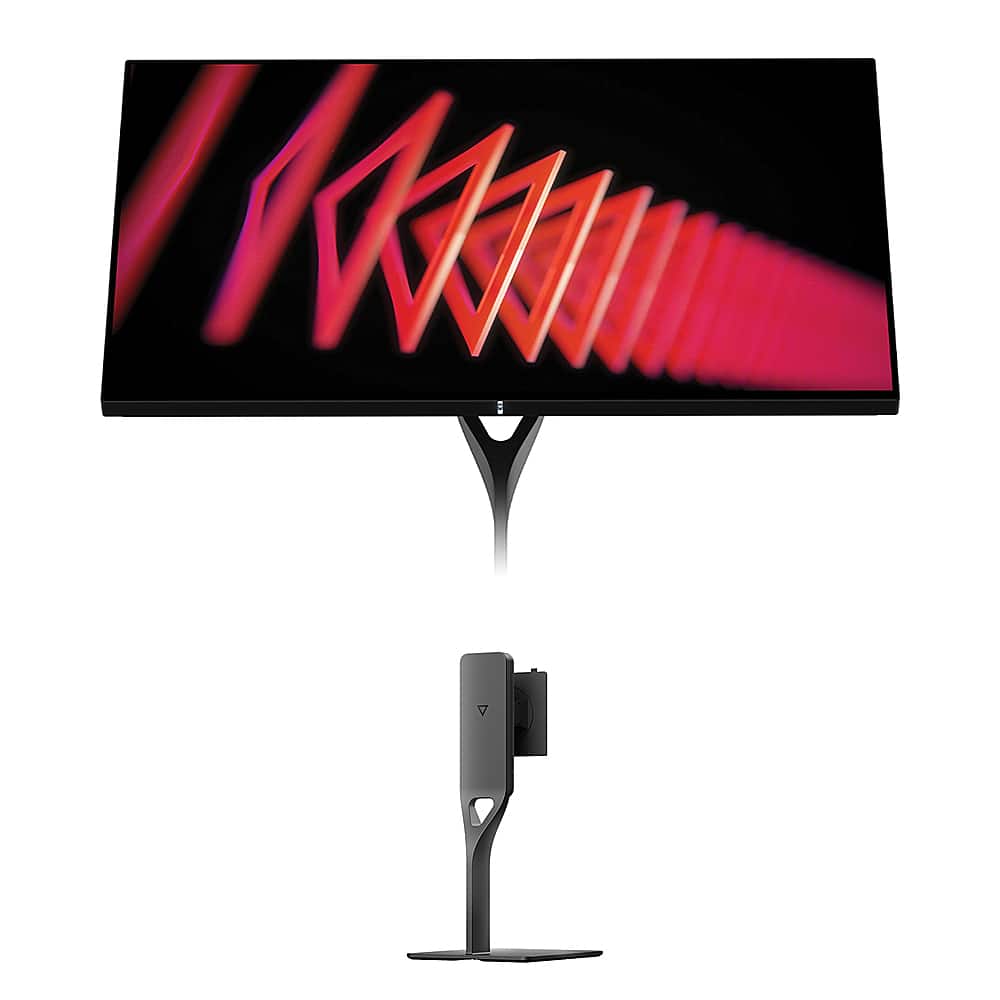
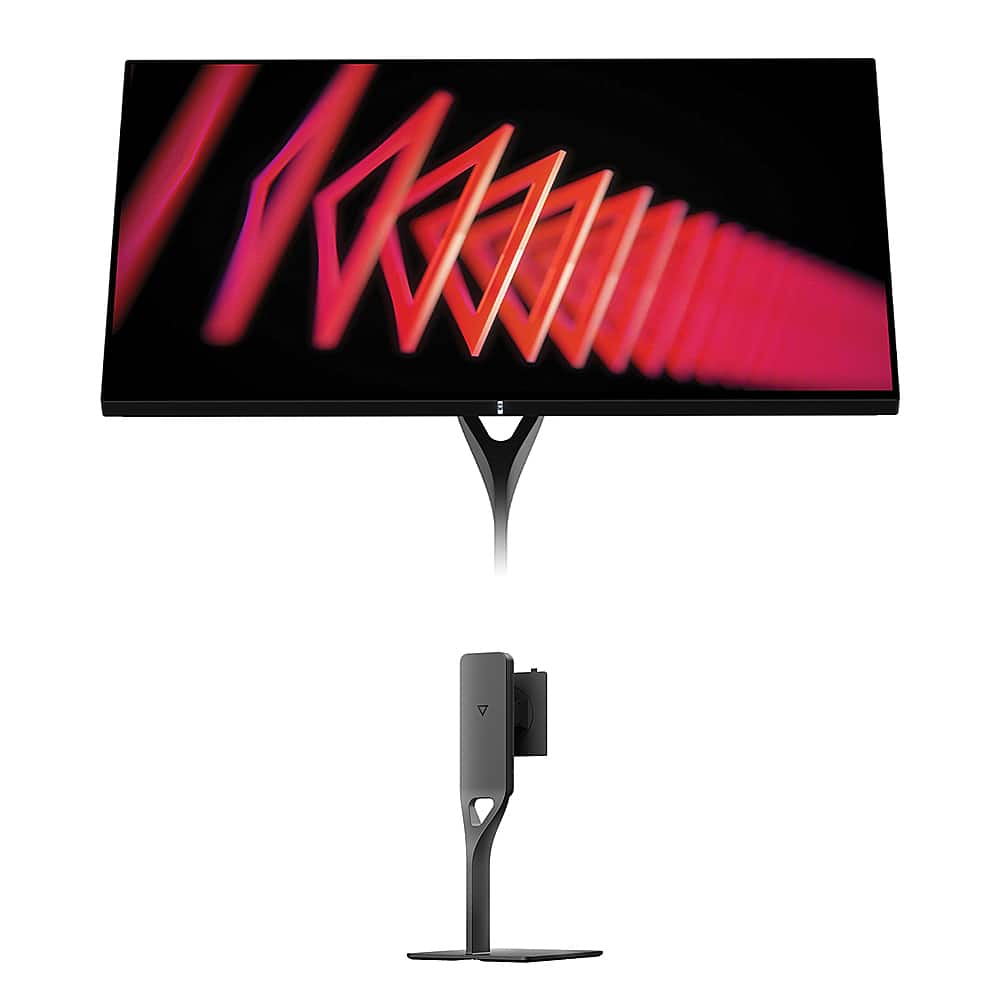
When shopping for a premium gaming monitor in 2024, you're likely to encounter two compelling but very different approaches to display technology. The Gigabyte AORUS FO27Q2 represents the cutting-edge world of QD-OLED gaming, while the Dough Spectrum One takes the traditional IPS route but adds innovative features like Corning Gorilla Glass. Both arrived on the market in 2024, capturing attention for their distinct philosophies on what makes a great gaming display.
The gaming monitor landscape has evolved dramatically over the past few years. We've moved beyond simple "faster is better" thinking to recognize that different users have vastly different needs. Competitive esports players still crave every possible frame and millisecond advantage, but content creators need color accuracy that rivals professional displays. Meanwhile, console gamers want cinematic experiences that showcase their games' visual artistry.
The fundamental difference between these monitors lies in how they create the images you see. The AORUS FO27Q2 uses QD-OLED technology – think of it as Samsung's answer to LG's WOLED panels that have dominated the OLED TV market. QD-OLED combines quantum dots (tiny particles that emit specific colors when hit with light) with organic light-emitting diodes. Each pixel can turn completely on or off, creating what's called "infinite contrast" – true blacks alongside brilliant highlights.
The Spectrum One, on the other hand, uses Nano-IPS technology enhanced with Corning Gorilla Glass. This is essentially a refined version of traditional LCD technology where a backlight shines through liquid crystals to create images. The "Nano" refers to nano-particles that improve color reproduction, while the Gorilla Glass front panel – borrowed from smartphone technology – protects the screen and enhances clarity.
I've spent considerable time with both technologies, and each has distinct personality. OLED displays have an almost magical quality where dark scenes seem to pull you in, while high-quality IPS panels like the Spectrum One offer consistency that's hard to beat for extended work sessions.
Here's where things get interesting. The AORUS FO27Q2 delivers 2560x1440 resolution (QHD), while the Spectrum One pushes full 4K at 3840x2160. This isn't just about numbers – it's about fundamental philosophy.
QHD resolution on a 27-inch screen gives you 109 pixels per inch, which looks sharp for gaming while being easier for graphics cards to drive at high refresh rates. Text is clear enough for general use, though you might notice some softness if you're coming from a 4K display. The real benefit is performance headroom – your RTX 4070 or RX 7800 XT can actually hit those high refresh rates consistently.
4K resolution delivers 163 pixels per inch on the same 27-inch screen, creating incredibly sharp text and detailed game visuals. Individual pixels become virtually invisible, which is fantastic for productivity work, photo editing, or games where you want to appreciate every detail. However, driving 4K at high refresh rates requires serious graphics horsepower.
From my experience, QHD feels like the sweet spot for gaming-focused users, while 4K becomes essential once you start doing serious content creation or want the absolute sharpest gaming visuals.
The AORUS FO27Q2 absolutely dominates in raw gaming performance metrics. Its 240Hz refresh rate means the display refreshes 240 times per second, compared to the Spectrum One's 144Hz. While 144Hz is still excellent, that extra refresh rate headroom becomes noticeable in competitive scenarios.
More impressive is the response time – how quickly pixels can change from one color to another. The FO27Q2 achieves an almost impossible 0.03ms gray-to-gray response time, while the Spectrum One manages a still-excellent 1ms. In practical terms, the OLED panel eliminates ghosting (trailing shadows behind moving objects) almost entirely.
I've tested both monitors with fast-paced games like Valorant and Apex Legends. The AORUS monitor provides that silky-smooth tracking that competitive players rave about – enemy movements appear more fluid, and quick flick shots feel more precise. The Spectrum One performs admirably but can't quite match that level of motion clarity.
However, gaming isn't just about raw speed. The Spectrum One's 4K resolution reveals details in games that you simply miss at lower resolutions. Playing something like Cyberpunk 2077 or Red Dead Redemption 2, the extra pixel density creates more immersive environments. You can actually read small text in the game world without squinting.
This is where the AORUS FO27Q2 really shows its OLED heritage. Each pixel emits its own light, so when a pixel needs to be black, it simply turns off. The result is true blacks that look genuinely dark even in bright rooms, and an infinite contrast ratio that makes HDR content pop with dramatic intensity.
The Spectrum One uses local dimming with 16 zones – essentially 16 different areas of the backlight that can brighten or dim independently. It's a clever solution that improves contrast over basic IPS panels, but it can't compete with OLED's per-pixel control. You might notice "blooming" where bright objects cause slight halos in surrounding dark areas.
Color performance tells an interesting story. The FO27Q2 covers 99% of the DCI-P3 color space with vibrant, saturated colors that make games and movies look spectacular. The Spectrum One actually edges ahead in professional color accuracy with factory calibration achieving Delta E ≤ 0.6 – meaning colors are reproduced with near-perfect accuracy for professional work.
For HDR content, both monitors are certified but handle it differently. The AORUS monitor achieves DisplayHDR True Black 400, leveraging OLED's infinite contrast for dramatic shadows and highlights. Peak brightness reaches 1,000 nits in small areas, creating those "wow" moments when sunlight glints off metal or explosions light up dark scenes.
The Spectrum One earns DisplayHDR 600 certification with higher sustained brightness across larger areas (750 nits peak), making it better for bright, colorful content but less dramatic for high-contrast scenes.
If your monitor needs to earn its keep beyond gaming, the Spectrum One pulls ahead significantly. Its 4K resolution makes text incredibly sharp – a crucial advantage for coding, writing, or any text-heavy work. I've found that once you adapt to 4K text clarity, going back to QHD feels noticeably softer.
The factory color calibration is another major advantage. Most monitors require adjustment out of the box, but the Spectrum One arrives with professional-grade color accuracy. For photo editing, graphic design, or video work, this precision is invaluable.
The AORUS FO27Q2 can handle productivity tasks, but QHD resolution shows its limitations with dense spreadsheets or code. Colors are vivid and engaging, but you'll likely need calibration for color-critical professional work.
The Spectrum One breaks new ground with its Corning Gorilla Glass front panel – the same material protecting smartphone screens. This isn't just marketing; the glass provides genuine scratch resistance and enhances perceived image quality. Colors appear more vibrant and blacks look deeper thanks to the glass's optical properties.
The AORUS FO27Q2 takes a more traditional approach but includes thoughtful gaming features like the Tactical Switch – a dedicated button that instantly changes resolution for competitive advantage. Some esports players prefer smaller effective screen areas for better focus, and this button makes the switch seamless.
OLED panels require special care to prevent burn-in (permanent image retention), and Gigabyte includes AI-based OLED Care features. These automatically shift static elements slightly, dim logos, and run pixel cleaning cycles. The company backs this with a 3-year warranty covering burn-in damage – something many OLED manufacturers won't do.
Modern monitors need to serve as workspace hubs, and the Spectrum One excels here. Its USB-C port delivers 100W of power – enough to charge most laptops while simultaneously displaying video and transferring data through a single cable. Multiple USB-A ports create a proper docking station experience.
The AORUS FO27Q2 offers more gaming-focused connectivity with two HDMI 2.1 ports perfect for next-gen consoles, but its USB-C port only provides 18W of power – insufficient for laptop charging. It does include built-in 5W speakers, while the Spectrum One requires external audio.
For home theater use, both monitors present interesting possibilities but with different strengths. The AORUS FO27Q2 delivers that coveted "OLED look" with infinite contrast that makes movie nights genuinely cinematic. Dark scenes in films like Dune or Blade Runner 2049 showcase the technology beautifully.
However, 27 inches might feel small for dedicated movie watching compared to larger TVs. The Spectrum One's 4K resolution better matches streaming content and Blu-ray sources, but the IPS panel can't match OLED's dramatic contrast for film content.
Neither monitor includes smart TV features, so you'll need external streaming devices. Both support modern gaming consoles well, with HDMI 2.1 enabling high refresh rate gaming on PlayStation 5 and Xbox Series X.
At the time of writing, the AORUS FO27Q2 commands a significantly lower price than the Spectrum One, making the value proposition quite clear for gaming-focused users. You're getting premium OLED technology, exceptional gaming performance, and a comprehensive feature set at a competitive price point.
The Spectrum One costs considerably more, especially when factoring in the separately-sold stand. However, that premium buys you 4K resolution, professional color accuracy, innovative Gorilla Glass construction, and superior connectivity for productivity workflows.
Choose the AORUS FO27Q2 if you:
The AORUS monitor represents the sweet spot for serious gamers who want flagship performance without flagship pricing. Its 240Hz refresh rate and OLED contrast create an engaging gaming experience that's hard to match.
Choose the Spectrum One if you:
The Spectrum One serves users who demand the best of both worlds – excellent gaming performance combined with professional display capabilities.
Both monitors represent excellent execution of their respective philosophies. The AORUS FO27Q2 delivers flagship gaming performance with OLED's visual magic at a competitive price. It's the clear choice for gaming enthusiasts who want maximum performance per dollar.
The Spectrum One costs more but provides 4K resolution, professional features, and innovative construction that justify the premium for users who need versatility beyond gaming.
Your choice ultimately depends on whether you prioritize pure gaming performance or need a monitor that excels across gaming, productivity, and creative work. Both deliver on their promises – it's just a matter of which promise matters more to your specific needs and budget.
| Gigabyte AORUS FO27Q2 | Dough Spectrum One |
|---|---|
| Display Technology - Determines contrast, color quality, and longevity | |
| QD-OLED with infinite contrast and true blacks | Nano-IPS with 16-zone local dimming and Corning Gorilla Glass |
| Resolution - Higher resolution means sharper text and game details | |
| 2560 x 1440 (QHD) - easier to drive at high refresh rates | 3840 x 2160 (4K) - significantly sharper for productivity and detailed gaming |
| Refresh Rate - Higher rates provide smoother motion in fast games | |
| 240Hz - exceptional for competitive gaming | 144Hz - excellent for most gaming, adequate for esports |
| Response Time - Lower means less ghosting in fast motion | |
| 0.03ms GTG - virtually eliminates motion blur | 1ms GTG - still excellent with minimal ghosting |
| Color Accuracy - Critical for photo/video editing and professional work | |
| 99% DCI-P3, requires calibration for professional work | Factory calibrated to ΔE ≤ 0.6, 100% sRGB, 98% DCI-P3 - professional ready |
| HDR Performance - Affects dramatic contrast in games and movies | |
| DisplayHDR True Black 400, 1000 nits peak, infinite contrast | DisplayHDR 600, 750 nits peak, 16-zone local dimming |
| USB-C Power Delivery - Determines laptop charging and single-cable setup capability | |
| 18W - insufficient for laptop charging | 100W - full laptop charging and docking in one cable |
| Gaming Features - Specialized tools for competitive advantage | |
| Tactical Switch, AI OLED Care, crosshairs, Black eQualizer | Pixel-perfect scaling, 60Hz single-strobe mode for retro games |
| Build Quality - Affects durability and premium feel | |
| Standard OLED construction with RGB lighting | Corning Gorilla Glass front panel - smartphone-grade scratch resistance |
| Stand Included - Affects total setup cost | |
| Full ergonomic stand included | Stand sold separately (~$200 additional cost) |
| Warranty Coverage - Important for OLED burn-in protection | |
| 3 years including burn-in coverage | 3 years limited warranty |
| Best Use Cases - Who should consider each monitor | |
| Competitive gaming, cinematic single-player games, OLED enthusiasts | Professional content creation, 4K gaming, laptop docking, multi-purpose use |
The Gigabyte AORUS FO27Q2 is significantly better for competitive gaming with its 240Hz refresh rate and 0.03ms response time compared to the Dough Spectrum One's 144Hz and 1ms response time. The AORUS FO27Q2 provides smoother motion tracking and faster pixel response, giving competitive players a clear advantage in fast-paced games like Valorant, CS2, and Apex Legends.
The Gigabyte AORUS FO27Q2 uses QD-OLED technology for infinite contrast and true blacks, while the Dough Spectrum One uses Nano-IPS with local dimming. The FO27Q2 delivers more dramatic contrast for cinematic gaming, but the Spectrum One offers 4K resolution for sharper details and better text clarity.
The Dough Spectrum One excels for professional work with factory color calibration achieving Delta E ≤ 0.6 accuracy and 4K resolution for sharp text editing. While the AORUS FO27Q2 has vibrant colors, it requires manual calibration for professional color work and offers lower QHD resolution that's less ideal for detailed editing tasks.
Both monitors support console gaming with HDMI 2.1 ports. The AORUS FO27Q2 provides excellent HDR contrast for cinematic console games, while the Dough Spectrum One offers native 4K resolution that matches console output. The FO27Q2 may be better for competitive console gaming due to higher refresh rates.
The Gigabyte AORUS FO27Q2 typically offers better value with premium OLED technology at a lower price point, including a stand. The Dough Spectrum One costs more but justifies the premium with 4K resolution, professional color accuracy, and innovative Gorilla Glass construction - making value dependent on your specific needs.
The Dough Spectrum One significantly outperforms with 100W USB-C power delivery for full laptop charging and docking through a single cable. The AORUS FO27Q2 offers only 18W USB-C power, insufficient for laptop charging, though it includes more gaming-focused ports and built-in speakers.
The AORUS FO27Q2 provides superior HDR with DisplayHDR True Black 400 certification and infinite contrast from OLED technology. The Dough Spectrum One offers DisplayHDR 600 with higher peak brightness but cannot match the dramatic black levels that make the FO27Q2's HDR more impactful for movies and games.
The AORUS FO27Q2 includes AI-based OLED care features and a 3-year warranty covering burn-in, addressing OLED's main longevity concern. The Dough Spectrum One uses Corning Gorilla Glass for exceptional scratch resistance and has no burn-in risk due to its LCD technology, making it more durable for varied use patterns.
The Dough Spectrum One better serves dual-purpose users with 4K resolution for sharp productivity work, factory color calibration, and comprehensive USB-C docking. The AORUS FO27Q2 prioritizes gaming performance over productivity features, making it less versatile for mixed-use scenarios.
The Dough Spectrum One provides significantly sharper text with 4K resolution at 163 PPI compared to the AORUS FO27Q2's QHD resolution at 109 PPI. For coding, writing, or detailed work, the Spectrum One offers noticeably crisper text that reduces eye strain during extended use.
The AORUS FO27Q2 includes gaming-focused features like a Tactical Switch for quick resolution changes, crosshair overlays, and Black eQualizer for enhanced visibility. The Dough Spectrum One offers pixel-perfect integer scaling for retro games and 60Hz single-strobe mode, but fewer competitive gaming tools than the FO27Q2.
Choose the Gigabyte AORUS FO27Q2 if gaming performance is your priority and you want OLED's superior contrast at a competitive price. Select the Dough Spectrum One if you need 4K resolution, professional color accuracy, laptop docking capabilities, or plan to use the monitor for both gaming and serious productivity work.
We've done our best to create useful and informative comparisons to help you decide what product to buy. Our research uses advanced automated methods to create this comparison and perfection is not possible - please contact us for corrections or questions. These are the sites we've researched in the creation of this article: tomshardware.com - pangoly.com - youtube.com - pangoly.com - rtings.com - displayninja.com - gigabyte.com - youtube.com - creativebloq.com - techpowerup.com - newegg.com - gigabyte.com - icecat.in - microcenter.com - aorus.com - bhphotovideo.com - provantage.com - bestbuy.com - displayspecifications.com - tomshardware.com - gigabyte.com - computronicsmultivision.com - gigabyte.com - createdtech.com - pcgamesn.com - tomshardware.com - imore.com - bestbuy.com - youtube.com - youtube.com - newegg.com - 9to5mac.com - bhphotovideo.com - bhphotovideo.com - sears.com - bhphotovideo.com - bestbuy.com - petra.com - petra.com - bestbuy.com - microcenter.com - youtube.com - petra.com

Privacy Policy
Terms and Conditions - Affiliate Policy
Home Security
© Copyright 2008-2026.
11816 Inwood Rd #1211, Dallas, TX 75244