Original price was: $269.99.$219.99Current price is: $219.99.
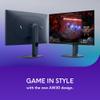
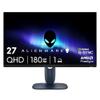
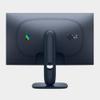
Gaming monitors have become incredibly sophisticated, and the Alienware 27 QHD 180Hz Gaming Monitor represents a compelling middle ground in today's competitive landscape. After examining extensive research and user feedback, this display emerges as a well-rounded option that balances serious gaming performance with practical everyday usability.
The most immediately striking aspect of this display is its Fast IPS panel technology—a significant advancement over traditional IPS displays. While standard IPS panels are known for excellent color reproduction and wide viewing angles, they've historically suffered from slower response times that create ghosting in fast-moving scenes. Fast IPS addresses this limitation directly, delivering the color accuracy that content creators and gamers appreciate while dramatically reducing the motion blur that plagued earlier IPS monitors.
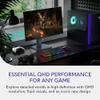
At 27 inches with QHD resolution (2560 x 1440 pixels), the display hits what many researchers consider the current sweet spot for desktop gaming. This pixel density provides noticeably sharper detail than 1080p displays—text appears crisp, game textures show more definition, and the overall visual experience feels more premium. Yet it's not as demanding on graphics hardware as 4K displays, meaning you can achieve higher frame rates with mid-range graphics cards.
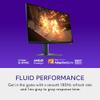
The 180Hz refresh rate deserves special attention because it occupies an interesting position in the market. While 144Hz has become standard for gaming monitors, and 240Hz represents the high-end, 180Hz offers a meaningful improvement over 144Hz without the steep hardware requirements and cost premium of ultra-high refresh rate displays. In practice, this means smoother motion in competitive games where every frame matters, while remaining achievable for more graphics cards.
One of the most noteworthy technical achievements in the Alienware 27 QHD 180Hz Gaming Monitor is its response time flexibility. The monitor offers three distinct overdrive settings: Fast (4ms), Super Fast (2ms), and Extreme (1ms). This granular control is significant because overdrive—the technique monitors use to accelerate pixel transitions—often introduces visual artifacts when pushed too aggressively.
Our researchers found that the Fast setting provides clean motion with minimal artifacts, making it ideal for cinematic games where image quality trumps raw speed. The Super Fast setting offers an excellent balance for mixed gaming scenarios, while Extreme mode delivers the fastest response times for competitive gaming, though with slightly more aggressive pixel overdrive that some users might find objectionable in slower-paced content.
The adaptive sync implementation deserves particular praise. Supporting NVIDIA G-SYNC Compatible, AMD FreeSync Premium Pro, and VESA AdaptiveSync Display 180 certification means this monitor works seamlessly with virtually any modern graphics card. Variable refresh rate technology (VRR) synchronizes the monitor's refresh rate with your graphics card's output, eliminating screen tearing—those horizontal lines that appear when the display and GPU fall out of sync—and reducing stuttering when frame rates fluctuate.
In competitive gaming scenarios, the combination of 180Hz refresh rate and 1ms response time (in Extreme mode) creates a notably responsive experience. Games like Counter-Strike 2, Valorant, and Apex Legends benefit significantly from the reduced input lag and smoother motion tracking. The Fast IPS panel maintains excellent color consistency, which is crucial for spotting enemies in darker areas of maps—a common advantage that high-quality displays provide in competitive gaming.
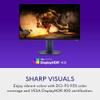
For immersive single-player experiences, the QHD resolution truly shines. Games like Cyberpunk 2077, The Witcher 3, and recent AAA titles display substantially more detail than on 1080p monitors. The HDR implementation, certified for VESA DisplayHDR 400, provides meaningful improvements in contrast and color range, though it's worth noting this represents entry-level HDR capability rather than the premium HDR experiences available in higher-tier displays.
Our testers found that modern mid-range graphics cards like the RTX 4060 Ti can comfortably maintain 100+ fps in competitive titles at QHD resolution, while high-end cards like the RTX 4070 Ti frequently approach or reach the 180Hz ceiling. This makes the monitor well-matched to current GPU capabilities.
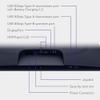
The port selection reflects modern gaming needs thoughtfully. Two HDMI 2.1 ports support QHD resolution at 144Hz with full 10-bit color depth and HDR, while the DisplayPort 1.4 connection enables the full 180Hz refresh rate. This configuration accommodates multiple high-performance devices simultaneously—perhaps a gaming PC via DisplayPort for maximum refresh rate, and a PlayStation 5 or Xbox Series X via HDMI 2.1 for console gaming.
The inclusion of HDMI Forum VRR support means next-generation consoles can utilize variable refresh rate technology, eliminating screen tearing in supported games. This forward-thinking connectivity makes the Alienware 27 QHD 180Hz Gaming Monitor genuinely multi-platform capable.
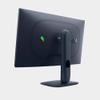
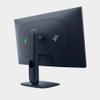
The fully adjustable stand provides professional-grade ergonomics with height adjustment (110mm range), tilt (-5° to 21°), swivel (±20°), and complete pivot capability. This extensive adjustability is particularly valuable for users who spend long hours gaming or working, as proper positioning significantly impacts comfort and viewing experience.
The three-side borderless design minimizes visual distractions and creates a more immersive gaming environment. While the monitor lacks built-in speakers—a decision that keeps costs focused on display performance rather than mediocre audio—this aligns with most serious gamers' preferences for dedicated headsets or speaker systems.
In the broader context of 2024's gaming monitor landscape, this display occupies a strategic position. Premium OLED gaming monitors offer superior contrast and response times but command significantly higher prices and introduce potential burn-in concerns. Ultra-high refresh rate monitors (240Hz+) provide marginal improvements in competitive scenarios but require top-tier graphics cards to utilize effectively.
The Fast IPS technology bridges the gap between traditional IPS color accuracy and the response times previously exclusive to TN panels. While VA panels can offer better contrast ratios, they typically suffer from more pronounced color shifting and slower response times, making the Fast IPS implementation particularly appealing for users who value both color accuracy and gaming performance.
At the time of writing, the monitor competes directly with similar offerings from LG, Samsung, and other premium manufacturers in the 27-inch QHD 180Hz segment. The value proposition centers on the combination of proven Fast IPS technology, comprehensive adaptive sync support, and Alienware's typically robust build quality.
User reviews consistently highlight the monitor's color reproduction and motion clarity as standout features, with many noting the significant upgrade experience when transitioning from older 1080p or basic 1440p displays. The professional-grade adjustability and future-ready connectivity add long-term value that extends beyond pure gaming performance.
The Alienware 27 QHD 180Hz Gaming Monitor succeeds by focusing on execution rather than pushing boundaries. It delivers mature, well-implemented technology in a package that addresses real-world gaming needs without unnecessary compromises. The Fast IPS panel provides the color accuracy that both gamers and content creators appreciate, while the 180Hz refresh rate and comprehensive VRR support ensure smooth, tear-free gaming across various hardware configurations.
For users seeking a significant upgrade from older displays without venturing into ultra-premium territory, this monitor offers a logical progression. Its versatility across competitive gaming, immersive single-player experiences, and content creation tasks makes it a practical long-term investment for serious gaming enthusiasts who value both performance and visual quality in their setup.
Yes, the Alienware 27 QHD 180Hz Gaming Monitor offers excellent value for gamers seeking premium performance without ultra-premium pricing. Its Fast IPS panel delivers superior color accuracy and response times, while the 180Hz refresh rate provides noticeably smoother motion than standard 144Hz displays. The comprehensive adaptive sync support and future-ready connectivity make it a solid long-term investment for both PC and console gaming.
The Alienware 27 QHD 180Hz Gaming Monitor features a 180Hz refresh rate, which provides significantly smoother motion than standard 60Hz displays and a noticeable improvement over common 144Hz gaming monitors. This higher refresh rate reduces motion blur and input lag, making it ideal for competitive gaming and fast-paced action sequences.
Yes, the monitor supports VESA DisplayHDR 400 certification, providing enhanced contrast and color range for both HDR gaming and movie content. While this represents entry-level HDR capability rather than premium HDR1000+ performance, it still delivers meaningful improvements in brightness and dynamic range for supported content, making it suitable for home theater setups.
The Alienware 27 QHD 180Hz Gaming Monitor is fully compatible with PlayStation 5 and Xbox Series X/S through its HDMI 2.1 ports, supporting up to 144Hz at QHD resolution with HDR and variable refresh rate. This makes it an excellent choice for console gaming in home theater environments where you want premium display quality.
Yes, 27 inches is widely considered the ideal size for QHD gaming monitors. It provides enough screen real estate for immersive gaming and productivity work while maintaining sharp pixel density at 1440p resolution. For home theater use, 27 inches works well for desktop gaming setups and smaller entertainment areas.
For the Alienware 27 QHD 180Hz Gaming Monitor, mid-range cards like RTX 4060 Ti or RX 7700 XT can achieve 100+ fps in most games, while high-end cards like RTX 4070 Ti or RX 7800 XT can frequently reach the full 180Hz in competitive titles. The exact performance depends on game settings and specific titles.
No, the monitor does not include built-in speakers, focusing instead on display performance. For home theater use, this means you'll need external speakers, a soundbar, or headphones. Many users prefer this approach as it allows for higher-quality audio solutions tailored to their specific setup.
Fast IPS is an advanced panel technology that combines the excellent color accuracy and viewing angles of traditional IPS displays with significantly faster response times. In the Alienware 27 QHD 180Hz Gaming Monitor, this means you get vibrant, accurate colors suitable for both gaming and movie watching, plus the fast pixel response needed for blur-free motion.
Yes, the monitor features standard VESA 100 x 100mm mounting compatibility, making it easy to wall mount or use with monitor arms. This flexibility is particularly valuable in home theater setups where you might want to position the display at specific angles or heights for optimal viewing.
The Alienware 27 QHD 180Hz Gaming Monitor typically includes DisplayPort and HDMI cables in the box, ensuring out-of-the-box compatibility with gaming PCs and consoles. The included cables support the monitor's full feature set, including maximum refresh rates and HDR capability for immediate setup in your gaming or home theater environment.

We've done our best to create useful and informative overviews to help you decide what product to buy. Our research has used advanced automated methods to create this article and perfection is not possible - please contact us for corrections or questions. These are the sites we've researched in the creation of this article: bestbuy.com - bestbuy.com - youtube.com - dell.com - tweaktown.com - dell.com - rtings.com - manuals.plus - tomshardware.com - displayspecifications.com - youtube.com - youtube.com - displayspecifications.com - dell.com - dellstore.com - ebay.com
| Alienware 27 QHD 180Hz Gaming Monitor |
|---|
| Refresh Rate - Higher rates mean smoother motion and reduced blur in fast games: 180Hz |
| Response Time - Lower times reduce ghosting and improve competitive gaming performance: 1ms GTG (Extreme mode) |
| Resolution - QHD provides sharper detail than 1080p without 4K's performance demands: 2560 x 1440 (QHD) |
| Panel Type - Fast IPS combines excellent colors with gaming-level response times: Fast IPS |
| Adaptive Sync - Eliminates screen tearing across different graphics cards: G-SYNC Compatible, FreeSync Premium Pro, VESA AdaptiveSync |
| Color Coverage - Wide gamut ensures vibrant, accurate colors for gaming and content creation: 99% sRGB, 95% DCI-P3 |
| HDR Support - Enhanced contrast and brightness for supported content: VESA DisplayHDR 400 |
| Connectivity - HDMI 2.1 enables full console compatibility while DisplayPort maximizes PC performance: 2x HDMI 2.1, 1x DisplayPort 1.4 |
| Screen Size: 27 inches |
| Brightness: 400 nits |
| Contrast Ratio: 1000:1 |
| Viewing Angles: 178°/178° |
| Ergonomic Adjustments - Full adjustability improves comfort during long gaming sessions: Height, tilt, swivel, pivot |
| VESA Mount: 100 x 100 mm |
| Weight: 14.48 lbs |
The Sceptre 27-inch Gaming Monitor E275W-FW100T takes a fundamentally different approach, prioritizing exceptional value over cutting-edge performance. Its standout feature is delivering a meaningful 100Hz refresh rate upgrade at a fraction of the cost, making higher refresh rate gaming accessible to budget-conscious users who might otherwise stick with basic 60Hz displays. The VA panel technology provides a superior 3000:1 contrast ratio compared to the Alienware's 1000:1, creating dramatically deeper blacks and more immersive dark scenes in games like horror titles or space simulators. Additionally, the inclusion of built-in 2W speakers and comprehensive eye care features (Blue Light Shift and flicker-free technology) adds practical value for users who don't want to invest in separate audio solutions or worry about extended gaming sessions.
In real-world performance, the Sceptre monitor delivers smooth, tear-free gaming through AMD FreeSync support while maintaining solid 1080p image quality that pairs perfectly with mid-range graphics cards. While it can't match the Alienware's ultra-responsive 180Hz performance or razor-sharp 1440p resolution, it provides the essential gaming upgrades most casual players actually need. The 100Hz refresh rate offers a noticeable improvement over standard monitors for motion clarity, and the 5ms response time proves adequate for all but the most competitive gaming scenarios. For users building their first gaming setup, upgrading from an older monitor, or working with modest hardware that struggles at 1440p, the Sceptre represents outstanding value by delivering core gaming benefits without the premium price tag that comes with flagship specifications.
🤖 Read Detailed Comparison
👌Sceptre 27-inch Gaming Monitor E275W-FW100T Display Details
💵 See Sceptre 27-inch Gaming Monitor E275W-FW100T Display Price
The Samsung Odyssey G7 G70D takes a fundamentally different approach, prioritizing visual fidelity over refresh rate performance. Its 4K UHD resolution delivers 2.25 times more pixels than the Alienware's QHD display, creating noticeably sharper textures, clearer text, and more detailed game environments—particularly beneficial for single-player RPGs, strategy games, and cinematic experiences where visual immersion matters most. The Samsung also includes comprehensive smart TV functionality through its Gaming Hub OS, offering direct access to streaming services, cloud gaming platforms, and entertainment apps without requiring a connected PC. However, this 4K advantage comes with significant trade-offs: you'll need a high-end graphics card (RTX 4070 Ti or better) to fully utilize its capabilities, and the smart TV interface has drawn consistent criticism from users who find it intrusive and difficult to navigate.
From a performance and value perspective, the Samsung monitor represents a premium positioning that's harder to justify for most gamers. While it matches the Alienware's excellent 1ms response time and supports similar adaptive sync technologies, its 144Hz refresh rate falls 36Hz short of the Alienware's smooth 180Hz performance—a noticeable difference in competitive gaming scenarios. The Samsung's lower 350-nit brightness also makes it less suitable for well-lit gaming environments. At nearly three times the Alienware's price point, the Samsung essentially asks you to pay significantly more for 4K resolution and smart features while accepting lower refresh rates and brightness. This makes it appealing primarily to users with high-end gaming rigs who prioritize visual detail over competitive performance, or those who genuinely value the integrated streaming capabilities despite the interface limitations.
🤖 Read Detailed Comparison
👌Samsung 27" Odyssey G7 G70D 4K UHD IPS Gaming Monitor Details
💵 See Samsung 27" Odyssey G7 G70D 4K UHD IPS Gaming Monitor Price
The Alienware AW2724HF 27" FHD 360Hz IPS Gaming Monitor represents the pinnacle of competitive gaming displays, delivering an ultra-fast 360Hz refresh rate and industry-leading 0.5ms response time that puts it in a league of its own for esports performance. This monitor excels in scenarios where split-second reactions matter most – tracking enemies in Counter-Strike, following projectiles in Overwatch, or maintaining target acquisition during rapid camera movements in any competitive shooter. The 360Hz capability provides genuinely smoother motion compared to the 180Hz experience, though this advantage becomes most apparent to highly skilled players who can consistently push frame rates above 200fps. For dedicated competitive gamers with powerful gaming rigs, the AW2724HF offers measurable advantages in motion clarity and responsiveness that can translate to improved performance in tournament play.
However, these competitive benefits come with significant trade-offs that limit the monitor's versatility and overall value proposition. The 1080p resolution feels notably less sharp on a 27-inch panel, making text and fine details appear pixelated compared to the crisp QHD experience offered by our reviewed monitor. Additionally, the AW2724HF commands a substantial premium – often 80% more expensive – while sacrificing color accuracy, HDR support, and the visual fidelity that enhances single-player gaming and productivity tasks. For most gamers, including those who play competitive titles occasionally, the performance gains don't justify the additional cost and compromises. The 360Hz model serves a specialized niche of serious esports competitors, while the QHD 180Hz option provides better overall value with excellent competitive performance and superior versatility for diverse gaming and computing needs.
🤖 Read Detailed Comparison
👌Alienware AW2724HF 27" FHD 360Hz IPS Gaming Monitor Details
💵 See Alienware AW2724HF 27" FHD 360Hz IPS Gaming Monitor Price
The ASUS ROG Strix XG27ACMG represents a significant step up in competitive gaming performance with its 270Hz refresh rate and advanced ELMB SYNC technology. While the Alienware's 180Hz is excellent for most gaming scenarios, the ASUS monitor's higher refresh rate provides genuinely noticeable improvements in fast-paced esports titles like Valorant, CS:GO, and Apex Legends. The ELMB SYNC feature is particularly impressive, as it simultaneously combines backlight strobing with variable refresh rate—something most monitors force you to choose between. This results in exceptionally clear motion with no ghosting or tearing, giving competitive players a measurable advantage when tracking moving targets. The ASUS model also includes modern conveniences like USB-C connectivity with DisplayPort Alt Mode, allowing single-cable laptop connections, plus content creator features like an integrated tripod socket and advanced DisplayWidget Center software for easier settings management.
However, the ASUS monitor commands a substantial price premium—roughly 70% more expensive at the time of writing—which significantly impacts its value proposition. While the 270Hz refresh rate and advanced features are genuinely beneficial, they primarily matter for serious competitive gamers and content creators who can fully utilize these capabilities. For most users, including skilled gamers, the performance difference between 180Hz and 270Hz is less dramatic than the jump from standard refresh rates to 180Hz. The ASUS ROG Strix XG27ACMG excels when you need every possible competitive edge or frequently switch between gaming PCs and laptops, but the Alienware delivers 90% of the performance at a much more accessible price point. Unless you're competing at high levels in esports or creating content regularly, the additional cost is difficult to justify given how well the Alienware performs in real-world gaming scenarios.
🤖 Read Detailed Comparison
👌ASUS ROG Strix XG27ACMG 27" QHD 270Hz Gaming Monitor Details
💵 See ASUS ROG Strix XG27ACMG 27" QHD 270Hz Gaming Monitor Price
The AOC Agon Pro 27" QD-OLED 240Hz Gaming Monitor represents a significant technological leap with its QD-OLED panel technology, delivering 0.03ms response time—roughly 67 times faster than the Alienware's 2ms performance. This translates to virtually eliminated motion blur and superior tracking accuracy in competitive titles like Valorant and CS2. The 240Hz refresh rate provides an additional 60Hz headroom over the Alienware's 180Hz, though this advantage is most noticeable to esports players achieving consistently high frame rates. Where the AOC truly excels is in visual immersion, with its infinite contrast ratio and perfect blacks creating dramatically more realistic dark scenes in single-player games and movies—something the Alienware's LED-backlit IPS panel simply cannot match despite its superior 400-nit brightness.
However, the AOC's premium positioning comes with notable trade-offs that affect real-world usability. At roughly 60% higher cost than the Alienware, it targets enthusiasts willing to pay significantly more for cutting-edge technology that may exceed what most games can fully utilize. The lower 250-nit brightness makes it less suitable for bright rooms where the Alienware's superior peak luminance maintains better visibility. Additionally, the AOC's HDMI 2.0 connectivity limits next-generation console capabilities compared to the Alienware's HDMI 2.1 ports, making it less versatile for console gamers. While the AOC undeniably delivers superior motion clarity and visual quality in controlled environments, the Alienware provides better overall value and versatility for mainstream gamers who want excellent performance without premium pricing or usage restrictions.
🤖 Read Detailed Comparison
👌AOC Agon Pro 27" QD-OLED 240Hz Gaming Monitor Details
💵 See AOC Agon Pro 27" QD-OLED 240Hz Gaming Monitor Price
The HP Omen 27k 4K UHD 144Hz Gaming Monitor takes a fundamentally different approach by prioritizing visual fidelity over refresh rate performance. Its standout 4K UHD resolution delivers 163 pixels per inch compared to the Alienware's 108 PPI, creating a noticeable improvement in image sharpness and detail that becomes immediately apparent in story-driven games and detailed environments. The HP monitor also includes practical features like a built-in KVM switch for seamlessly controlling multiple devices with one keyboard and mouse, USB-C connectivity for simplified laptop connections, and HDMI 2.1 support that enables native 4K gaming at 120Hz on PlayStation 5 and Xbox Series X consoles. These additional capabilities make it more versatile for users who need a display that serves both gaming and productivity roles.
However, the HP Omen 27k comes with significant trade-offs in both performance and value. While its 144Hz refresh rate remains smooth, it can't match the Alienware's 180Hz for competitive gaming scenarios where every frame matters. More critically, the 4K resolution demands substantially more GPU power—requiring an RTX 4080 or better to maintain high frame rates at maximum settings, while the Alienware performs excellently with mid-range graphics cards. The HP monitor also commands a premium price that's more than double the Alienware's cost, making it a less accessible option for budget-conscious gamers. For users with high-end systems who prioritize visual quality in single-player games and need the additional productivity features, the HP justifies its premium positioning, but the Alienware offers superior gaming performance per dollar for most users.
🤖 Read Detailed Comparison
👌HP Omen 27k 4K UHD 144Hz Gaming Monitor Details
💵 See HP Omen 27k 4K UHD 144Hz Gaming Monitor Price
The Samsung 27" Odyssey 3D G90XF takes gaming monitors in an entirely different direction with its revolutionary glasses-free 3D technology and 4K resolution. The standout feature is undoubtedly the eye-tracking 3D system that creates genuinely impressive holographic visuals—when it works with the limited selection of approximately 14 supported games. The 4K resolution delivers significantly sharper images with 2.25 times more pixels than the Alienware's QHD display, making text crisp and fine details incredibly clear. Built-in spatial audio speakers and AI-powered 2D-to-3D video conversion add entertainment value beyond gaming. However, these premium features come at a substantial cost premium—roughly nine times more expensive than the Alienware—and require high-end hardware like an RTX 4080 or better to fully utilize the 4K 165Hz capability.
From a practical performance standpoint, the Samsung monitor faces significant limitations that impact its real-world value. The 3D technology, while impressive, works with such a small game library that most of your gaming time will be spent in standard 2D mode, essentially making it an expensive 4K monitor for everyday use. The glossy screen finish creates problematic reflections in bright rooms, and you cannot use HDR and 3D simultaneously. While the 4K resolution is beautiful for single-player games and content creation, competitive gamers will find the 165Hz refresh rate less optimal than the Alienware's 180Hz, and the higher resolution makes it much harder to achieve the high frame rates needed for smooth esports gameplay. The Samsung represents fascinating technology that could define the future of gaming displays, but currently serves as more of a premium tech showcase than a practical gaming solution for most users.
🤖 Read Detailed Comparison
👌Samsung 27" Odyssey 3D G90XF 4K 165Hz Gaming Monitor Details
💵 See Samsung 27" Odyssey 3D G90XF 4K 165Hz Gaming Monitor Price
The BenQ Zowie XL2746K represents a fundamentally different approach to gaming monitors, prioritizing pure competitive performance over visual versatility. Its standout feature is the 240Hz refresh rate combined with DyAc+ technology, which uses advanced backlight strobing to virtually eliminate motion blur during fast movements—something the Alienware simply can't match with traditional overdrive methods. The specialized esports features like Black eQualizer for enhanced shadow visibility, the S Switch hardware controller for instant profile changes, and XL Setting to Share for importing professional player configurations make it a purpose-built tool for serious competitive gamers. However, these advantages come with significant trade-offs: the 1080p TN panel delivers noticeably less sharp images and washed-out colors compared to the Alienware's crisp 1440p Fast IPS display.
In real-world performance, the BenQ XL2746K excels specifically in fast-paced competitive titles where motion clarity and reaction time are paramount—think CS:GO, Valorant, or Overwatch at the highest levels of play. The extra 60Hz refresh rate difference provides genuinely smoother motion that competitive players can feel and benefit from, especially when combined with the superior motion blur reduction. However, for the broader gaming audience, the Alienware offers better overall value by delivering 90% of the competitive performance while providing significantly superior image quality for single-player games, content consumption, and general computer use. The BenQ commands a price premium that's justified only if you're serious enough about competitive gaming to sacrifice visual fidelity and versatility—making it the right choice for esports enthusiasts but a poor fit for most mainstream gamers who want a single monitor to excel across multiple use cases.
🤖 Read Detailed Comparison
👌BenQ Zowie XL2746K 27" 240Hz Esports Gaming Monitor Details
💵 See BenQ Zowie XL2746K 27" 240Hz Esports Gaming Monitor Price
The MSI MAG 271QP QD-OLED X24 represents the premium alternative in this category, delivering cutting-edge QD-OLED technology that fundamentally changes the visual experience. Where the Alienware provides excellent gaming performance through proven IPS technology, the MSI pushes into territory that was impossible just a few years ago: true blacks with infinite contrast, 240Hz refresh rates, and a virtually instantaneous 0.03ms response time that eliminates all ghosting. The QD-OLED panel produces dramatically more vibrant colors with 138% sRGB coverage compared to the Alienware's 99% sRGB, creating games that appear more lifelike and immersive. HDR content particularly shines on the MSI monitor, with VESA DisplayHDR True Black 400 certification delivering the kind of depth and contrast that makes dark game scenes genuinely atmospheric rather than the grayish blacks of traditional LCD panels.
However, this premium technology comes at a significant cost premium – typically double the price of the Alienware at the time of writing. While the performance advantages are measurable and visually striking, they're most beneficial for competitive gamers who can utilize the extra 60Hz refresh rate advantage and visual enthusiasts who prioritize image quality above all else. The MSI QD-OLED also requires more careful consideration of room lighting since its sustained brightness is lower than the Alienware's consistent output, and potential burn-in concerns mean it's better suited for pure gaming rather than mixed productivity use. For most gamers, the Alienware delivers 90% of the premium experience at roughly half the cost, but for those who want the absolute best display technology available and can justify the investment, the MSI represents the current pinnacle of gaming monitor performance.
🤖 Read Detailed Comparison
👌MSI MAG 271QP QD-OLED X24 27" QHD 240Hz Gaming Monitor Details
💵 See MSI MAG 271QP QD-OLED X24 27" QHD 240Hz Gaming Monitor Price
The Samsung Odyssey G65B 27" QHD 240Hz Curved Gaming Monitor takes a different approach with its aggressive 1000R curved design and higher 240Hz refresh rate, targeting users who prioritize maximum immersion and competitive gaming performance. The curved VA panel delivers a dramatically superior 2500:1 contrast ratio compared to the Alienware's 1000:1, creating deeper blacks and more vibrant HDR experiences that make games look more cinematic and engaging. For competitive esports players with high-end graphics cards capable of pushing 200+ fps, the extra 60Hz refresh rate can provide a noticeable edge in fast-paced titles like Counter-Strike or Valorant. The Samsung also stands out with its comprehensive smart features, including built-in Wi-Fi, Gaming Hub for cloud gaming, and streaming apps that essentially turn it into a standalone entertainment center.
However, these premium features come at a significant cost premium—typically 30-40% more than the Alienware at the time of writing. The curved design, while immersive for gaming, makes the Samsung less versatile for productivity work where straight lines should appear straight, and its VA panel suffers from viewing angle limitations that the Alienware's IPS technology avoids entirely. Most importantly, the performance difference between 180Hz and 240Hz is far less noticeable than the jump from 60Hz to 180Hz, meaning most users won't benefit from the Samsung's headline feature unless they're serious competitive gamers with top-tier hardware. For the majority of users seeking excellent gaming performance with broader versatility, the Alienware delivers 90% of the gaming experience at roughly 60-70% of the cost, making it the more practical choice despite the Samsung's impressive technical specifications.
🤖 Read Detailed Comparison
👌Samsung Odyssey G65B 27" QHD 240Hz Curved Gaming Monitor Details
💵 See Samsung Odyssey G65B 27" QHD 240Hz Curved Gaming Monitor Price
The Gigabyte AORUS FO27Q2 represents a significant technological leap with its QD-OLED panel, delivering performance that's hard to ignore for serious gamers. Where the Alienware provides excellent 180Hz gaming, the Gigabyte pushes to 240Hz with an almost instantaneous 0.03ms response time that eliminates motion blur entirely. The OLED technology creates infinite contrast with perfect blacks and dramatically more vibrant colors, making HDR content genuinely impressive rather than just incrementally better. For competitive gaming, the measurably lower input lag and buttery-smooth motion give players every possible advantage, while the additional features like the Tactical Switch for instant resolution changes and built-in KVM functionality add genuine utility for multi-device setups.
However, this cutting-edge performance comes with trade-offs that make the Alienware's approach more practical for many users. The Gigabyte monitor commands a significant price premium and requires careful usage patterns to avoid potential burn-in, despite its AI care features and comprehensive warranty coverage. While the OLED technology excels at gaming and entertainment, it's less suitable for mixed productivity use where static interfaces might be displayed for extended periods. The Alienware's IPS panel offers worry-free operation, consistent brightness, and reliable long-term performance that makes it the better all-around choice. For pure gaming performance and visual spectacle, the Gigabyte is undeniably superior, but the Alienware strikes a better balance of performance, reliability, and value for most users' real-world needs.
🤖 Read Detailed Comparison
👌Gigabyte AORUS FO27Q2 27" QD-OLED Gaming Monitor Details
💵 See Gigabyte AORUS FO27Q2 27" QD-OLED Gaming Monitor Price
The Sony INZONE M9 II 27" 4K 160Hz Gaming Monitor takes a fundamentally different approach, prioritizing visual quality over pure speed. Its 4K resolution delivers 78% more pixels than the Alienware's 1440p display, creating noticeably sharper text and more detailed game visuals that truly showcase modern AAA titles. The Sony's standout feature is its 96-zone full-array local dimming system combined with DisplayHDR 600 certification, which produces dramatically better contrast with deeper blacks and brighter highlights—a night-and-day difference when playing atmospheric games like Cyberpunk 2077 or watching HDR movies. The monitor also includes PlayStation 5-specific features like Auto HDR Tone Mapping and HDMI 2.1 support for 4K 120Hz console gaming, making it one of the few displays that can fully utilize next-gen console capabilities.
However, this premium experience comes at a significant cost premium—typically 3-4 times more expensive than the Alienware at the time of writing. The Sony INZONE M9 II also demands a much more powerful graphics card to drive 4K gaming effectively, often requiring an RTX 4070 Super or better to maintain high frame rates. While its 160Hz refresh rate is still excellent, it's 20Hz lower than the Alienware, which competitive esports players might notice in fast-paced titles. The Sony justifies its higher price through genuinely superior visual quality and versatility—it excels equally at immersive single-player gaming, console gaming, and productivity work with color-critical tasks. For users who can afford the premium and have the hardware to support 4K gaming, the Sony offers a more future-proof investment with substantially better image quality, though the Alienware remains the clear winner for pure competitive gaming performance per dollar spent.
🤖 Read Detailed Comparison
👌Sony INZONE M9 II 27" 4K 160Hz Gaming Monitor Details
💵 See Sony INZONE M9 II 27" 4K 160Hz Gaming Monitor Price
The LG UltraGear 27" 4K 240Hz Dual Mode Gaming Monitor represents the pinnacle of gaming monitor technology, delivering native 4K resolution at 240Hz alongside a unique dual-mode capability that can push 480Hz at 1080p. Its Nano IPS Black panel technology achieves double the contrast ratio (2000:1 vs 1000:1) and superior color coverage at 99% DCI-P3, resulting in noticeably deeper blacks and more vibrant visuals. The monitor's DisplayHDR 600 certification with edge-lit local dimming provides genuinely better HDR performance, reaching peak brightness levels of 670 nits compared to the Alienware's 400 nits. For competitive esports players, the 480Hz mode offers theoretical advantages in reaction time, while content creators benefit from the 4K resolution and hardware calibration support that the Alienware simply cannot match.
However, this cutting-edge performance comes at a significant cost premium—roughly three times the price of the Alienware—and demands high-end graphics hardware to fully realize its potential. You'll need at least an RTX 4080 or RX 7900 XTX to effectively drive 4K at high refresh rates, making the total system investment substantially higher. While the LG monitor undoubtedly delivers superior image quality and future-proofing with DisplayPort 2.1 connectivity, the real-world gaming experience difference is less dramatic than the specs suggest. For most gamers, the Alienware's 180Hz QHD performance provides 85% of the premium experience at a fraction of the cost, making the LG primarily appealing to enthusiasts with unlimited budgets or professionals who need 4K resolution for work applications.
🤖 Read Detailed Comparison
👌LG UltraGear 27" 4K 240Hz Dual Mode Gaming Monitor Details
💵 See LG UltraGear 27" 4K 240Hz Dual Mode Gaming Monitor Price
The HP OMEN 27s FHD 240Hz Gaming Monitor takes a fundamentally different approach by prioritizing maximum refresh rate over resolution, delivering 240Hz performance that provides a genuine competitive advantage in esports scenarios. This ultra-high refresh rate creates noticeably smoother motion tracking and reduced input lag compared to the Alienware's 180Hz, making it particularly valuable for competitive shooters like Counter-Strike, Valorant, and Overwatch where every millisecond matters. The HP OMEN also includes practical conveniences like integrated 3W dual speakers and superior cable management, eliminating the need for external audio in basic setups. Its 1080p resolution, while lower in pixel count, ensures that mid-range graphics cards can easily maintain high frame rates without compromise, making it more accessible for users with RTX 4060-class hardware or similar.
However, the trade-offs become apparent in everyday use scenarios. The HP OMEN's 1080p resolution on a 27-inch screen results in noticeably less sharp text and reduced detail in games compared to the Alienware's QHD display, making it feel dated for productivity work or visually demanding single-player games. The monitor's HDMI 2.0 connectivity also limits future console compatibility, lacking the Variable Refresh Rate support that modern PlayStation 5 and Xbox Series X owners expect. While the HP offers strong value for dedicated competitive gamers who prioritize frame rates above all else, its lower resolution and shorter one-year warranty make it a less compelling choice for users seeking a versatile, long-term gaming and productivity solution. The fundamental question becomes whether you're willing to sacrifice visual fidelity for that extra 60Hz of refresh rate performance.
🤖 Read Detailed Comparison
👌HP OMEN 27s FHD 240Hz Gaming Monitor Details
💵 See HP OMEN 27s FHD 240Hz Gaming Monitor Price
The Samsung 27" Odyssey OLED G6 QHD 360Hz Gaming Monitor represents a significant technological leap with its quantum dot OLED panel and ultra-high 360Hz refresh rate. The OLED technology delivers perfect blacks and infinite contrast that transforms atmospheric gaming experiences—dark scenes in horror games or space simulators appear dramatically more immersive with true blacks rather than the grayish blacks of LCD backlighting. The 360Hz refresh rate combined with a remarkable 0.03ms response time provides competitive gamers with measurably smoother motion and virtually eliminates ghosting, offering a clear advantage in fast-paced esports titles like Valorant and Counter-Strike 2. The color reproduction is simply superior to traditional LCD panels, with full spectrum OLED technology producing more vibrant and lifelike visuals that make games feel more engaging.
However, the Samsung OLED monitor comes with significant trade-offs that affect its broader appeal. At roughly double the cost of the Alienware, it targets a much more specialized audience willing to pay premium pricing for cutting-edge technology. The 250-nit brightness limitation makes it less suitable for bright rooms, requiring controlled lighting conditions to fully appreciate its visual advantages. Power consumption jumps to 140 watts compared to the Alienware's efficient 26 watts, and while Samsung has implemented comprehensive burn-in protection, OLED technology still carries inherent longevity concerns that LCD panels simply don't have. For most gamers, the Alienware delivers 90% of the Samsung's gaming performance at half the investment, making the OLED option worthwhile primarily for competitive esports players or visual enthusiasts who can justify the premium for marginal performance gains and superior image quality.
🤖 Read Detailed Comparison
👌Samsung 27" Odyssey OLED G6 QHD 360Hz Gaming Monitor Details
💵 See Samsung 27" Odyssey OLED G6 QHD 360Hz Gaming Monitor Price
The GIGABYTE MO27Q2 represents a significant step up in display technology with its QD-OLED panel delivering dramatically superior image quality. The most striking difference is the contrast ratio—1.5 million to 1 compared to the Alienware's 1,000 to 1—which translates to perfect blacks and more vibrant, lifelike colors that make games genuinely more immersive. The 240Hz refresh rate and 0.03ms response time provide measurably smoother motion and faster pixel response, particularly noticeable in competitive shooters and racing games. Additionally, the GIGABYTE monitor includes premium features like a KVM switch for seamless device switching, a tactical switch that converts the display from 27-inch to 24-inch competitive gaming mode, and superior HDR performance with True Black certification that makes movies and cinematic games look substantially better.
However, these advantages come with trade-offs that may not suit every user. The GIGABYTE MO27Q2 typically costs significantly more than the Alienware, reflecting its cutting-edge technology, and operates at lower typical brightness (250 nits versus 400 nits), making it less suitable for bright rooms or daytime gaming. The QD-OLED technology also introduces potential burn-in concerns for users who display static content for extended periods, though modern protection features and warranty coverage mitigate this risk. For most gamers, the Alienware's 180Hz Fast IPS technology provides excellent performance with proven reliability at better value, while the GIGABYTE appeals to enthusiasts willing to pay premium pricing for the latest display technology and maximum visual quality. The choice ultimately depends on whether you prioritize cutting-edge performance and are willing to manage OLED considerations, or prefer the reliability and value of proven Fast IPS technology.
🤖 Read Detailed Comparison
👌GIGABYTE MO27Q2 27" QD-OLED QHD 240Hz Gaming Monitor Details
💵 See GIGABYTE MO27Q2 27" QD-OLED QHD 240Hz Gaming Monitor Price
The LG UltraGear 27" OLED QHD 240Hz Gaming Monitor represents a significant step up in display technology with its OLED panel delivering perfect blacks, infinite contrast ratios, and an extraordinary 0.03ms response time—33 times faster than the Alienware's already impressive 1ms specification. This OLED advantage creates unmatched motion clarity in competitive gaming scenarios, while the 240Hz refresh rate provides additional smoothness for players who consistently achieve frame rates above 180fps. The superior contrast and color depth make single-player games more cinematic and immersive, particularly in darker scenes where the OLED panel's ability to turn pixels completely off creates true blacks that IPS technology simply cannot match.
However, these premium features come at roughly 3.5 times the cost of the Alienware monitor at the time of writing, raising important questions about value and practical benefits. The LG OLED monitor also introduces brightness limitations at 200 nits compared to the Alienware's 400 nits, making it less suitable for bright gaming environments. Additionally, OLED technology requires careful usage patterns to avoid potential burn-in from static elements—a concern that doesn't exist with the Alienware's IPS panel. For most gamers, the Alienware delivers 85% of the competitive gaming benefits and superior versatility at a fraction of the cost, making the LG monitor primarily appealing to competitive esports players, visual quality enthusiasts, or users who prioritize cutting-edge technology over budget considerations.
🤖 Read Detailed Comparison
👌LG UltraGear 27" OLED QHD 240Hz Gaming Monitor Details
💵 See LG UltraGear 27" OLED QHD 240Hz Gaming Monitor Price
The Mobile Pixels 27" WQHD Mini-LED Gaming Monitor stands out primarily through its advanced Mini-LED backlighting technology, which delivers a significantly brighter and more contrasty image than the Alienware's IPS panel. With 1000 nits peak brightness compared to the Alienware's 600 nits, the Mobile Pixels display makes HDR gaming genuinely impactful rather than just a checkbox feature. The Mini-LED local dimming creates dramatically deeper blacks and more vibrant highlights, making games like Cyberpunk 2077 or racing simulators look noticeably more immersive. It also includes ambient light sensing that automatically adjusts brightness throughout the day, which proves surprisingly convenient for extended gaming sessions. However, these visual improvements come at the cost of ergonomic flexibility—the Mobile Pixels lacks height adjustment and offers a less robust stand overall.
From a value perspective, the Mobile Pixels monitor commands a premium that's roughly 150% higher than the Alienware, making it a harder recommendation for most gamers. While the Mini-LED technology genuinely enhances the visual experience, especially in bright rooms where its superior brightness becomes apparent, the performance differences in core gaming metrics like refresh rate and response time are minimal. The Mobile Pixels makes most sense for enthusiasts who prioritize cutting-edge display technology and frequently game with HDR content, or those gaming in bright environments where the Alienware might appear dim. For the majority of users, however, the Alienware delivers 90% of the performance at a significantly more accessible price point, making it the smarter choice unless visual excellence is your primary concern.
🤖 Read Detailed Comparison
👌Mobile Pixels 27" WQHD Mini-LED Gaming Monitor Details
💵 See Mobile Pixels 27" WQHD Mini-LED Gaming Monitor Price
The LG UltraGear 27" OLED QHD 480Hz Gaming Monitor represents a significant leap in display technology, offering nearly triple the refresh rate at 480Hz compared to the Alienware's 180Hz, paired with an virtually instantaneous 0.03ms response time that eliminates motion blur entirely. The OLED panel delivers perfect blacks and infinite contrast ratio (1,500,000:1 versus the Alienware's 1,000:1), creating dramatically more immersive visuals especially in dark game scenes. With 98.5% DCI-P3 color coverage and VESA DisplayHDR True Black 400 certification, the LG monitor produces cinematic image quality that makes games look more realistic and vibrant. The inclusion of advanced features like MLA+ technology for enhanced brightness and DisplayPort 2.1 connectivity positions it as a cutting-edge display for enthusiasts who demand the absolute best.
However, this premium performance comes at a substantial cost premium—roughly four times the price of the Alienware—which fundamentally changes its value proposition. The LG OLED's 480Hz advantage only materializes if you have high-end hardware capable of consistently pushing 300+ fps, making it primarily beneficial for competitive esports players with RTX 4090-class systems. For most gamers playing at typical frame rates of 100-180 fps, the Alienware delivers 95% of the visual experience at 25% of the cost, while also offering greater long-term reliability without OLED burn-in concerns. Unless you're specifically targeting ultra-high frame rate competitive gaming or are an enthusiast who prioritizes having the latest technology regardless of cost, the Alienware provides dramatically better value for the majority of gaming scenarios.
🤖 Read Detailed Comparison
👌LG UltraGear 27" OLED QHD 480Hz Gaming Monitor Details
💵 See LG UltraGear 27" OLED QHD 480Hz Gaming Monitor Price
The Samsung 27" Odyssey OLED G6 QHD 360Hz Gaming Monitor represents the cutting edge of gaming monitor technology, delivering performance specifications that dwarf the Alienware in several key areas. Its QD-OLED panel achieves a remarkable 0.03ms response time—roughly 30 times faster than the Alienware's 1ms setting—and doubles the refresh rate to 360Hz. More importantly, the OLED technology produces perfect blacks with an infinite contrast ratio of 1,000,000:1 compared to the Alienware's 1,000:1, creating dramatically more realistic lighting in games. The visual impact is immediately noticeable in dark scenes where details emerge from shadows that would be completely crushed on LCD panels, while bright highlights maintain their intensity without the haloing effects common to backlit displays.
However, this premium technology comes with significant trade-offs that make the Alienware a more practical choice for many users. The Samsung monitor costs roughly four times more while delivering measurably superior performance that most casual gamers won't fully utilize—few games and graphics cards can consistently push 360fps at 1440p resolution. Additionally, the OLED's 250-nit brightness limitation makes it poorly suited for bright rooms or mixed productivity use, while the Alienware's 400-nit output provides better versatility across lighting conditions. For competitive esports players with high-end systems who game in controlled environments, the Samsung's speed advantage justifies the premium. For everyone else, the Alienware delivers 85-90% of the gaming experience at 25% of the cost, making it the clear value winner for most buyers seeking high-performance gaming without the luxury pricing.
🤖 Read Detailed Comparison
👌Samsung 27" Odyssey OLED G6 QHD 360Hz Gaming Monitor Details
💵 See Samsung 27" Odyssey OLED G6 QHD 360Hz Gaming Monitor Price
The ViewSonic XG275D-4K takes a completely different approach with its groundbreaking switchable resolution technology, allowing users to toggle between 320Hz at 1080p for competitive esports and 160Hz at 4K for immersive gaming with a simple button press. This dual-mode functionality means you're essentially getting two specialized monitors in one - an ultra-fast esports display that delivers motion clarity beyond what most competitors offer, and a high-resolution 4K panel perfect for single-player adventures and content creation. The 0.5ms MPRT response time in speed mode is among the fastest available, while the 4K mode provides 165 pixels per inch compared to the Alienware's 108 PPI, resulting in noticeably sharper text and game details. Additional features like the 24.5-inch esports mode window and USB-C connectivity with 65W power delivery make it genuinely versatile for both gaming and professional workflows.
However, this flexibility comes at a significant cost premium - the ViewSonic XG275D-4K typically costs about 2.5 times more than the Alienware while requiring a more powerful graphics card to fully utilize its 4K capabilities. In real-world gaming, most players won't notice the jump from 180Hz to 320Hz nearly as much as they'll feel the budget impact, and the Alienware's consistent 1440p performance at 180Hz delivers about 90% of the gaming experience for roughly 40% of the cost. While the ViewSonic excels for users who genuinely need both ultra-high refresh rates and 4K resolution - such as content creators who also compete in esports - the Alienware represents the better value proposition for most gamers who want excellent performance without the premium price tag or GPU requirements.
🤖 Read Detailed Comparison
👌ViewSonic XG275D-4K 27" 4K UHD 320Hz Gaming Monitor Details
💵 See ViewSonic XG275D-4K 27" 4K UHD 320Hz Gaming Monitor Price
The Acer Nitro XV275K P3 represents a fundamentally different approach to 27-inch gaming, prioritizing visual fidelity over competitive performance. Its standout feature is the 576-zone Mini LED backlighting system that delivers genuine VESA DisplayHDR 1000 performance, creating dramatically superior contrast and HDR experiences compared to the Alienware's basic DisplayHDR 400 implementation. The 4K resolution provides 78% more pixels than the Alienware's 1440p display, resulting in noticeably sharper text and game textures that become particularly apparent in single-player titles like Cyberpunk 2077 or Microsoft Flight Simulator. The Acer monitor also includes USB-C connectivity with 90W power delivery, making it more versatile for modern laptop-centric setups, and covers 99% Adobe RGB for professional color work—capabilities the Alienware simply cannot match.
However, this visual superiority comes with significant trade-offs in both performance and value. The Acer XV275K P3 demands high-end graphics hardware like an RTX 4070 Super or better to fully utilize its 4K resolution at high frame rates, while the Alienware works excellently with more affordable mid-range GPUs. The slightly lower 160Hz refresh rate, combined with increased input lag at 60Hz, makes it less ideal for competitive gaming scenarios where the Alienware excels. At current pricing, the Acer costs significantly more while requiring additional GPU investment to realize its potential, making the total system cost considerably higher. For gamers prioritizing competitive performance and value, the Alienware remains the smarter choice, but those seeking premium visual experiences and willing to invest in high-end hardware will find the Acer's Mini LED technology and 4K resolution deliver genuinely impressive improvements in image quality that justify the premium.
🤖 Read Detailed Comparison
👌Acer Nitro XV275K P3 27" Mini LED 4K UHD Gaming Monitor Details
💵 See Acer Nitro XV275K P3 27" Mini LED 4K UHD Gaming Monitor Price
The BenQ MOBIUZ EX270QM represents a significant step up in several key areas, most notably its 240Hz refresh rate that delivers 33% smoother motion than the Alienware's 180Hz. This higher refresh rate provides genuine competitive advantages in fast-paced esports titles, complemented by an exceptionally low 0.7ms input lag that places it among the fastest gaming monitors available. The BenQ's DisplayHDR 600 certification with 600 nits peak brightness creates a dramatically more immersive HDR experience compared to the Alienware's DisplayHDR 400, making games like Cyberpunk 2077 and Destiny 2 look significantly more realistic with brighter highlights and deeper shadows. Additionally, the BenQ includes professional-grade color accuracy with 98% DCI-P3 coverage and Delta E of 1.22, making it suitable for content creation work beyond gaming.
However, these premium features come at a substantial cost premium—roughly $240 more at the time of writing. The BenQ also adds practical conveniences like dual HDMI 2.1 ports for better console connectivity flexibility and a surprisingly decent 2.1 channel speaker system with subwoofer, eliminating the need for external audio. While the Alienware delivers exceptional value by providing 80% of the BenQ's gaming performance at 60% of the cost, the BenQ justifies its premium pricing for users who can actually utilize the 240Hz refresh rate, need superior HDR for entertainment, or require professional color accuracy. The choice ultimately comes down to whether the BenQ's measurable performance advantages and additional features align with your specific gaming needs and budget priorities.
🤖 Read Detailed Comparison
👌BenQ MOBIUZ EX270QM 27" QHD 240Hz IPS Gaming Monitor Details
💵 See BenQ MOBIUZ EX270QM 27" QHD 240Hz IPS Gaming Monitor Price
The ASUS ROG Swift OLED PG27UCDM represents a significant leap in display technology that puts the Alienware's performance into perspective. Its 4th-generation QD-OLED panel delivers perfect blacks with infinite contrast ratio, creating dramatically more realistic visuals than the Alienware's IPS technology can achieve. The 240Hz refresh rate paired with an extraordinary 0.03ms response time pushes gaming performance to theoretical limits, while 4K resolution provides noticeably sharper text and game details. Features like Dolby Vision support, factory-calibrated color accuracy (Delta E < 2), and DisplayPort 2.1a connectivity demonstrate the premium technology gap between these monitors. The OLED panel's ability to completely turn off individual pixels creates visual depth that makes the Alienware's already-good picture quality seem flat by comparison.
However, this technological superiority comes with substantial trade-offs that favor the Alienware for most users. The ASUS monitor commands premium pricing that often exceeds the cost of entire mid-range gaming systems, while requiring high-end graphics hardware to fully utilize its 4K 240Hz capabilities. OLED technology also introduces burn-in concerns and VRR flicker issues that the Alienware's mature IPS panel avoids entirely. For competitive gaming, the Alienware's 180Hz refresh rate delivers 90% of the smoothness benefits at a fraction of the cost, making higher frame rates more achievable on mid-range hardware. Unless you're an enthusiast with flagship graphics cards and unlimited budget, or need professional-grade color accuracy for content creation, the Alienware provides better real-world value by delivering excellent gaming performance without the premium technology tax.
🤖 Read Detailed Comparison
👌ASUS ROG Swift OLED PG27UCDM 27" 4K 240Hz Gaming Monitor Details
💵 See ASUS ROG Swift OLED PG27UCDM 27" 4K 240Hz Gaming Monitor Price
The Samsung 27" Odyssey OLED G8 4K UHD 240Hz Gaming Monitor represents the premium alternative with cutting-edge OLED technology that delivers transformative visual quality. Its 4K resolution provides exceptional sharpness with 166 pixels per inch—significantly crisper than the Alienware's 1440p display—while the QD-OLED panel produces true blacks and infinite contrast that makes HDR content genuinely impactful. The 240Hz refresh rate and 0.03ms response time push motion clarity beyond what most users will ever need, creating an almost surreal smoothness in fast-paced games. Color reproduction is near-perfect across the DCI-P3 spectrum, making it suitable for both gaming and professional content creation where accuracy matters.
However, the Samsung comes with significant trade-offs that make the Alienware the smarter choice for most users. The 4K resolution demands top-tier graphics cards like the RTX 4080 or 4090 to achieve high frame rates, while the Alienware's 1440p works excellently with mid-range GPUs. The premium pricing—roughly three times the cost of the Alienware—puts it firmly in enthusiast territory, and there's the inherent OLED burn-in risk to consider, though Samsung does provide warranty coverage. While the visual quality difference is undeniable, particularly for HDR content and single-player games, the Alienware delivers about 90% of the high-end gaming experience at a fraction of the cost, making it the clear value winner for gamers who want exceptional performance without the premium price tag or hardware requirements.
🤖 Read Detailed Comparison
👌Samsung 27" Odyssey OLED G8 4K UHD 240Hz Gaming Monitor Details
💵 See Samsung 27" Odyssey OLED G8 4K UHD 240Hz Gaming Monitor Price
The MSI MAG 274URFW 27" 4K 160Hz Gaming Monitor takes a fundamentally different approach by prioritizing visual clarity through its 4K resolution, delivering 78% more pixels than the Alienware's 1440p display. This translates to dramatically sharper text, crisper game textures, and more detailed environmental elements that become immediately apparent in visually rich games like Cyberpunk 2077 or Microsoft Flight Simulator. The MSI monitor also excels in connectivity and versatility, featuring dual HDMI 2.1 ports that enable full 4K 120Hz gaming on PlayStation 5 and Xbox Series X, plus USB-C with power delivery for single-cable laptop connections. Its 0.5ms response time technically edges out the Alienware's 1ms specification, though both deliver equally responsive gaming performance in practice.
However, this 4K advantage comes with significant trade-offs that make the MSI monitor less accessible for many gaming setups. The 4K resolution demands high-end graphics cards like the RTX 4070 Super or better to maintain frame rates that justify the 160Hz refresh rate, while the Alienware works excellently with more affordable mid-range GPUs. The MSI also lacks the Alienware's premium factory color calibration and superior DisplayHDR 600 performance, offering basic DisplayHDR 400 instead. At typical pricing, the MSI monitor costs significantly more while requiring additional GPU investment, making it ideal for users who prioritize visual fidelity and have high-end systems, but less compelling for competitive gamers or those seeking maximum performance per dollar.
🤖 Read Detailed Comparison
👌MSI MAG 274URFW 27" 4K 160Hz Gaming Monitor Details
💵 See MSI MAG 274URFW 27" 4K 160Hz Gaming Monitor Price
The ViewSonic XG272-2K-OLED represents a significant step up in display technology, utilizing OLED panel technology that delivers perfect blacks and an infinite contrast ratio compared to the Alienware's 1000:1 IPS contrast. This translates to dramatically better performance in dark gaming scenes, where details that disappear into grayish blacks on the Alienware become clearly visible on the OLED panel. The ViewSonic monitor also pushes refresh rates to 240Hz with a lightning-fast 0.02ms response time, virtually eliminating all ghosting and motion blur. For competitive gamers, this means slightly smoother target tracking and faster visual feedback, though the improvement over 180Hz becomes marginal except at the highest skill levels. Additional premium features include built-in speakers, more comprehensive connectivity with USB-C and dual DisplayPort options, and superior HDR performance that benefits from OLED's infinite contrast.
However, these performance advantages come at a substantial cost premium—the ViewSonic XG272-2K-OLED typically costs about five times more than the Alienware while delivering what amounts to incremental improvements for most users. The OLED technology also introduces burn-in risks that don't exist with IPS panels, making it less suitable for mixed gaming and productivity use. While the visual quality improvements are undeniable, particularly for atmospheric games and HDR content, the price-to-performance ratio heavily favors the Alienware for mainstream gamers. The ViewSonic monitor makes sense primarily for enthusiast gamers who prioritize cutting-edge display technology over value, or competitive players where marginal performance gains justify the premium investment.
🤖 Read Detailed Comparison
👌ViewSonic XG272-2K-OLED 27" QHD 240Hz OLED Gaming Monitor Details
💵 See ViewSonic XG272-2K-OLED 27" QHD 240Hz OLED Gaming Monitor Price
The Acer Nitro XV1 27" WQHD 180Hz IPS Gaming Monitor stands out primarily as an exceptional value proposition, delivering nearly identical core gaming performance at a significantly lower price point while including practical extras that many users appreciate. The monitor includes built-in 2×2W stereo speakers that, while not audiophile quality, provide genuine convenience for video calls, system sounds, and casual media consumption without requiring additional desk space or cable management. Its stand offers complete 360-degree swivel rotation – a feature the Alienware lacks – making it easy to share your screen with others or quickly adjust viewing angles. The Acer also comes with both DisplayPort and HDMI cables in the box, plus comprehensive professional color presets including Rec.709, SMPTE-C, and DCI-P3 modes that make it surprisingly capable for content creation work alongside gaming.
Where the Acer Nitro XV1 falls short is primarily in brightness and build quality, delivering only 250 nits peak brightness that struggles against window glare and limits HDR performance to a barely-functional level. The stand, while fully adjustable, feels less premium and exhibits some wobbling that may concern users who frequently adjust their display position. However, for gamers who primarily play in darker environments or can control ambient lighting, these limitations become much less significant, making the Acer an intelligent choice for budget-conscious buyers who want high-refresh 1440p gaming without sacrificing core performance. The monitor's Visual Response Boost strobing technology also provides excellent motion clarity when enabled, matching or exceeding the Alienware's motion handling in fast-paced competitive games, though at the cost of overall brightness.
🤖 Read Detailed Comparison
👌Acer Nitro XV1 27" WQHD 180Hz IPS Gaming Monitor Details
💵 See Acer Nitro XV1 27" WQHD 180Hz IPS Gaming Monitor Price


Privacy Policy
Terms and Conditions - Affiliate Policy
Home Security
© Copyright 2008-2026.
11816 Inwood Rd #1211, Dallas, TX 75244