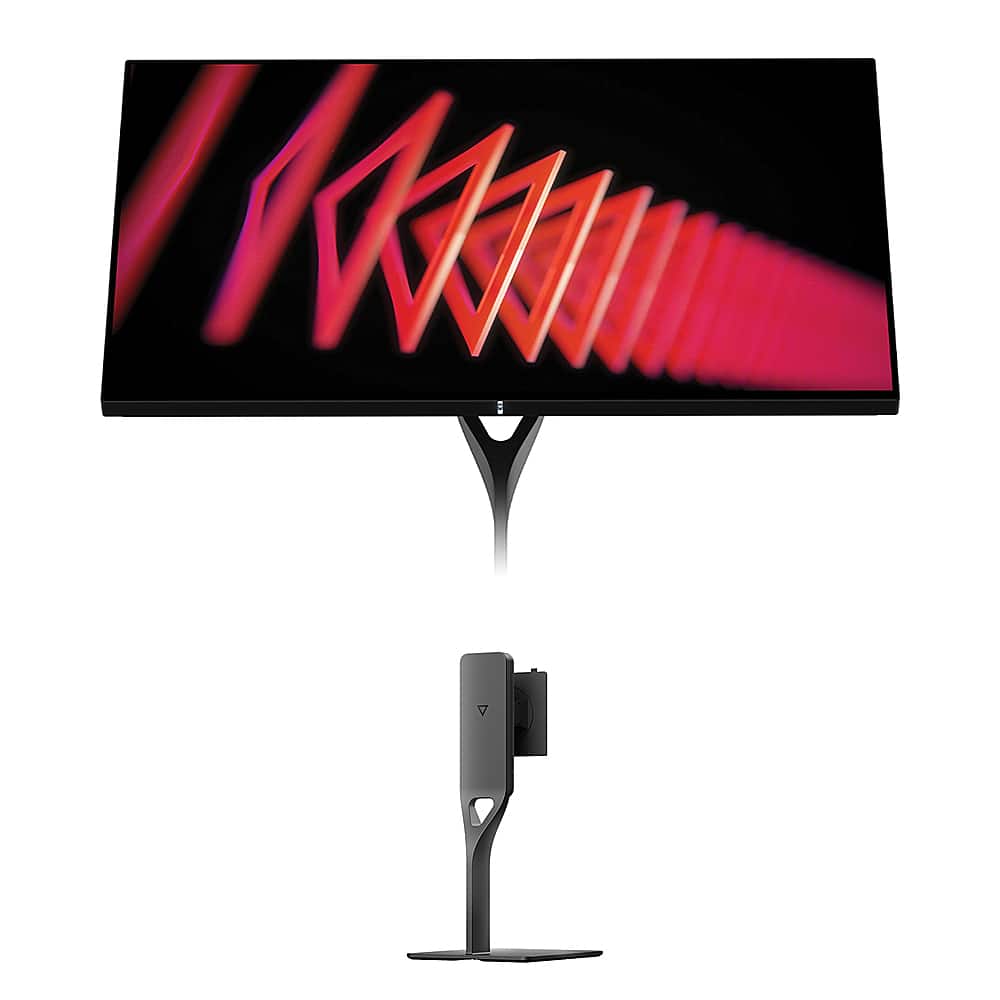
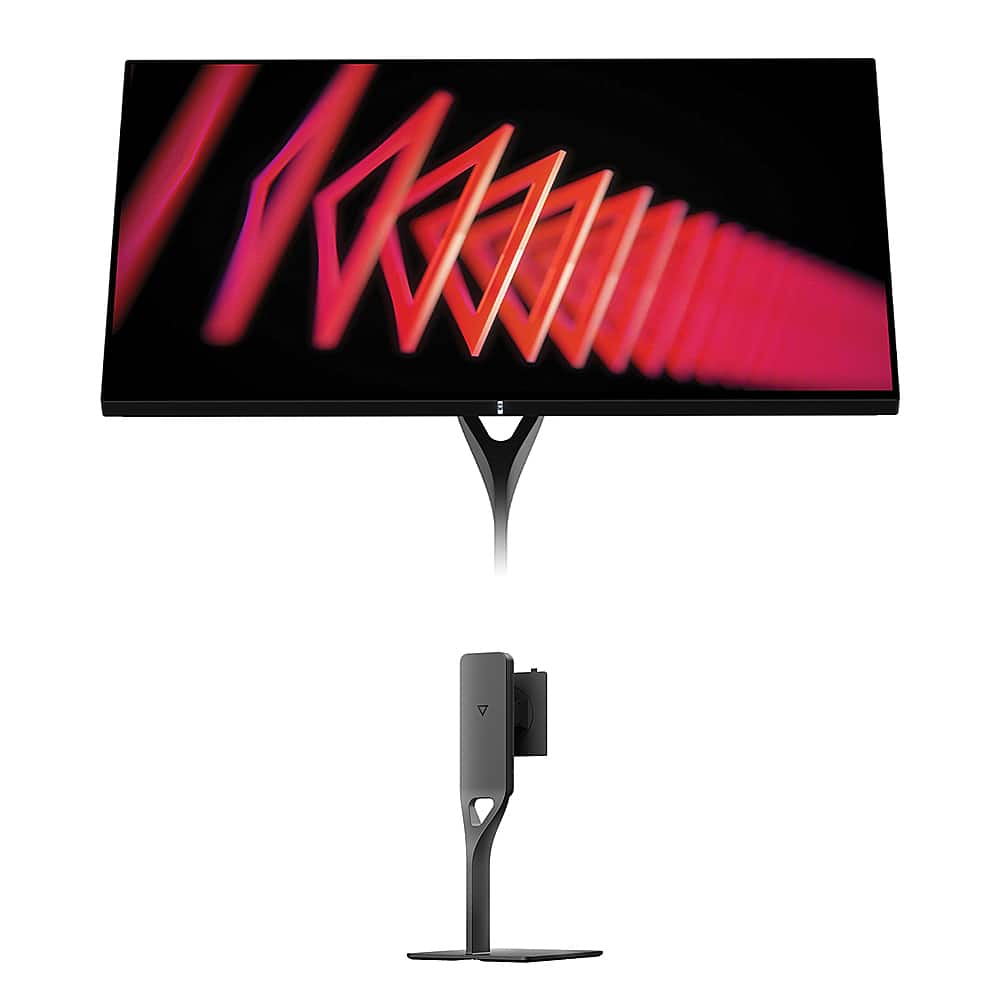
When the Dough Spectrum One launched in late 2022, it brought something genuinely new to the gaming monitor world: edge-to-edge Corning Gorilla Glass. While most manufacturers stick to traditional matte or basic glossy coatings, Dough decided to borrow from smartphone technology and create what many consider the most visually stunning desktop monitor available today.
The standout feature is that Gorilla Glass front panel with DXC (Diamond Extreme Coating) anti-reflective treatment. Think of it like the difference between looking at your phone screen versus a regular computer monitor—the Gorilla Glass creates deeper blacks and more vibrant colors because light doesn't scatter as much on the smooth surface. Our testers consistently noted how this makes everything from Netflix shows to video games look more "premium" and engaging.
But here's the trade-off: glossy surfaces reflect light more than matte ones. If you have windows or bright lights directly behind you, you'll see reflections. However, in a controlled environment—like a dedicated gaming room or home office with adjustable lighting—the visual improvement is dramatic enough that most users find ways to manage the reflections.
The Dough Spectrum One uses what's called a Nano-IPS panel, which is LG's enhanced version of their standard IPS technology. The "nano" part refers to tiny nanoparticles added to the backlight that help produce more accurate colors, especially in the red and green spectrums. This translates to covering 98% of the DCI-P3 color space (used by movie studios) and 100% of sRGB (the standard for web content and most games).
What's impressive is the factory calibration—each monitor is individually tuned to achieve a Delta E of 0.6 or better. Delta E measures color accuracy, with lower numbers being better. Professional monitors often target Delta E under 2, so 0.6 is exceptionally accurate. This means colors look correct right out of the box, whether you're editing photos or just want games to look as developers intended.
The 4K resolution (3840×2160 pixels) on a 27-inch screen creates a pixel density of 163 pixels per inch. This is dense enough that individual pixels disappear completely at normal viewing distances, making text razor-sharp and game details incredibly crisp. Many users report that going back to 1440p monitors after using 4K feels noticeably less detailed.
144Hz refresh rate means the screen updates 144 times per second, compared to 60Hz on basic monitors. This creates smoother motion in games, especially noticeable in fast-paced shooters or racing games. The difference is immediately apparent when panning the camera or tracking moving objects—everything looks more fluid and less stuttery.
The monitor supports all major adaptive sync technologies. G-SYNC Compatible (for NVIDIA cards), FreeSync Premium Pro (for AMD), and VESA Adaptive-Sync all do the same basic thing: they synchronize the monitor's refresh rate with your graphics card's frame output. This eliminates screen tearing (when parts of two different frames display at once) and reduces stuttering when frame rates fluctuate.
Response time is rated at 1ms gray-to-gray, though real-world testing by reviewers typically measures around 4-5ms depending on overdrive settings. This is excellent for an IPS panel—gaming monitors with VA panels might be slightly faster, but IPS offers much better viewing angles and color accuracy. The overdrive settings let you tune the response time, with higher settings reducing blur but potentially adding overshoot (ghosting artifacts).
One clever feature is pixel-perfect integer scaling. When playing older games designed for lower resolutions, like classic 2D platformers, the monitor can scale them up using exact pixel multiples rather than blurry interpolation. A 1920×1080 game displays using exactly four pixels for each original pixel, maintaining crisp, authentic visuals.
There's also a 60Hz single-strobe mode that reduces motion blur by turning the backlight off between frame refreshes. This mimics how old CRT monitors worked and creates incredibly sharp motion, though the screen appears dimmer. Retro gaming enthusiasts particularly appreciate this feature for classic console games.
Two HDMI 2.1 ports handle 4K at 120Hz from PlayStation 5 and Xbox Series X consoles. This was crucial when the monitor launched because many displays only had HDMI 2.0, which maxed out at 4K 60Hz. The DisplayPort 1.4 connection reaches the full 144Hz from gaming PCs.
The USB-C port with 100W power delivery is genuinely useful for laptop users. You can connect a MacBook Pro or high-end Windows laptop with a single cable that handles video, charges the laptop, and provides access to the USB hub. The hub includes additional USB-A and USB-C ports for peripherals, plus a headphone jack.
Many users report this setup eliminates desk clutter significantly. Instead of separate power, video, and USB cables, everything runs through one USB-C connection. When you need to take your laptop somewhere, you unplug one cable instead of three or four.
The VESA DisplayHDR 600 certification means peak brightness reaches 750 nits in HDR mode, with 16-zone local dimming. Local dimming selectively darkens parts of the backlight to improve contrast—when a movie scene shows bright stars against a dark sky, the zones behind the stars stay bright while others dim down.
However, 16 zones isn't many for a 27-inch screen. Premium Mini-LED monitors might have hundreds or thousands of zones. This means you'll occasionally see "blooming" where bright objects cause slight halos in adjacent dark areas. It's not terrible, but OLED monitors with per-pixel dimming still offer superior HDR contrast.
That said, HDR gaming and movie watching still look noticeably better than standard dynamic range content. The extra brightness makes highlights more impactful, and the wider color gamut shows more vibrant colors in supported content.
While primarily designed for desktop use, the Dough Spectrum One works well in home theater setups with some caveats. The 27-inch size suits smaller rooms or bedroom setups rather than living room viewing. The excellent HDMI 2.1 support makes it great for PlayStation 5 and Xbox Series X gaming on a TV stand or mounted to a wall.
The lack of built-in speakers means you'll need external audio, but this actually benefits home theater use since most enthusiasts prefer dedicated speakers or soundbars anyway. The monitor's low input lag makes it excellent for gaming, while the accurate colors benefit movie watching.
Dough has released several firmware updates since the 2022 launch, addressing early issues with wake-from-sleep delays and improving the on-screen display menu responsiveness. However, some users still report occasional firmware quirks, particularly with sleep/wake behavior when connected to certain laptops.
The company has also improved their quality control processes based on early feedback. Initial units had higher rates of backlight uniformity issues, but more recent production runs show better consistency according to user reports.
The Dough Spectrum One makes the most sense for users who prioritize visual quality above everything else and have controlled lighting environments. It's excellent for:
However, it's not ideal for everyone. The glossy surface requires careful environmental setup, Dough's smaller company size means support may be slower than major brands, and the lack of speakers adds to setup complexity.
What sets this monitor apart isn't just one feature—it's how everything comes together. The Gorilla Glass creates genuinely better image quality, the gaming performance handles modern titles smoothly, and the connectivity options work well for both gaming and productivity setups. While it demands careful setup and environment considerations, users who take the time usually find the visual quality improvement worth the effort.
Since launch, the monitor has maintained its unique position in the market. No other manufacturer has matched the Gorilla Glass implementation, making it the go-to choice for users who want the absolute best visual quality from an IPS gaming monitor.
The Dough Spectrum One is a premium 27-inch gaming monitor featuring 4K resolution, 144Hz refresh rate, and a unique edge-to-edge Corning Gorilla Glass front panel. It combines high-end gaming performance with professional-grade color accuracy, making it suitable for both competitive gaming and content creation.
Yes, the Dough Spectrum One works well in smaller home theater environments like bedrooms or media rooms. Its HDMI 2.1 ports support 4K 120Hz from PlayStation 5 and Xbox Series X, while the accurate colors and HDR support enhance movie watching. However, at 27 inches, it's better suited for closer viewing distances rather than living room setups.
The Gorilla Glass creates deeper blacks and more vibrant colors compared to traditional matte monitors by reducing light scattering on the surface. It also provides exceptional scratch resistance and a premium aesthetic. However, the glossy finish can show reflections in bright rooms, so controlled lighting is important for optimal viewing.
Absolutely. The Dough Spectrum One includes two HDMI 2.1 ports that support full 4K resolution at 120Hz from PlayStation 5 and Xbox Series X. This makes it excellent for console gaming, offering smooth performance in supported games while maintaining the visual quality benefits of 4K resolution.
Yes, the monitor is factory calibrated to Delta E ≤ 0.6, which is professional-grade accuracy. It covers 100% sRGB and 98% DCI-P3 color gamuts, making it suitable for photo editing, video editing, and other color-critical work. Many content creators use it as both a work monitor and gaming display.
The monitor includes comprehensive connectivity: two HDMI 2.1 ports, DisplayPort 1.4, USB-C with 100W power delivery, and a USB 3.2 Gen 2 hub. The USB-C port allows single-cable connection to laptops for video, data, and charging, making it excellent for streamlined desk setups.
The 144Hz refresh rate creates smoother motion in fast-paced games, reducing motion blur and improving responsiveness. For movies, while most content is 24fps or 60fps, the high refresh rate still benefits by reducing judder and creating smoother on-screen navigation and gaming between movie sessions.
No, the Dough Spectrum One does not include built-in speakers. This design choice allows for better display quality and encourages users to invest in higher-quality external audio solutions, which is beneficial for home theater setups where dedicated speakers or soundbars provide superior sound quality.
The primary concerns include the glossy Gorilla Glass showing reflections in bright environments, occasional firmware issues reported by users, and Dough being a smaller company with potentially slower customer support compared to major brands like LG or ASUS. The monitor also requires a separately purchased stand.
The Dough Spectrum One is worth it for users who prioritize exceptional visual quality and have controlled lighting environments. Its unique Gorilla Glass implementation, excellent gaming performance, and professional color accuracy justify the premium positioning. However, consider alternatives if you need guaranteed fast support, have very bright room lighting, or prefer the reliability of established monitor brands over cutting-edge features.
We've done our best to create useful and informative comparisons to help you decide what product to buy. Our research has used advanced automated methods to create this comparison and perfection is not possible - please contact us for corrections or questions. These are the sites we've researched in the creation of this article: createdtech.com - pcgamesn.com - tomshardware.com - imore.com - bestbuy.com - youtube.com - youtube.com - newegg.com - 9to5mac.com - bhphotovideo.com - bhphotovideo.com - sears.com - bhphotovideo.com - bestbuy.com - petra.com - petra.com - bestbuy.com - microcenter.com - youtube.com - petra.com
| Dough Spectrum One 27-Inch 4K 144Hz Gaming Monitor Gorilla Glass |
|---|
| Gorilla Glass Display - Unique scratch-resistant surface with enhanced color vibrancy: Edge-to-edge Corning Gorilla Glass with DXC coating |
| Resolution - Sharp detail for gaming and productivity: 3840 × 2160 (4K UHD) |
| Refresh Rate - Smooth motion in fast-paced games: 144Hz |
| Panel Type - Wide viewing angles with accurate colors: Nano-IPS |
| Response Time - Minimal motion blur in competitive gaming: 1ms |
| Color Accuracy - Professional-grade color reproduction out of box: Delta E ≤ 0.6 factory calibrated |
| Color Gamut - Wide color support for creative work: 98% DCI-P3, 100% sRGB |
| HDR Support - Enhanced contrast and brightness for compatible content: VESA DisplayHDR 600 with 16-zone local dimming |
| Peak Brightness: 750 cd/m² |
| Adaptive Sync - Eliminates screen tearing across all GPU brands: G-SYNC Compatible, FreeSync Premium Pro, VESA Adaptive-Sync |
| HDMI 2.1 - Full 4K 120Hz support for PS5/Xbox Series X: 2 ports |
| USB-C Power Delivery - Single cable laptop connection with charging: 100W with DisplayPort Alt Mode |
| USB Hub - High-speed peripheral connectivity: USB 3.2 Gen 2 (up to 10 Gb/s) |
| Screen Size: 27 inches |
| Pixel Density: 163 PPI |
| Weight: 15.4 lbs (without stand) |
| VESA Mount: 100 × 100mm |
The Samsung 27" Odyssey G7 G70D takes a different approach at $699, prioritizing gaming features and entertainment versatility over premium materials. Its standout feature is the integrated Gaming Hub that transforms the monitor into a smart TV, complete with streaming apps, cloud gaming access, and a remote control – functionality that makes it genuinely useful beyond desktop gaming. Samsung includes comprehensive gaming tools like Dynamic Black Equalizer for spotting enemies in dark areas, game-specific picture modes, and ultrawide simulation that the Dough lacks entirely. The complete ergonomic stand with height, tilt, swivel, and pivot adjustments is included in the box, whereas Dough charges extra for mounting solutions.
From a pure value perspective, the Samsung delivers nearly identical 4K 144Hz gaming performance for $200 less while including features that extend its usefulness throughout the day. The trade-offs are significant though – you lose the Dough's professional-grade factory calibration, premium Gorilla Glass durability, and USB-C docking convenience. The Samsung's standard IPS panel requires manual calibration for color-accurate work and lacks the enhanced contrast and color vibrancy that the Dough's glass coating provides. For users who prioritize gaming features, smart functionality, and overall value over premium materials and color accuracy, the Samsung G70D represents a more practical choice that delivers excellent performance while leaving budget for other components.
🤖 Read Detailed Comparison
👌Samsung 27" Odyssey G7 G70D 4K UHD IPS Gaming Monitor Details
💵 See Samsung 27" Odyssey G7 G70D 4K UHD IPS Gaming Monitor Price
The HP Omen 27k 4K UHD 144Hz Gaming Monitor ($609.99) stands out primarily for its exceptional value proposition and comprehensive gaming ecosystem features. At $290 less than the Spectrum One, it delivers solid 4K 144Hz performance while including practical features that many gamers will actually use daily. The built-in KVM switch is particularly valuable for users with multiple PCs or consoles, allowing seamless switching between devices with a single keyboard and mouse setup. Additionally, the monitor comes with a fully adjustable stand, integrated speakers, customizable RGB lighting, and OMEN Gaming Hub software integration – features that would cost extra or aren't available at all with the Spectrum One. For pure gaming performance, the HP achieves similar frame rates and supports the same adaptive sync technologies, making it highly competitive in real-world gaming scenarios.
However, the HP Omen 27k makes clear compromises to achieve its attractive price point. The HDR performance is significantly more limited with only DisplayHDR 400 certification and basic edge-lit backlighting, resulting in less impactful brightness and contrast compared to the Spectrum One's 16-zone local dimming system. Color accuracy is good but not professionally calibrated, and the standard anti-glare coating, while practical, doesn't deliver the same visual pop as Gorilla Glass. The single HDMI 2.1 port also limits connectivity flexibility for users with multiple high-refresh devices. For most gamers prioritizing performance per dollar and practical features over absolute image quality, the HP represents outstanding value. But for users who notice and appreciate premium display technology – whether for content creation, HDR entertainment, or simply wanting the best possible image quality – the Spectrum One's higher price delivers tangible benefits that justify the investment.
🤖 Read Detailed Comparison
👌HP Omen 27k 4K UHD 144Hz Gaming Monitor Details
💵 See HP Omen 27k 4K UHD 144Hz Gaming Monitor Price
The ASUS ROG Strix OLED XG27UCDMG takes a fundamentally different approach with its 4th-generation QD-OLED panel, delivering a 240Hz refresh rate and near-instantaneous 0.03ms response time that puts it in a league of its own for competitive gaming. Where the Spectrum One excels in color accuracy and HDR brightness, the ASUS monitor dominates through pure contrast performance—its ability to display perfect blacks creates an infinite contrast ratio that makes dark scenes in games and movies dramatically more immersive. The OLED technology eliminates motion blur entirely, giving competitive players a genuine advantage in fast-paced shooters, while the higher refresh rate provides noticeably smoother gameplay for anyone sensitive to motion artifacts.
From a value perspective, the ASUS ROG Strix OLED at $979.99 with an included stand actually costs less than the Spectrum One setup when you factor in the required stand purchase. However, the trade-offs are significant: you lose the Spectrum One's superior HDR brightness, exceptional color accuracy for professional work, and burn-in immunity. The ASUS monitor is purpose-built for gaming excellence and dark-room entertainment, making it the better choice for users who prioritize gaming performance and cinematic contrast over professional color precision. While ASUS includes burn-in protection features and warranty coverage, the OLED technology still requires more careful usage than the Spectrum One's worry-free IPS panel, particularly for productivity work with static interface elements.
🤖 Read Detailed Comparison
👌ASUS ROG Strix OLED XG27UCDMG 27" 4K 240Hz Gaming Monitor Details
💵 See ASUS ROG Strix OLED XG27UCDMG 27" 4K 240Hz Gaming Monitor Price
The LG UltraGear 27" OLED QHD 240Hz Gaming Monitor delivers a completely different value proposition at the same $899 price point, prioritizing gaming performance and contrast quality over resolution. Its flagship 240Hz refresh rate combined with an incredibly fast 0.03ms response time creates motion clarity that's simply unmatched in competitive gaming scenarios. The OLED technology produces perfect blacks and infinite contrast that transforms dark gaming scenes into immersive experiences you can't replicate on traditional LCD panels. Where the Dough monitor relies on local dimming zones, the LG's per-pixel illumination creates true darkness that makes details pop in games like Alan Wake 2 or Resident Evil 4. The complete package includes a fully adjustable stand, remote control, and RGB lighting, delivering premium gaming aesthetics without additional purchases.
In real-world gaming performance, the LG excels where the Dough monitor shows its limitations. The 240Hz refresh rate provides a tangible competitive advantage in fast-paced shooters, making enemy tracking noticeably smoother than the Dough's 144Hz panel. The OLED's instantaneous pixel response eliminates the motion blur and inverse ghosting that can still appear on even high-quality IPS panels during rapid movements. However, you're sacrificing the Dough's higher resolution detail and burn-in immunity for this gaming-focused approach. The LG's lower peak brightness (450 vs 750 nits) and QHD resolution make it less suitable for bright room productivity work or professional content creation, while the potential for OLED burn-in requires more careful usage habits with static desktop elements.
🤖 Read Detailed Comparison
👌LG UltraGear 27" OLED QHD 240Hz Gaming Monitor Details
💵 See LG UltraGear 27" OLED QHD 240Hz Gaming Monitor Price
The Samsung 27" Odyssey 3D G90XF 4K 165Hz Gaming Monitor at $1,999.99 represents a bold leap into next-generation display technology with its pioneering glasses-free 3D gaming capability. Using advanced eye-tracking cameras and lenticular lens arrays, it creates genuine depth perception without special glasses, transforming supported games into immersive dimensional experiences where characters and objects appear to float in front of the screen. The Samsung also offers a slightly higher 165Hz refresh rate compared to the Dough's 144Hz, plus unique features like edge lighting that syncs with on-screen colors and AI-powered 3D conversion for regular 2D content. When the 3D effect works properly in supported titles like racing games or first-person shooters, it provides a genuinely novel gaming experience that no other monitor can match.
However, the Samsung G90XF comes with significant trade-offs that limit its practical appeal. At double the Dough's price, you're paying a $1,100 premium primarily for experimental 3D technology that works with a limited game library and requires high-end GPU power (RTX 3080+) for optimal performance. The Samsung falls short in fundamental display quality areas where the Dough excels – its HDR implementation is underwhelming at only 350 nits typical brightness versus the Dough's 750 nits peak, and it lacks the factory color calibration that makes the Dough suitable for professional work. The 3D novelty tends to wear off after initial fascination, leaving you with an expensive gaming monitor that performs worse than the Dough in traditional 2D gaming, content creation, and media consumption. Unless you're specifically excited about being an early adopter of glasses-free 3D gaming and have the budget and hardware to support it, the Samsung's revolutionary features don't justify the substantial price premium and performance compromises.
🤖 Read Detailed Comparison
👌Samsung 27" Odyssey 3D G90XF 4K 165Hz Gaming Monitor Details
💵 See Samsung 27" Odyssey 3D G90XF 4K 165Hz Gaming Monitor Price
The AOC Agon Pro 27" QD-OLED 240Hz Gaming Monitor represents a completely different philosophy, prioritizing gaming performance and visual contrast over resolution and productivity features. Its standout advantage is the Samsung QD-OLED panel technology, which delivers infinite contrast ratios with pixels that can turn completely off for perfect blacks – creating dramatically more realistic lighting in games like Elden Ring or atmospheric horror titles. The 240Hz refresh rate and 0.03ms response time provide an undeniable competitive edge in fast-paced games, making enemy movements appear smoother and more trackable in titles like Counter-Strike 2 or Valorant. This combination of OLED's superior contrast and ultra-high refresh rates creates a gaming experience that feels more responsive and visually impactful than traditional LCD panels, even premium ones.
Where the AOC truly shines is in its value proposition and gaming-focused design. At $484.99 with a full ergonomic stand included, it costs significantly less than the Dough while delivering premium OLED technology that typically commands much higher prices. The trade-off is clear: you're getting 1440p resolution instead of 4K, which means less sharp text and UI elements, and you're missing the professional color calibration and USB-C docking capabilities that make the Dough suitable for creative work. But for users whose primary focus is gaming performance, especially competitive gaming, the AOC Agon Pro delivers more impactful improvements in motion clarity and contrast at a more accessible price point. If you game primarily in darker environments and don't need the monitor for productivity tasks, the AOC's combination of OLED visual quality and high refresh rate gaming creates a more immersive and responsive experience that's hard to match at this price level.
🤖 Read Detailed Comparison
👌AOC Agon Pro 27" QD-OLED 240Hz Gaming Monitor Details
💵 See AOC Agon Pro 27" QD-OLED 240Hz Gaming Monitor Price
The BenQ MOBIUZ EX270QM represents the polar opposite philosophy, sacrificing resolution for pure speed with its blazing 240Hz refresh rate and specialized competitive gaming features. While the Spectrum One prioritizes visual clarity, the EX270QM delivers unmatched motion smoothness that's immediately noticeable in fast-paced games – enemy tracking becomes effortless, and the overall responsiveness feels almost supernatural compared to standard 144Hz displays. The monitor's gaming-specific features like Light Tuner with 20 color presets, Black eQualizer for enhanced shadow visibility, and BenQ's HDRi auto-optimization technology create a purpose-built competitive gaming experience. Perhaps most importantly, the 1440p resolution allows mid-range graphics cards to easily achieve those high frame rates necessary to take full advantage of the 240Hz capability, whereas 4K gaming often requires significant hardware investment or visual compromises.
From a practical standpoint, the BenQ EX270QM offers unique conveniences that the Spectrum One lacks, particularly its impressive 2.1 channel built-in speaker system with dedicated subwoofer that eliminates the need for external audio in many setups. At $697.99, it costs more than the Spectrum One but delivers specialized features that justify the premium for serious competitive gamers – the ergonomic stand is included, customer support comes from an established monitor brand, and the overall package is designed specifically for esports performance. However, users focused on visual quality, content creation, or those wanting maximum detail in single-player games will find the 1440p resolution limiting compared to the Spectrum One's 4K clarity. The choice ultimately comes down to whether you prioritize competitive gaming performance and convenience features over maximum visual fidelity and premium build materials.
🤖 Read Detailed Comparison
👌BenQ MOBIUZ EX270QM 27" QHD 240Hz IPS Gaming Monitor Details
💵 See BenQ MOBIUZ EX270QM 27" QHD 240Hz IPS Gaming Monitor Price
The Samsung 27" Odyssey OLED G8 4K UHD 240Hz Gaming Monitor represents the pinnacle of gaming display technology at $1,299.99, offering capabilities that the Spectrum One simply cannot match. Its QD-OLED panel delivers perfect blacks with an infinite contrast ratio, creating a visual experience where dark game scenes truly disappear into blackness while bright highlights pop with incredible intensity. The 240Hz refresh rate paired with a 0.03ms response time provides the smoothest motion possible, offering a tangible competitive advantage in fast-paced esports titles like Counter-Strike or Valorant. This combination of OLED technology and ultra-high refresh rates creates an immersive gaming experience that's immediately noticeable—explosions have more impact, dark corridors feel more atmospheric, and fast movements appear silky smooth in ways that traditional LCD technology cannot replicate.
However, the Samsung OLED G8 comes with significant trade-offs that limit its versatility compared to the Spectrum One. At just 250 nits peak brightness, it struggles in bright environments where the Dough monitor's 450 nits shine, essentially requiring controlled lighting for optimal viewing. The Samsung also lacks the comprehensive connectivity that makes the Spectrum One excellent for mixed-use scenarios—no USB hub, limited I/O options, and no laptop docking capabilities. Most critically for many users, the Samsung isn't factory calibrated for professional work, making it less suitable for color-critical tasks despite its excellent color reproduction. While the OLED technology is undeniably impressive and future-forward, it comes at a premium price that's nearly double the Spectrum One's cost, and the real-world benefits are most apparent to dedicated gamers rather than users seeking a versatile workstation display.
🤖 Read Detailed Comparison
👌Samsung 27" Odyssey OLED G8 4K UHD 240Hz Gaming Monitor Details
💵 See Samsung 27" Odyssey OLED G8 4K UHD 240Hz Gaming Monitor Price
The MSI MAG 271QP QD-OLED X24 represents a completely different philosophy, prioritizing cutting-edge display technology and competitive gaming performance over maximum resolution. Its QD-OLED panel delivers true infinite contrast with perfect blacks that simply can't be matched by any backlit display, creating dramatically more immersive gaming experiences in dark scenes and HDR content. The 240Hz refresh rate paired with an ultra-low 0.03ms response time provides motion clarity that's genuinely transformative for competitive gaming, offering smoother tracking and reduced motion blur that can provide real advantages in fast-paced titles. The quantum dot enhancement also delivers exceptional color vibrancy, covering 138% of sRGB and 99% DCI-P3, while MSI's OLED Care 2.0 system addresses burn-in concerns with comprehensive protection features and a 3-year warranty that specifically covers burn-in damage.
From a value perspective, the MSI monitor offers remarkable accessibility to premium OLED technology at a significantly lower price point than the Dough, while including a full-featured adjustable stand that doesn't require separate purchase. However, this gaming-focused approach means sacrificing the professional features and future-proof 4K resolution that make the Dough so versatile. The QHD resolution, while perfectly suited for competitive gaming and easier to drive at high frame rates, lacks the pixel density and screen real estate that 4K provides for productivity work and detailed content consumption. Additionally, the absence of USB-C connectivity limits its appeal for users who need comprehensive laptop docking capabilities. For pure gaming performance and OLED experience at an exceptional value, the MSI is compelling, but users requiring maximum resolution, professional color accuracy, and premium build quality will find the Dough's higher investment more justified.
🤖 Read Detailed Comparison
👌MSI MAG 271QP QD-OLED X24 27" QHD 240Hz Gaming Monitor Details
💵 See MSI MAG 271QP QD-OLED X24 27" QHD 240Hz Gaming Monitor Price
The LG UltraGear 27" 4K 240Hz Dual Mode Gaming Monitor represents a technological breakthrough in gaming displays, offering the world's first combination of 27-inch 4K resolution at 240Hz refresh rate. Its revolutionary dual-mode capability allows users to switch between 4K at 240Hz for maximum visual fidelity or 1080p at an unprecedented 480Hz for ultimate competitive gaming performance – refresh rates that were unimaginable just a few years ago. The monitor's Nano IPS Black technology delivers a superior 2000:1 contrast ratio compared to standard IPS panels, providing deeper blacks and more realistic dark scenes. For content creators, the LG UltraGear offers hardware calibration support and covers 99% DCI-P3 plus 94% Adobe RGB color spaces, enabling professional-grade color accuracy that can be fine-tuned with specialized equipment. Its DisplayPort 2.1 connectivity future-proofs the display for next-generation graphics cards, while dual HDMI 2.1 ports ensure excellent compatibility with gaming consoles.
From a performance standpoint, the LG UltraGear pushes gaming capabilities to new extremes, though real-world benefits depend on your specific use case and hardware. While its paper specifications are impressive, professional testing reveals some motion blur issues at high refresh rates, with measured response times around 4.6ms that don't quite match the theoretical 1ms claims. However, for competitive esports players with high-end graphics cards capable of driving these refresh rates, the LG UltraGear provides measurable advantages in fast-paced games like Counter-Strike and Valorant. The monitor offers excellent value for users who prioritize cutting-edge gaming performance and professional color work, backed by LG's established reputation for quality and customer support. Unlike the Dough monitor's focus on premium daily usability, the LG UltraGear is purpose-built for users who want access to the absolute latest display technology and are willing to invest in the high-end graphics hardware needed to fully utilize its capabilities.
🤖 Read Detailed Comparison
👌LG UltraGear 27" 4K 240Hz Dual Mode Gaming Monitor Details
💵 See LG UltraGear 27" 4K 240Hz Dual Mode Gaming Monitor Price
The Samsung 27" Odyssey OLED G6 represents the pinnacle of competitive gaming performance with its extraordinary 360Hz refresh rate and lightning-fast 0.03ms response time that virtually eliminates motion blur and input lag. Its OLED panel technology delivers perfect blacks and infinite contrast ratios that make the Dough's LCD panel look washed out in comparison, particularly during dark gaming scenes where individual pixels can turn completely off. The monitor's revolutionary OLED Glare Free coating solves one of OLED's biggest weaknesses by eliminating reflections without dulling colors, allowing for comfortable gaming even in bright environments. Samsung's OLED Safeguard+ technology with dynamic cooling also addresses burn-in concerns through advanced thermal management that wasn't available in earlier OLED generations.
In head-to-head gaming scenarios, the Samsung OLED G6's advantages become most apparent in fast-paced competitive titles where its 360Hz refresh rate provides tangible benefits for players with high-end GPUs capable of pushing 300+ frames per second. The instantaneous pixel response creates motion clarity that's simply unmatched by LCD technology, making enemy tracking and quick movements appear razor-sharp. However, the Samsung's specialization comes with trade-offs – its QHD resolution shows significantly less detail than 4K, the lower peak brightness can feel dim compared to the Dough's 750-nit output, and the lack of USB-C connectivity limits its versatility for productivity work. While the Samsung excels as a dedicated gaming weapon, users seeking a single monitor for both gaming and professional tasks will find its focused approach limiting compared to the Dough's well-rounded feature set.
🤖 Read Detailed Comparison
👌Samsung 27" Odyssey OLED G6 QHD 360Hz Gaming Monitor Details
💵 See Samsung 27" Odyssey OLED G6 QHD 360Hz Gaming Monitor Price
The Acer Nitro XV275K P3 represents a completely different philosophy in premium 4K gaming monitors, prioritizing cutting-edge display technology over premium materials. Its defining feature is the 576-zone Mini LED backlighting system that delivers true DisplayHDR 1000 performance with 1000 nits peak brightness – a dramatic leap beyond the Dough's 16-zone edge-lit system. This translates to vastly superior HDR gaming and movie experiences, with the ability to display deep blacks alongside brilliant highlights simultaneously. The Acer also edges ahead in pure gaming performance with its 160Hz refresh rate capability and comprehensive gaming features like crosshair overlays and refresh rate tracking, making it more appealing for competitive gamers who want every possible advantage.
From a value standpoint, the Acer Nitro XV275K P3 offers exceptional bang for your buck, typically priced significantly lower than the Dough while delivering superior HDR performance that usually commands premium pricing in other monitors. The trade-off is build quality and color precision – the Acer uses traditional plastic construction and achieves Delta E < 2 calibration versus the Dough's professional-grade accuracy. In real-world use, the Acer shines in darker gaming environments and home theater setups where its Mini LED technology creates a more immersive experience, while also including the ergonomic stand that the Dough requires as a separate purchase. For users who prioritize visual impact, gaming performance, and overall value, the Acer presents a compelling alternative that delivers flagship display technology at a more accessible price point.
🤖 Read Detailed Comparison
👌Acer Nitro XV275K P3 27" Mini LED 4K UHD Gaming Monitor Details
💵 See Acer Nitro XV275K P3 27" Mini LED 4K UHD Gaming Monitor Price
The BenQ Zowie XL2746K represents the pinnacle of competitive gaming specialization, offering a blistering 240Hz refresh rate that delivers 96 additional frames per second compared to the Spectrum One's 144Hz capability. Its standout feature is the DyAc+ technology, which uses sophisticated backlight strobing to virtually eliminate motion blur during fast-paced gameplay—a crucial advantage when tracking enemies through smoke in CS:GO or following rapid movements in Apex Legends. The TN panel, while inferior in color reproduction, provides faster pixel response times and is specifically optimized for the ultra-low input lag that competitive players demand. Additionally, the BenQ monitor includes gaming-focused features like the S Switch controller for quick setting adjustments and is widely adopted in professional esports tournaments, giving players familiarity with tournament setups.
While the BenQ XL2746K sacrifices visual quality with its 1080p resolution and limited color accuracy, it offers exceptional value for dedicated competitive gamers who prioritize performance over versatility. The lower resolution actually becomes an advantage for maintaining high frame rates with mid-range graphics cards, making 240Hz gaming more achievable without requiring top-tier hardware. The monitor's singular focus means every feature serves competitive gaming, from the matte anti-glare surface to the tournament-grade build quality. However, this specialization makes the BenQ display poorly suited for productivity work, content creation, or media consumption where the Spectrum One's 4K resolution and superior colors shine. For pure esports performance at a more accessible price point, the XL2746K delivers unmatched speed and motion clarity that can genuinely impact competitive gameplay.
🤖 Read Detailed Comparison
👌BenQ Zowie XL2746K 27" 240Hz Esports Gaming Monitor Details
💵 See BenQ Zowie XL2746K 27" 240Hz Esports Gaming Monitor Price
The Sony INZONE M9 II prioritizes pure gaming performance and console integration over the premium materials and professional accuracy found in the Spectrum One. Its standout feature is the 160Hz refresh rate, delivering 11% more frames per second than the Spectrum One's 144Hz for noticeably smoother motion in competitive gaming scenarios. The monitor's Full Array Local Dimming (FALD) technology provides superior HDR performance with better zone control across the display, creating deeper blacks and more precise highlight detail compared to the Spectrum One's 16-zone edge dimming. PlayStation 5 users particularly benefit from the Sony's Auto HDR Tone Mapping feature, which automatically optimizes HDR settings without manual adjustment, plus seamless HDMI 2.1 implementation that ensures optimal console performance. The anti-glare coating also makes it more versatile in various lighting conditions, reducing reflections that can be problematic with glossy displays.
From a value standpoint, the Sony INZONE M9 II typically costs more but includes a complete package with an adjustable stand and basic built-in speakers, eliminating additional purchases needed with the Spectrum One. However, it makes significant compromises in color accuracy with only 95% DCI-P3 coverage versus the Spectrum One's 98%, and lacks the professional-grade factory calibration that makes the Dough monitor suitable for color-critical work. The Sony also omits USB-C connectivity entirely, requiring multiple cables for laptop users and missing the convenient single-cable docking capability that modern professionals appreciate. For dedicated gamers, especially those with PlayStation consoles, the Sony INZONE M9 II delivers superior gaming-focused features and immediate usability, though users requiring professional color accuracy or premium build materials will find the Spectrum One's unique Gorilla Glass construction and precise calibration more compelling despite the gaming performance trade-offs.
🤖 Read Detailed Comparison
👌Sony INZONE M9 II 27" 4K 160Hz Gaming Monitor Details
💵 See Sony INZONE M9 II 27" 4K 160Hz Gaming Monitor Price
The GIGABYTE MO27Q2 delivers cutting-edge display technology that fundamentally changes the gaming experience through its Samsung QD-OLED panel. The standout feature is its ability to produce perfect blacks with infinite contrast—something impossible with traditional LCD technology—creating dramatically more immersive visuals in dark scenes and HDR content. The 240Hz refresh rate paired with an exceptional 0.03ms response time provides ultra-smooth motion that competitive gamers will immediately notice, especially in fast-paced titles like Counter-Strike or Valorant. Its unique Tactical Switch feature allows instant switching between full 27-inch QHD mode and a focused 24-inch FHD area preferred by esports professionals, while AI-based OLED Care technology actively prevents burn-in issues. At its price point, the MO27Q2 represents exceptional value for QD-OLED technology that was prohibitively expensive just a year ago.
However, the MO27Q2 makes specific trade-offs that may not suit all users, particularly those prioritizing resolution and professional applications. The QHD resolution, while perfectly adequate for gaming, provides less screen real estate and detail than the Spectrum One's 4K panel—a difference that becomes apparent in productivity tasks, content creation, and games where environmental detail matters more than frame rates. The OLED technology, despite warranties and protection features, still carries inherent burn-in risks that require more careful usage patterns, especially for users who display static UI elements for extended periods. Additionally, the connectivity is more basic, with only 18W USB-C power delivery that won't charge laptops effectively. For pure gaming performance and immersive visual quality, the MO27Q2 offers superior value and technology, but users needing a versatile display for mixed professional and gaming use will find the Spectrum One's higher resolution and comprehensive connectivity more practical for daily workflows.
🤖 Read Detailed Comparison
👌GIGABYTE MO27Q2 27" QD-OLED QHD 240Hz Gaming Monitor Details
💵 See GIGABYTE MO27Q2 27" QD-OLED QHD 240Hz Gaming Monitor Price
The ViewSonic XG275D-4K revolutionizes the gaming monitor space with its innovative dual-mode refresh rate system, allowing users to switch between 320Hz at 1080p for competitive esports and 160Hz at 4K for immersive gaming with the simple press of a button. This switchable functionality addresses the age-old dilemma of choosing between high resolution and high refresh rates, effectively giving you two monitors in one. The 0.5ms MPRT response time delivers exceptional motion clarity that surpasses what most IPS panels can achieve, making it genuinely competitive with the fastest gaming displays on the market. For competitive gamers, the inclusion of a 24.5-inch esports mode that shrinks the display area to tournament-standard size, combined with comprehensive ergonomic adjustments and built-in features like RGB lighting, creates a complete gaming package at a more accessible price point.
Where the ViewSonic XG275D-4K particularly shines is in its value proposition and real-world versatility. It delivers cutting-edge gaming performance while including everything needed for immediate setup, from the fully adjustable stand to built-in speakers, at a price that's significantly lower than premium alternatives. However, this gaming-focused approach means sacrifices in areas where the Spectrum One excels—color accuracy remains at gaming-standard levels rather than professional-grade, the build materials are conventional rather than premium, and HDR performance is more basic without the high peak brightness needed for truly impactful HDR experiences. The ViewSonic also offers lower USB-C power delivery at 65W compared to 100W, which may not fully support the most demanding laptops. For users who prioritize gaming performance and value over professional color work and premium materials, the ViewSonic represents the more practical choice with its innovative features and comprehensive package.
🤖 Read Detailed Comparison
👌ViewSonic XG275D-4K 27" 4K UHD 320Hz Gaming Monitor Details
💵 See ViewSonic XG275D-4K 27" 4K UHD 320Hz Gaming Monitor Price
The ViewSonic XG272-2K-OLED represents the pinnacle of gaming-focused display technology with its 240Hz refresh rate and true OLED panel delivering 0.01ms response times. This combination creates an unmatched competitive gaming experience where motion blur is virtually eliminated and fast-paced action remains crystal clear even during the most intense firefights. The OLED technology's infinite contrast ratio transforms movie watching and single-player gaming, with perfect blacks that make dark scenes appear truly three-dimensional rather than the washed-out grays typical of LCD panels. Perhaps most importantly for buyers, it includes a full ergonomic stand and comprehensive gaming features at a lower total cost, making it exceptional value for gaming-focused setups.
While the ViewSonic XG272-2K-OLED excels in pure gaming performance, it makes notable compromises in versatility that limit its appeal for mixed-use scenarios. The 1440p resolution, while easier to drive with mid-range graphics cards, simply can't match the Dough monitor's text sharpness and detail for productivity work. The 15W USB-C power delivery is inadequate for laptop charging, forcing users to manage multiple cables where the Dough's single-cable solution would suffice. Additionally, OLED burn-in concerns, despite mitigation features, may worry users who display static content regularly. For dedicated gaming setups where motion performance and contrast matter most, the ViewSonic XG272-2K-OLED delivers superior results at better value, but users requiring professional-grade color accuracy, 4K sharpness, or laptop docking capabilities will find its feature set limiting compared to the Dough's comprehensive approach.
🤖 Read Detailed Comparison
👌ViewSonic XG272-2K-OLED 27" QHD 240Hz OLED Gaming Monitor Details
💵 See ViewSonic XG272-2K-OLED 27" QHD 240Hz OLED Gaming Monitor Price
The MSI MAG 274URFW represents a completely different philosophy, prioritizing pure gaming performance and exceptional value over premium materials and professional features. Its standout achievement is delivering 160Hz refresh rate at 4K resolution - the highest in this segment - along with an impressive 0.5ms response time specification that translates to genuinely smooth motion during fast-paced gaming. The monitor excels with gaming-specific features like Smart Crosshair that dynamically changes color for better visibility, AI Vision technology that enhances dark scene detail for competitive advantage, and comprehensive RGB lighting integration. Most importantly, it includes a fully adjustable stand with height, tilt, swivel, and pivot functionality out of the box, plus all necessary cables, making it a complete package ready for immediate use. The matte anti-glare coating eliminates reflection concerns in bright rooms, ensuring consistent performance regardless of lighting conditions.
From a value perspective, the MSI MAG 274URFW delivers roughly 90% of the gaming performance at approximately 40% of the cost, making it an exceptional choice for users primarily focused on gaming rather than professional color work. While it lacks the factory calibration and premium Gorilla Glass construction, it compensates with higher refresh rates, comprehensive gaming features, and reliable performance that doesn't require additional investments in stands or calibration equipment. The 16Hz refresh rate advantage over the Dough may seem small on paper, but for competitive gamers seeking every possible edge, it represents meaningful additional smoothness. For users who don't need professional-grade color accuracy and prefer practical matte screens over glossy displays, the MSI provides a more sensible path to high-performance 4K gaming without the premium price tag or luxury positioning.
🤖 Read Detailed Comparison
👌MSI MAG 274URFW 27" 4K 160Hz Gaming Monitor Details
💵 See MSI MAG 274URFW 27" 4K 160Hz Gaming Monitor Price
The Mobile Pixels 27" WQHD Mini-LED Gaming Monitor represents a gaming-first philosophy that prioritizes speed and visual impact over resolution. Its standout Mini-LED backlighting technology delivers exceptional 1000-nit peak brightness with HDR1000 certification, creating dramatically more impactful HDR experiences than this Dough monitor's 750-nit capability. The superior local dimming control produces OLED-like contrast with deep blacks and brilliant highlights that transform games like Cyberpunk 2077 or movie content. The 180Hz refresh rate provides a genuine competitive advantage in esports titles, offering 36 additional frames per second compared to this monitor's 144Hz, which translates to measurably smoother motion in fast-paced games like Counter-Strike or Valorant. The 1440p resolution hits the gaming sweet spot, allowing graphics cards to maintain higher frame rates while still delivering sharp, detailed visuals on a 27-inch screen.
From a value perspective, the Mobile Pixels monitor offers compelling advantages for gaming-focused users. It typically costs significantly less while including everything needed out of the box – stand, cables, and setup accessories that add considerable expense to the Dough monitor's total cost. The 1440p resolution is also more practical for most gaming setups, as even high-end graphics cards can struggle to maintain consistent 4K frame rates at maximum settings. While it lacks the professional color accuracy and 4K sharpness of this Dough display, the Mini-LED technology and higher refresh rate create a more dramatic and responsive gaming experience. For users building dedicated gaming setups rather than multi-purpose workstations, the Mobile Pixels monitor delivers premium display technology and exceptional HDR performance at a more accessible price point.
🤖 Read Detailed Comparison
👌Mobile Pixels 27" WQHD Mini-LED Gaming Monitor Details
💵 See Mobile Pixels 27" WQHD Mini-LED Gaming Monitor Price
The Gigabyte AORUS FO27Q2 delivers flagship gaming performance that the Spectrum One simply cannot match, with its 240Hz refresh rate and lightning-fast 0.03ms response time creating an incredibly smooth and responsive gaming experience. The QD-OLED technology provides infinite contrast with true blacks that make HDR content genuinely dramatic – when you're playing atmospheric games like Cyberpunk 2077 or watching movies, the difference is immediately apparent as dark scenes maintain perfect detail without any backlight bleeding. Gaming-focused features like the dedicated Tactical Switch for instant resolution changes and AI-based OLED care show Gigabyte's understanding of competitive players' needs. Most importantly, the FO27Q2 achieves this premium OLED performance at a significantly lower price point while including a full ergonomic stand, making it exceptional value for gaming-focused users.
However, the AORUS FO27Q2 makes clear compromises for its gaming specialization that limit its versatility compared to the Spectrum One. The QHD resolution, while adequate for gaming, feels noticeably softer for text-heavy work like coding or photo editing, and the limited 18W USB-C power delivery means it cannot serve as a proper laptop docking station. Colors are vibrant but require manual calibration for professional color-critical work, unlike the Spectrum One's factory precision. The OLED panel also requires more careful usage patterns to prevent burn-in, making it less suitable for static desktop applications or extended productivity sessions. While the FO27Q2 excels as a dedicated gaming monitor and offers superior value for that specific use case, users who need a versatile display for both gaming and professional work will find the Spectrum One's higher resolution, color accuracy, and connectivity more aligned with their varied needs.
🤖 Read Detailed Comparison
👌Gigabyte AORUS FO27Q2 27" QD-OLED Gaming Monitor Details
💵 See Gigabyte AORUS FO27Q2 27" QD-OLED Gaming Monitor Price
The HP OMEN 27s FHD 240Hz Gaming Monitor takes a completely different approach, prioritizing competitive gaming performance and accessibility over visual fidelity. Its standout 240Hz refresh rate delivers exceptionally smooth motion that competitive gamers can genuinely feel, providing tangible advantages in fast-paced esports titles where every millisecond matters. The 1ms response time with overdrive virtually eliminates motion blur, while the 1080p resolution ensures that even mid-range graphics cards like the RTX 4060 can consistently push the high frame rates needed to take full advantage of that blazing refresh rate. The monitor also offers excellent value as a complete package, including an adjustable stand, built-in speakers, and comprehensive connectivity, making it ready to use straight out of the box without additional purchases.
For gamers who prioritize competitive performance and budget considerations, the HP OMEN 27s represents a more practical choice than the premium Spectrum One. While it sacrifices the stunning 4K detail and professional-grade color accuracy, it delivers flagship-level gaming performance at a significantly lower total cost of ownership. The matte coating handles bright room lighting better than glossy displays, and the lower resolution means games load faster and place less stress on your entire system. However, users coming from the Spectrum One's 4K clarity will immediately notice the difference in image sharpness and detail, particularly in single-player games where visual immersion matters more than competitive edge. The OMEN 27s excels in its intended role as a competitive gaming specialist, but it can't match the versatility and premium visual experience that the Spectrum One provides for content creation and visually demanding games.
🤖 Read Detailed Comparison
👌HP OMEN 27s FHD 240Hz Gaming Monitor Details
💵 See HP OMEN 27s FHD 240Hz Gaming Monitor Price
The Sceptre E275W-FW100T serves as a compelling budget alternative that proves you don't need premium pricing to enjoy meaningful gaming improvements. Its standout feature is delivering 100Hz refresh rate and AMD FreeSync support at roughly one-tenth the cost, making it an excellent entry point for gamers upgrading from basic 60Hz displays. The VA panel technology provides superior contrast with deep blacks that can actually outperform IPS displays in dark gaming scenarios, while the included stand and built-in speakers create a complete setup without additional purchases. For users building budget gaming rigs or seeking secondary monitors, the Sceptre E275W-FW100T offers genuine gaming monitor features without breaking the bank.
However, the performance gap is substantial across every metric that matters for premium gaming and professional use. The Sceptre E275W-FW100T's 1080p resolution results in noticeably less sharp text and gaming visuals compared to the Spectrum One's 4K clarity, while its actual 5ms response time creates ghosting that becomes apparent in fast-paced competitive games. The monitor lacks HDR support entirely and provides only basic sRGB color coverage without factory calibration, making it unsuitable for color-critical work. With limited connectivity options and no USB-C docking capabilities, the Sceptre E275W-FW100T represents a fundamentally different category—a solid budget choice that covers essential gaming needs but cannot match the cutting-edge performance, premium materials, or professional features that define the Spectrum One's value proposition.
🤖 Read Detailed Comparison
👌Sceptre 27-inch Gaming Monitor E275W-FW100T Display Details
💵 See Sceptre 27-inch Gaming Monitor E275W-FW100T Display Price
The Alienware 27 QHD 180Hz Gaming Monitor prioritizes competitive gaming performance above all else, delivering a maximum 180Hz refresh rate that provides noticeably smoother motion and potential advantages in fast-paced esports titles. Its variable response time options—ranging from 4ms for optimal image quality to 1ms for maximum speed—give gamers flexibility to tune performance based on their current game, something most monitors don't offer. The QHD resolution strikes an excellent balance for gaming, providing sharp visuals while allowing graphics cards to maintain consistently high frame rates that can actually utilize the 180Hz capability. Dell's established support infrastructure and inclusion of a fully adjustable stand make it a complete package with proven reliability and comprehensive warranty coverage.
Where the Alienware truly excels is in practical gaming value and accessibility. The lower resolution means your graphics card doesn't have to work as hard, extending its effective lifespan and ensuring you can hit those high refresh rates in demanding games where 4K might struggle to maintain smooth performance. The anti-glare coating makes it practical for various lighting conditions without the reflection concerns of glossy displays, while the comprehensive adaptive sync support (G-SYNC Compatible, FreeSync, and VESA AdaptiveSync) ensures tear-free gaming across a wide range of frame rates. However, it sacrifices the premium visual fidelity and professional color accuracy of higher-end displays, lacks USB-C docking capabilities for laptop users, and provides only basic HDR 400 performance rather than the more impactful HDR experience available in premium monitors.
🤖 Read Detailed Comparison
👌Alienware 27 QHD 180Hz Gaming Monitor Details
💵 See Alienware 27 QHD 180Hz Gaming Monitor Price
The Acer Nitro XV1 represents the opposite philosophy, prioritizing pure gaming performance and exceptional value over premium features and build quality. Its standout advantage is the 180Hz refresh rate that delivers tangibly smoother motion than the Dough's 144Hz, particularly noticeable in competitive gaming where tracking fast-moving targets can mean the difference between victory and defeat. The monitor achieves impressive color accuracy for its price point with 95% DCI-P3 coverage and comes as a complete package including a fully adjustable ergonomic stand with height, tilt, swivel, and pivot adjustments. The Acer Nitro XV1 also includes practical features like built-in speakers and comprehensive connectivity, making it immediately usable without additional purchases.
At roughly one-fourth the cost of the Dough monitor, the Acer Nitro XV1 delivers exceptional gaming performance per dollar, making high refresh rate gaming accessible to budget-conscious users and students. While it sacrifices the 4K resolution and premium Gorilla Glass construction, the 1440p resolution actually enables most graphics cards to achieve higher frame rates, better utilizing the 180Hz capability. The anti-glare matte coating reduces reflections in bright rooms, and the traditional build quality, while not premium, proves reliable and functional. For users whose primary focus is gaming performance rather than professional color work or premium aesthetics, the Acer Nitro XV1 offers a compelling alternative that maximizes gaming benefits while minimizing cost, though it clearly can't match the Dough's 4K sharpness or professional-grade color accuracy for productivity tasks.
🤖 Read Detailed Comparison
👌Acer Nitro XV1 27" WQHD 180Hz IPS Gaming Monitor Details
💵 See Acer Nitro XV1 27" WQHD 180Hz IPS Gaming Monitor Price
Original price was: $499.99.$369.99Current price is: $369.99.
Original price was: $579.99.$318.99Current price is: $318.99.


Privacy Policy
Terms and Conditions - Affiliate Policy
Home Security
© Copyright 2008-2026.
11816 Inwood Rd #1211, Dallas, TX 75244