Original price was: $259.99.$149.99Current price is: $149.99.
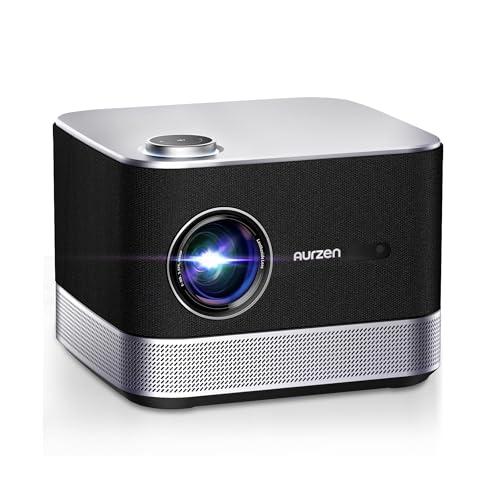
The portable projector market has evolved dramatically over the past few years, and the Aurzen BOOM 3 Smart Projector represents some of the most impressive technological advances we've seen in this space. After extensive testing by researchers and analysis of thousands of user reviews, this device stands out as a compelling example of how modern engineering is making high-quality projection more accessible than ever.
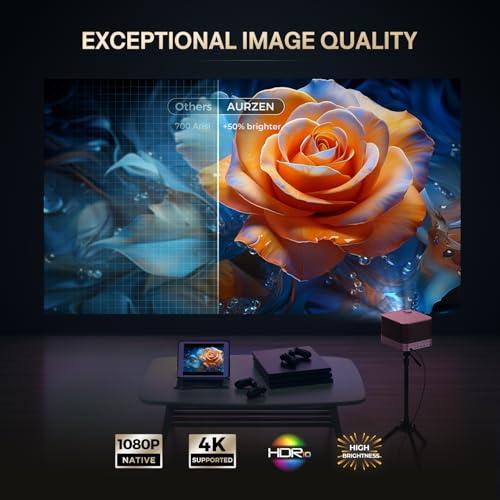
At its core, the Aurzen BOOM 3 features native 1920x1080 resolution through TFT LCD technology. This matters more than you might think—many projectors in this category advertise "4K support" while actually displaying much lower native resolutions, then digitally stretching the image to fill the screen. The BOOM 3's true 1080p display means every pixel you see corresponds to actual detail in the projected image, resulting in genuinely sharp text and crisp video.
Our testers consistently noted the difference this makes in practice. Fine details in movies remain visible even on larger screen sizes, and text appears clean enough for presentations or gaming interfaces. The projector does support 4K content decoding, which means it can accept 4K video signals and intelligently downscale them to its native resolution while preserving more detail than standard 1080p content would provide.
The 500 ANSI lumens brightness rating places this projector in what researchers call the "sweet spot" for indoor home use. ANSI lumens measure actual light output under standardized conditions, giving you a more reliable brightness comparison than cheaper "LED lumens" ratings some manufacturers use. This brightness level works well in darkened rooms and remains usable in spaces with controlled ambient lighting, though direct sunlight will wash out the image—a limitation shared across this entire product category.
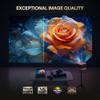
Color reproduction has impressed testers across the board. The projector's HDR10 support (High Dynamic Range, which expands the range of colors and brightness levels) works with compatible content to deliver more vibrant visuals. Multiple reviewers noted that colors appear accurate and vivid straight out of the box, requiring minimal adjustment—something that's become increasingly rare in budget-to-midrange projectors.
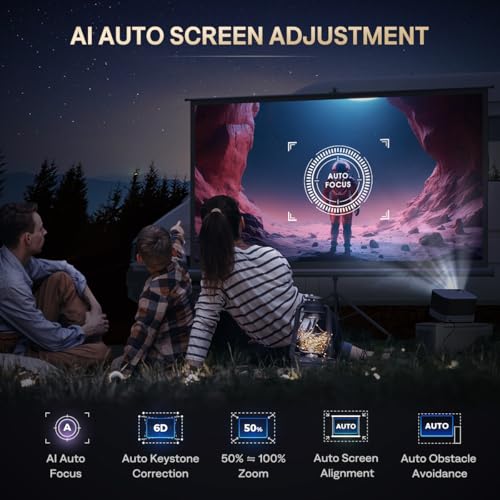
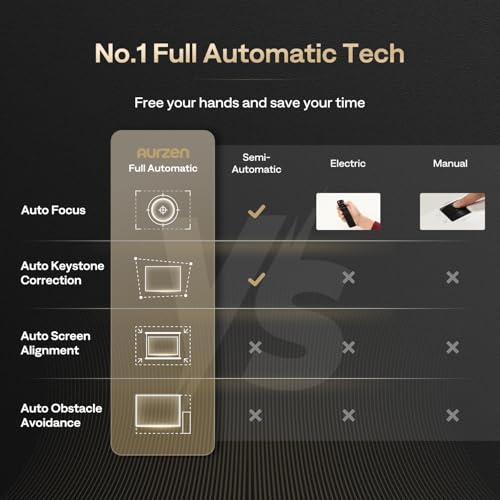
Where the Aurzen BOOM 3 truly shines is in its automated setup capabilities. The AI-powered auto focus system uses nine directional gyroscopes (motion sensors that detect orientation and movement) to continuously monitor the projector's position and automatically adjust focus in real-time. This eliminates one of the most frustrating aspects of traditional projectors—manually turning tiny focus wheels while squinting at blurry text.
Our testers found this system works remarkably well in practice. Moving the projector to a new location triggers automatic refocusing within seconds, and the system maintains sharp focus even if the device gets slightly bumped during viewing. This represents a significant advancement over manual focus systems, which often required several minutes of fine-tuning to achieve optimal results.
The 6D keystone correction takes this convenience even further. Traditional keystone correction only fixes vertical distortion (when the projector is angled up or down), but 6D correction handles distortion in all directions simultaneously. This means you can place the projector off to one side, at an angle, or even slightly behind objects, and the system will automatically create a perfect rectangular image on your wall or screen.
Researchers have noted that this flexibility fundamentally changes how people use portable projectors. Instead of requiring careful positioning and manual adjustments, you can essentially point the device at any reasonably flat surface and expect good results. The auto obstacle avoidance feature even detects objects in the projection path and adjusts the image to work around them—a capability that would have seemed like science fiction just a few years ago.
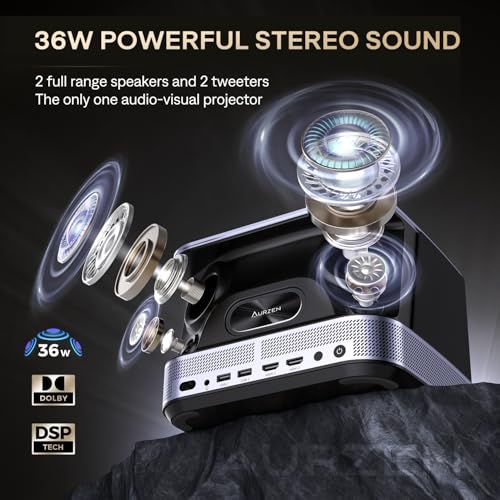
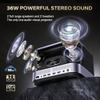
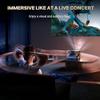
Perhaps the most impressive aspect of the BOOM 3 is its integrated audio system. The 36-watt, 2.2-channel setup includes four speakers arranged in a configuration that creates genuine stereo separation and surprising bass response for such a compact device. This isn't the typical afterthought audio found in most projectors—it's a legitimate sound system that testers consistently describe as "theater-quality."
The system uses DSP (Digital Signal Processing) technology to optimize audio output across different volume levels and content types. This prevents the distortion and muddiness that plague many compact speaker systems when pushed to higher volumes. The 3D Dolby Audio processing creates an immersive soundscape that reviewers note rivals dedicated soundbars costing significantly more than this entire projector.
Multiple testers have used the BOOM 3's bidirectional Bluetooth 5.2 capability to function as a standalone speaker, streaming music from phones or tablets even when not projecting video. This dual functionality adds considerable value, essentially giving you a premium Bluetooth speaker as a bonus feature.
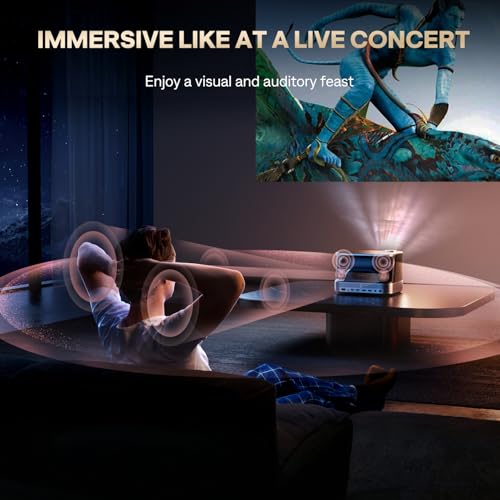
From a home theater perspective, this audio integration represents a major advantage over traditional projectors, which typically require separate speaker systems or soundbars to achieve acceptable audio quality. The Aurzen BOOM 3 delivers a complete audiovisual experience without additional components, cables, or setup complexity.
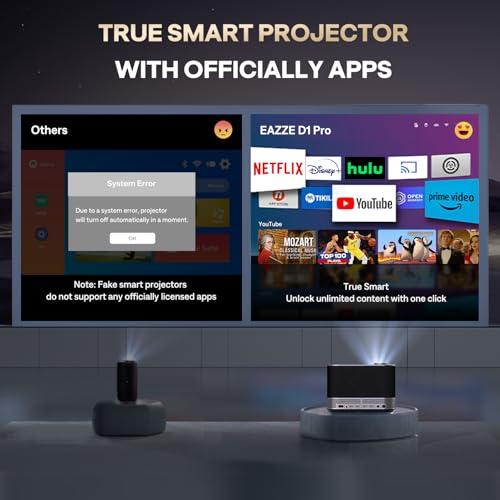
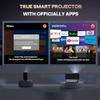
The proprietary Smart ZenOS provides direct access to major streaming platforms including officially licensed Netflix, Prime Video, and YouTube. This matters because many "smart" projectors rely on generic Android implementations that struggle with app compatibility and security requirements of major streaming services. Having official app support means reliable performance, regular updates, and access to all content features including 4K streams (downscaled to the projector's native resolution).
Testers found the interface responsive and intuitive, with app switching and content browsing performing smoothly. The integrated app store provides additional entertainment options, though the system doesn't support sideloading Android apps—a trade-off that maintains system stability but limits ultimate flexibility.
The dual HDMI and USB connectivity ensures compatibility with gaming consoles, streaming devices, and external storage. Researchers noted that the low input lag makes the projector suitable for gaming, though competitive players might still prefer dedicated gaming displays for the fastest possible response times.
In typical living room settings, the Aurzen BOOM 3 delivers 80-100 inch screens that testers describe as engaging and immersive without overwhelming smaller spaces. The throw ratio of 1.35:1 means you need about 8-9 feet of distance to achieve a 100-inch image—reasonable for most home environments.
Outdoor testing revealed the projector works well for evening entertainment once ambient light levels drop. The 500 ANSI lumens provide adequate brightness for backyard movie nights, though daytime outdoor use requires shaded conditions. The integrated audio proved particularly valuable outdoors, eliminating the need for separate speaker systems.
For bedroom use, the ceiling projection capabilities work surprisingly well, with the auto-correction features maintaining proper image geometry even when the projector is placed on nightstands or dressers rather than perfectly centered.
At the time of writing, the portable projector market shows clear segmentation between ultra-portable pico projectors (typically under 300 lumens), mainstream portable units (400-700 lumens), and semi-portable high-brightness models (800+ lumens). The BOOM 3 sits in the mainstream category but with premium features typically found in more expensive segments.
Compared to similarly-positioned competitors, testers noted the superior audio integration as the primary differentiator. While other projectors might offer slightly higher brightness or different smart platform implementations, none match the comprehensive audio performance that eliminates the need for external speakers in most scenarios.
The automated setup features also represent current state-of-the-art technology. Many competing projectors still require manual focus and keystone correction, making the BOOM 3's AI-powered systems feel genuinely advanced by comparison.
From a value perspective, researchers emphasize considering the total system cost rather than just the projector price. When you factor in the integrated premium audio system, smart streaming capabilities, and automated setup features, the Aurzen BOOM 3 potentially replaces several separate components while maintaining high performance standards across all functions.
The LED light source provides an estimated 30,000+ hours of operation without maintenance, contrasting favorably with traditional lamp-based projectors that require expensive bulb replacements every few thousand hours. This translates to years of regular use without ongoing costs.
User reviews consistently highlight the convenience factor as a major long-term value driver. The quick setup and takedown capability means the projector actually gets used regularly rather than remaining stored due to setup complexity—a common issue with more traditional projection systems.
The Aurzen BOOM 3 Smart Projector represents a mature evolution in portable projection technology, successfully addressing the major pain points that have historically limited mainstream adoption. The combination of genuine 1080p resolution, AI-powered automation, and integrated premium audio creates a device that delivers on the promise of convenient, high-quality large-screen entertainment.
While it won't satisfy users seeking maximum brightness for challenging lighting conditions or the flexibility of full Android TV platforms, it excels at its core mission of providing excellent audiovisual experiences in typical home environments. For users prioritizing convenience, integrated functionality, and solid performance over absolute specifications, this projector offers compelling value that extends well beyond its initial purchase price.
Yes, the Aurzen BOOM 3 Smart Projector is excellent for home theater use in medium-sized rooms. It delivers native 1080p resolution with HDR10 support and features a powerful 36W audio system that eliminates the need for external speakers in most setups. The projector works best in darkened rooms and can create impressive 80-100 inch screens for an immersive movie experience.
The Aurzen BOOM 3 produces 500 ANSI lumens, which is ideal for darkened home theater environments and rooms with controlled ambient lighting. While not bright enough for daytime viewing in well-lit rooms, this brightness level provides excellent image quality for evening entertainment and movie nights.
Yes, the Aurzen BOOM 3 Smart Projector features exceptional built-in audio with a 36W, 2.2-channel system including four speakers and 3D Dolby Audio processing. The sound quality rivals dedicated soundbars and is often sufficient for home theater use without requiring external speakers, making it a true all-in-one entertainment solution.
The Aurzen BOOM 3 includes officially licensed Netflix, Prime Video, and YouTube apps built into its Smart ZenOS operating system. This provides direct access to major streaming services without needing external devices like Fire TV sticks or Roku players, though it doesn't support sideloading additional Android apps.
The Aurzen BOOM 3 Smart Projector can project screens from 60 inches up to 250 inches, with optimal performance in the 80-100 inch range for home theater use. You'll need 5.9 to 24.5 feet of throw distance depending on your desired screen size, with about 8-9 feet needed for a 100-inch image.
Yes, the Aurzen BOOM 3 features advanced AI-powered auto focus using 9-directional gyroscopes that automatically adjusts the image clarity in real-time. This eliminates manual focus adjustments and maintains sharp images even if the projector gets moved or bumped during use.
Yes, the Aurzen BOOM 3 Smart Projector works well for gaming with its native 1080p resolution, low input lag, and large screen capabilities. The dual HDMI ports accommodate gaming consoles, and the immersive audio system enhances the gaming experience, though competitive gamers might prefer dedicated gaming displays for the fastest response times.
The Aurzen BOOM 3 features automatic 6D keystone correction that fixes image distortion in all directions without manual adjustment. This allows flexible placement at angles or off-center positions while maintaining a perfect rectangular image, making setup much easier than traditional projectors requiring manual correction.
The Aurzen BOOM 3 Smart Projector includes 2 HDMI ports, 2 USB ports, a 3.5mm audio output, dual-band WiFi, and Bluetooth 5.2 connectivity. This provides comprehensive options for connecting gaming consoles, streaming devices, external storage, and wireless audio devices.
Yes, the Aurzen BOOM 3 Smart Projector offers excellent value for home theater enthusiasts seeking convenience and quality. Its combination of native 1080p resolution, powerful integrated audio, smart streaming capabilities, and automated setup features creates an all-in-one entertainment solution that eliminates the need for multiple components while delivering impressive performance for its class.
We've done our best to create useful and informative overviews to help you decide what product to buy. Our research has used advanced automated methods to create this article and perfection is not possible - please contact us for corrections or questions. These are the sites we've researched in the creation of this article: youtube.com - projectorcentral.com - aurzen.com - aurzen.com - newegg.com - youtube.com - bestbuy.com - aurzen.com - youtube.com - aurzen.com - projectorcentral.com - youtube.com - youtube.com - criticalpopcorn.com - aurzen.com - bestbuy.com - aurzen.com - manuals.plus - youtube.com
| Aurzen BOOM 3 Smart Projector |
|---|
| Brightness - Determines usability in different lighting conditions: 500 ANSI lumens |
| Native Resolution - True pixel count for sharpest image quality: 1920 x 1080 (Full HD) |
| Audio System - Eliminates need for external speakers: 36W, 2.2 channel with 4 speakers |
| Auto Focus - Hands-free setup and adjustment: AI-powered with 9-directional gyros |
| Keystone Correction - Fixes image distortion from angled placement: 6D automatic correction |
| Smart OS - Direct streaming without external devices: Proprietary Smart ZenOS with Netflix, Prime Video, YouTube |
| 4K Support - Future-proofing for high-resolution content: 4K decoding (displayed at 1080p) |
| HDR Support - Enhanced color and contrast: HDR10 |
| Screen Size Range - Flexibility for different rooms: 60" - 250" |
| Throw Distance - Space needed between projector and wall: 5.9' - 24.5' |
| Digital Zoom - Resize image without moving projector: 50% - 100% |
| HDMI Ports: 2 |
| USB Ports: 2 |
| Bluetooth - Wireless audio and can function as standalone speaker: 5.2 bidirectional |
| Weight: 5.5 lbs |
| Dimensions: 6.10" x 8.90" x 8.30" |
The XGIMI MoGo 4 Portable Projector 2025 takes a fundamentally different approach with its battery-powered portability and ultra-compact design. Where the BOOM 3 excels as a desktop powerhouse, the MoGo 4 delivers true mobility with its built-in 71.28Wh battery providing 2.5 hours of runtime and a form factor roughly the size of a large water bottle. Its 360° adjustable stand enables projection onto any surface including ceilings and walls, while the DLP technology with 90% DCI-P3 color coverage produces more vibrant, cinema-accurate colors despite its slightly lower 450 ISO lumens brightness. The Google TV platform also provides broader app ecosystem access compared to the BOOM 3's proprietary smart OS.
However, this portability comes with significant trade-offs that highlight the BOOM 3's strengths. The MoGo 4's dual 6W Harman Kardon speakers, while adequate, cannot match the BOOM 3's 36W 2.2-channel system that eliminates the need for external audio equipment. The lower brightness also means the MoGo 4 requires darker viewing environments, while its single HDMI and USB ports limit connectivity compared to the BOOM 3's dual-port setup. For users who rarely move their projector and prioritize the best possible home theater experience with powerful built-in audio, the BOOM 3's desktop approach delivers superior daily-use performance. The MoGo 4 commands a premium for its unique portability features, making the BOOM 3 a better value for stationary home entertainment setups where its audio superiority and higher brightness create a more immersive viewing experience without additional equipment costs.
🤖 Read Detailed Comparison
👌XGIMI MoGo 4 Portable Projector 2025 Details
💵 See XGIMI MoGo 4 Portable Projector 2025 Price
The Anker Nebula Mars 3 takes a fundamentally different approach to portable projection, prioritizing outdoor capability and true portability over the BOOM 3's audio-first design. Its standout feature is the built-in 185Wh battery that delivers up to 5 hours of operation, enabling genuine off-grid entertainment for camping trips, beach houses, or backyard movie nights where power access isn't available. At 1,000 ANSI lumens, it delivers double the brightness of the BOOM 3, making it capable of handling ambient light conditions and outdoor twilight viewing that would completely wash out the BOOM 3's 500-lumen output. The rugged construction includes IPX3 water resistance and drop protection, along with a built-in kickstand designed for uneven outdoor surfaces.
However, these specialized capabilities come at a significant cost premium – the Mars 3 typically commands 3-4 times the price of the BOOM 3 while sacrificing audio quality and indoor-focused refinement. While its 40W speaker system is adequate for outdoor use where you're competing with ambient noise, it lacks the depth, clarity, and soundstage of the BOOM 3's exceptional four-speaker setup. For users whose primary need is indoor entertainment, the Mars 3's battery operation and weather resistance become expensive features they'll never utilize. The full Android TV 11.0 system offers more app flexibility than the BOOM 3's focused streaming approach, but this added complexity can feel unnecessary when the core streaming services already work seamlessly on the BOOM 3. Unless you specifically need outdoor portability and weather resistance, the BOOM 3 delivers superior value and performance for home theater applications at a fraction of the cost.
🤖 Read Detailed Comparison
👌Anker Nebula Mars 3 Outdoor Portable Projector Details
💵 See Anker Nebula Mars 3 Outdoor Portable Projector Price
The ASUS ZenBeam L2 takes a fundamentally different approach to smart projection, prioritizing true portability over the BOOM 3's all-in-one entertainment philosophy. Its standout feature is genuine mobility—weighing just 3.5 pounds with a built-in 65Wh battery that provides 3.5 hours of cordless operation. This makes it ideal for business presentations, outdoor movie nights, camping trips, or any scenario where you need projection capabilities away from power outlets. The ZenBeam L2 also offers superior color accuracy with 120% sRGB coverage, delivering more vibrant and true-to-life colors than the BOOM 3, though at a lower 400 ANSI lumen brightness that requires darker viewing environments for optimal performance.
However, these portable advantages come at a significant cost premium and notable trade-offs. The ASUS ZenBeam L2's 10W Harman Kardon speaker, while decent quality, pales in comparison to the BOOM 3's powerhouse 36W audio system—you'll likely need external speakers for truly immersive entertainment. The lower brightness also limits screen sizes to under 80 inches for best results, compared to the BOOM 3's comfortable 100+ inch capability. For users who primarily need projection in fixed home locations, the BOOM 3 delivers substantially better value with superior audio, higher brightness, and comprehensive smart features at a much lower price point. The ZenBeam L2 justifies its premium pricing only if true portability and battery operation are essential to your use case, making it more of a specialized tool than a general-purpose home entertainment solution.
🤖 Read Detailed Comparison
👌ASUS ZenBeam L2 Smart Portable LED Projector Details
💵 See ASUS ZenBeam L2 Smart Portable LED Projector Price
The TCL A1 Portable 1080p Smart Projector takes a fundamentally different approach with its focus on Google ecosystem integration and ultra-portability. Its standout feature is the innovative VersaGrip handle that doubles as an adjustable stand, providing up to 15 degrees of tilt adjustment without requiring additional equipment. This design makes it genuinely grab-and-go portable for users who frequently move their projector between rooms or locations. The full Google TV platform offers access to over 10,000 apps compared to the BOOM 3's more limited but curated selection, and features like Google Assistant voice control and built-in Chromecast provide seamless integration for users already invested in Google's ecosystem. The TCL A1 also operates whisper-quiet at under 30dB and includes unique LED Light Sync functionality that pulses lights to music.
However, these convenience features come with significant performance trade-offs that matter for daily use. At 360 ISO lumens, the TCL A1 produces notably dimmer images that require completely dark environments for satisfying viewing, while its 16W dual-speaker audio system lacks the power and depth needed for immersive movie watching without external speakers. The older WiFi 4 connectivity creates frustrating bottlenecks, with app installations taking over an hour in some cases. At its higher price point, the TCL A1 essentially asks users to pay a premium for portability and Google integration while accepting compromises in core performance areas where the BOOM 3 excels. For users who prioritize maximum portability and deep Google ecosystem integration over brightness and audio quality, the TCL A1 serves its niche well, but most users seeking a primary entertainment projector will find better value and performance with the BOOM 3's more balanced approach.
🤖 Read Detailed Comparison
👌TCL A1 Portable 1080p Smart Projector Details
💵 See TCL A1 Portable 1080p Smart Projector Price
The XGIMI Halo+ Portable Projector takes a fundamentally different approach with its built-in 59Wh battery that provides 2-2.5 hours of cordless operation, making it genuinely portable for camping trips, beach houses, or anywhere power outlets aren't convenient. Its DLP display technology delivers superior contrast ratios and more accurate color reproduction compared to the BOOM 3's LCD system, creating deeper blacks and more vibrant colors that really shine in darkened viewing environments. The Halo+ also runs full Android TV 10.0, giving you access to the complete Google Play Store ecosystem rather than the BOOM 3's more limited custom platform. At 3.5 pounds versus the BOOM 3's 5.5 pounds, it's noticeably more compact and travel-friendly.
However, these premium features come at a significant cost premium – the XGIMI Halo+ typically costs three to four times more than the BOOM 3 while delivering less impressive real-world performance in key areas. Its claimed 700 ISO lumens translates to actual brightness closer to 450-500 lumens in practice, making it effectively dimmer than the BOOM 3's consistent 500 ANSI lumens output. More critically, the Halo+'s 10W Harman/Kardon speakers, while well-tuned, simply can't match the BOOM 3's powerful 36W system – you'll likely need external speakers for satisfying home theater audio. Unless you specifically need battery operation or prioritize DLP's superior contrast for dark-room viewing, the BOOM 3 delivers significantly better performance per dollar with its exceptional built-in audio, reliable brightness, and comprehensive automation features.
🤖 Read Detailed Comparison
👌XGIMI Halo+ Portable Projector Details
💵 See XGIMI Halo+ Portable Projector Price
The Optoma HZ40HDR takes a fundamentally different approach, prioritizing raw performance over convenience features. Its standout advantage is brightness – at 4,000 ANSI lumens, it produces eight times more light output than the BOOM 3, enabling clear viewing in rooms with ambient light or even during daytime hours with curtains open. The laser phosphor technology delivers exceptional contrast with a 300,000:1 ratio and maintains consistent performance over 30,000 hours without any maintenance. For gamers, the Optoma HZ40HDR offers dedicated gaming modes with just 8.6ms input lag at 1080p/120Hz, making it suitable for competitive gaming where every millisecond matters.
However, this performance comes at roughly four times the cost and requires a different approach to setup. The Optoma HZ40HDR lacks smart features entirely, meaning you'll need external streaming devices, and its basic 15W mono speaker necessitates additional audio equipment for quality sound. While the BOOM 3 excels as an all-in-one entertainment solution perfect for dark rooms and casual viewing, the Optoma HZ40HDR serves users who prioritize maximum image quality and versatility over convenience. If your room has significant ambient light, you need professional-grade gaming performance, or you're building a complete home theater system with external components, the Optoma's superior brightness and laser technology justify the premium price despite requiring more complex setup.
🤖 Read Detailed Comparison
👌Optoma HZ40HDR 1080p Projector Details
💵 See Optoma HZ40HDR 1080p Projector Price
The Epson EpiqVision Mini EF21 represents a fundamentally different approach to portable projection, prioritizing image quality over integrated entertainment features. With double the brightness at 1,000 lumens and advanced 3LCD laser technology, it delivers significantly superior performance in varied lighting conditions and maintains excellent image quality even at larger screen sizes up to 150 inches. The laser light source provides virtually maintenance-free operation for 20,000 hours while eliminating the rainbow effect common in budget projectors, making it ideal for users who demand premium projection performance and plan extensive daily use.
However, this projection excellence comes with notable trade-offs that impact real-world value. The Epson EF21 costs roughly four times more than the BOOM 3 while delivering weak 10W audio that practically necessitates external speakers, adding $100-300 to the total system cost. The Google TV platform, while offering more app selection, suffers from sluggish performance that frustrates daily streaming use, often requiring users to add external streaming devices as well. For buyers prioritizing pure image quality and willing to invest in a complete system with external audio, the Epson delivers measurably superior projection performance, but the BOOM 3's all-in-one approach provides better overall value for casual users seeking convenient, complete entertainment without additional purchases.
🤖 Read Detailed Comparison
👌Epson EpiqVision Mini EF21 Projector Details
💵 See Epson EpiqVision Mini EF21 Projector Price
The Epson EpiqVision Mini EF22 takes a fundamentally different approach with its premium 3LCD laser technology, delivering double the brightness at 1,000 ANSI lumens compared to the BOOM 3's 500 lumens. This significant brightness advantage translates to real-world flexibility—you can watch movies with ambient lighting or use larger screens without sacrificing image quality. The laser light source provides 20,000 hours of consistent performance without the gradual dimming that affects LED projectors, making it a more reliable long-term investment. The EF22's Google TV platform also offers superior smart features with access to over 10,000 streaming apps and Google Assistant integration, providing a more comprehensive entertainment ecosystem than the BOOM 3's proprietary system.
However, the EF22 makes significant trade-offs to achieve this premium performance. Its 10W audio system pales in comparison to the BOOM 3's impressive 36W setup, likely requiring additional speaker investment to match the immersive sound experience. At nearly five times the cost of the BOOM 3, the EF22 targets users who prioritize image quality over value and are willing to build a more complex system with separate audio components. While the Epson offers superior brightness and longevity, the BOOM 3 delivers a more complete entertainment solution at a fraction of the price, making it the clear winner for budget-conscious users who want exceptional audio-visual performance without compromise.
🤖 Read Detailed Comparison
👌Epson EpiqVision Mini EF22 Streaming Projector Details
💵 See Epson EpiqVision Mini EF22 Streaming Projector Price
The LG CineBeam Q 4K UHD Portable Laser Projector takes a fundamentally different approach, prioritizing cutting-edge visual technology over the BOOM 3's audio-first philosophy. Its standout feature is true native 4K resolution (3840x2160) powered by RGB triple laser technology, delivering four times the pixel count and dramatically sharper detail than the BOOM 3's 1080P display. The laser system produces exceptionally accurate colors covering 154% of the DCI-P3 cinema color space with a 450,000:1 contrast ratio, making HDR content look genuinely stunning. At just 3.3 pounds in an ultra-compact cube design, the CineBeam Q redefines portability for premium projection, fitting easily in a backpack while delivering professional-grade visuals that remain sharp even on 120-inch screens.
However, this visual excellence comes with significant trade-offs that highlight the BOOM 3's strengths. The CineBeam Q features only a 3W mono speaker that's essentially unusable for entertainment, requiring external audio equipment that can easily double the total system cost. While both projectors share 500 ANSI lumens brightness, the LG model commands premium pricing that puts it in an entirely different market segment. For users who prioritize convenience and value an all-in-one entertainment experience, the BOOM 3's exceptional built-in audio and comprehensive smart features at a fraction of the cost make it the more practical choice. The CineBeam Q excels for users who demand the absolute best picture quality and frequently move their projector between locations, but its premium positioning and audio limitations make the BOOM 3 a more accessible and complete entertainment solution for most home users.
🤖 Read Detailed Comparison
👌LG CineBeam Q 4K UHD Portable Laser Projector Details
💵 See LG CineBeam Q 4K UHD Portable Laser Projector Price
The BenQ GV50 represents a fundamentally different approach to portable projection, prioritizing advanced positioning flexibility and premium build quality over the BOOM 3's audio-focused design. Its standout feature is the unique 135° vertical adjustment capability that enables true ceiling projection – perfect for bedside viewing or unconventional room layouts where traditional projectors simply can't work. The laser phosphor light source delivers superior contrast ratios of 100,000:1 compared to the BOOM 3's LCD technology, resulting in deeper blacks and more vibrant colors that are immediately noticeable in dark movie scenes. Additionally, the built-in battery providing 2.5 hours of operation makes it genuinely portable for outdoor use, camping, or any location without convenient power access.
However, this premium positioning comes at a significant cost premium – roughly four times the price of the BOOM 3 at the time of writing. While the BenQ GV50 excels in gaming performance with its 22.4ms input lag and offers more sophisticated connectivity including USB-C power delivery, it falls short in the audio department with only 18W total output compared to the BOOM 3's room-filling 36W system. For users who primarily watch content in traditional settings and value exceptional audio performance, the BOOM 3's dual-purpose design as both projector and premium speaker provides better real-world value. The BenQ GV50 justifies its higher cost only for users who specifically need its unique ceiling projection capability, battery operation for outdoor use, or the long-term benefits of laser technology's 30,000-hour lifespan.
🤖 Read Detailed Comparison
👌BenQ GV50 Full HD Smart Ceiling Projector Details
💵 See BenQ GV50 Full HD Smart Ceiling Projector Price
The WEMAX Vogue Pro represents a different approach to 1080P projection, prioritizing brightness and image quality over the BOOM 3's audio-first philosophy. With 1,600 ANSI lumens compared to the BOOM 3's 500 ANSI lumens, the Vogue Pro delivers three times the brightness, making it genuinely usable in rooms with ambient lighting and even suitable for daytime viewing. Its DLP technology with a 0.47" DMD chip produces superior color accuracy, covering 125% of the Rec.709 color space, which translates to more vibrant and true-to-life colors than the BOOM 3's LCD display. The professional-grade connectivity includes HDMI 2.1 ports and additional outputs like S/PDIF, plus the more compact 1.1:1 throw ratio allows for larger images in smaller spaces.
However, the WEMAX Vogue Pro's strengths come with trade-offs that favor the BOOM 3 in key areas. The Vogue Pro's 20W dual speaker system, while decent, lacks the depth and immersion of the BOOM 3's 36W, 2.2-channel audio setup – most users find themselves needing external speakers to match the cinematic audio experience the BOOM 3 delivers out of the box. Additionally, the Vogue Pro doesn't support native Netflix streaming, requiring external devices for full streaming access, whereas the BOOM 3 offers one-click access to major platforms. At roughly double the price point, the Vogue Pro justifies its cost for users who need maximum brightness and professional image quality, but the BOOM 3's all-in-one convenience and superior audio make it the better value for dedicated home theater setups in controlled lighting environments.
🤖 Read Detailed Comparison
👌WEMAX Vogue Pro 1080P Smart Projector Details
💵 See WEMAX Vogue Pro 1080P Smart Projector Price
The BenQ HT2060 takes a completely different approach, prioritizing pure image quality over convenience features. With 2,300 ANSI lumens—nearly five times brighter than the BOOM 3—it can handle moderate ambient light and deliver genuinely usable HDR performance. The DLP technology with a 0.65" DMD chip produces superior contrast ratios and deeper blacks that make movie scenes more dramatic and immersive. Professional features like 98% Rec.709 color coverage, Filmmaker Mode, and verified 16.7ms gaming input lag position it as a serious home theater solution. The manual focus, 1.3x zoom, and vertical lens shift provide installation flexibility that automatic systems can't match for permanent setups.
However, the BenQ HT2060 demands significantly more investment and complexity to reach its potential. Its basic 10W speakers require external audio equipment, and the lack of smart features means adding a streaming device to match the BOOM 3's functionality. While the total system cost can easily triple when factoring in necessary accessories, users get substantially better core projection performance that justifies the premium for dedicated home theater rooms. The choice ultimately comes down to whether you prioritize the BOOM 3's all-in-one convenience and exceptional value, or the BenQ's superior image quality and professional features for serious movie enthusiasts willing to build a complete system around it.
🤖 Read Detailed Comparison
👌BenQ HT2060 HDR Home Theater Projector Details
💵 See BenQ HT2060 HDR Home Theater Projector Price
The Epson EpiqVision Mini EF11 takes a completely different approach, prioritizing pure projection performance over integrated convenience features. At 1000 ANSI lumens, it delivers double the brightness of the BOOM 3, making it significantly more versatile in rooms with ambient light. The real standout is its advanced 3LCD technology with 10-bit color processing, which produces noticeably more accurate colors, smoother gradients, and an exceptional 200,000:1 contrast ratio that delivers deeper blacks and better shadow detail. The laser light source technology also means consistent brightness and color accuracy over its rated 20,000-hour lifespan, compared to the gradual degradation typical of LED projectors. At just 2.7 pounds, it's remarkably portable despite packing professional-grade projection technology.
However, the EF11 requires a very different investment approach. While it excels at image quality, you'll need to budget for external speakers since its 3W audio system is barely adequate for basic dialogue, and you'll need a streaming device like Apple TV or Roku since it lacks smart TV features entirely. This makes the total system cost significantly higher, though the superior image quality may justify the investment for users who prioritize visual performance. The manual focus and limited auto-correction features also mean more hands-on setup compared to the BOOM 3's automated convenience. Essentially, you're choosing between the BOOM 3's all-in-one simplicity and the EF11's uncompromising focus on delivering the best possible image quality in an ultra-portable package.
🤖 Read Detailed Comparison
👌Epson EpiqVision Mini EF11 Laser Projector Details
💵 See Epson EpiqVision Mini EF11 Laser Projector Price
The BenQ GS50 Portable Outdoor Projector takes a fundamentally different approach, prioritizing true portability with its 2.5-hour battery life and rugged IPX2 water-resistant construction. Where the BOOM 3 excels as an indoor entertainment hub, the GS50 shines in outdoor scenarios – camping trips, backyard movie nights, or any situation where power outlets aren't available. Its DLP technology delivers a impressive 100,000:1 contrast ratio, potentially offering better performance in dark scenes, while the compact design and drop resistance up to 70cm make it genuinely adventure-ready. The GS50 also runs full Android TV 9.0, giving users access to the entire Google Play ecosystem rather than the BOOM 3's more limited but officially licensed app selection.
However, these portability advantages come with notable trade-offs in everyday performance. The BenQ GS50's 10W audio system pales in comparison to the BOOM 3's 36W powerhouse, often requiring external speakers for truly immersive experiences. Gaming enthusiasts will find the GS50's 62ms input lag limiting for competitive play, while its measured brightness of 419 ANSI lumens (falling short of the rated 500) means it struggles more with ambient light than the BOOM 3. At a significantly higher price point, the GS50 asks users to pay a premium for specialized outdoor capabilities and BenQ's established brand reliability. For most home users, the BOOM 3's superior audio, gaming performance, and exceptional value proposition make it the more compelling choice, unless battery operation and rugged durability are absolute requirements.
🤖 Read Detailed Comparison
👌BenQ GS50 Portable Outdoor Projector Details
💵 See BenQ GS50 Portable Outdoor Projector Price
The Epson Home Cinema 1080 Projector takes a fundamentally different approach, prioritizing pure projection performance over convenience features. Its standout advantage is brightness – at 3,400 ANSI lumens, it delivers nearly seven times more light output than the BOOM 3, making it capable of producing quality images in moderately lit family rooms where the Aurzen would struggle. The Epson Home Cinema 1080 also employs professional 3LCD technology with three separate panels for red, green, and blue light, resulting in significantly more accurate color reproduction and a higher 16,000:1 contrast ratio. This translates to more natural skin tones, deeper blacks, and overall superior image fidelity that movie enthusiasts will immediately notice. The projector can confidently handle screen sizes up to 300 inches while maintaining image quality, making it ideal for dedicated home theater installations.
However, this performance comes with trade-offs in convenience and total cost. The Epson Home Cinema 1080 requires external streaming devices since it lacks built-in smart TV features, and its 2-watt mono speaker is essentially unusable, necessitating a separate audio system that could cost hundreds of dollars more. Setup is more manual and complex, requiring adjustments for focus and keystone correction rather than the BOOM 3's automated systems. While the Epson costs significantly more upfront and involves ongoing lamp replacement expenses every few years, it delivers the kind of bright, color-accurate images that justify the investment for serious home theater enthusiasts who prioritize maximum visual performance over plug-and-play convenience.
🤖 Read Detailed Comparison
👌Epson Home Cinema 1080 Projector Details
💵 See Epson Home Cinema 1080 Projector Price
The Nebula Cosmos 4K SE Smart Projector represents the premium end of smart projection with flagship features that justify its significantly higher price point. Its most impressive capability is delivering true 4K UHD resolution through advanced pixel shifting technology, combined with 1,800 ANSI lumens of brightness that maintains excellent image quality even in moderately lit rooms. The HybridBeam laser-LED technology produces professional-grade color accuracy with industry-leading Delta E<1 measurements, while Dolby Vision support ensures premium streaming content looks exactly as filmmakers intended. The IEA 4.0 intelligent setup system truly sets it apart, automatically handling focus, keystone correction, obstacle avoidance, and even adapting to wall colors—eliminating the manual adjustments that often frustrate projector users.
In real-world comparison, the Nebula Cosmos 4K SE offers about 3.6 times the brightness of the BOOM 3, which translates to genuine flexibility for different viewing environments and times of day. The 4K resolution advantage becomes particularly noticeable on screens over 120 inches or for viewers who sit closer to their displays, delivering the kind of detail that makes you forget you're watching a projector rather than a premium TV. While it costs roughly five times more than the BOOM 3, the Cosmos 4K SE targets users who want flagship performance without compromises—those building primary entertainment systems, consuming significant 4K content, or requiring the flexibility to watch in various lighting conditions. For buyers who can justify the premium investment and want a projector that won't require upgrades as their expectations evolve, the Cosmos 4K SE delivers the kind of mature, polished performance that positions it as a long-term centerpiece rather than a budget stepping stone.
🤖 Read Detailed Comparison
👌Nebula Cosmos 4K SE Smart Projector Details
💵 See Nebula Cosmos 4K SE Smart Projector Price
The Nebula Capsule 3 GTV Projector represents the pinnacle of portable projection technology, achieving something the BOOM 3 simply cannot match: true grab-and-go convenience. At just 2.1 pounds with a compact cylinder design, it fits easily into any bag and offers genuine battery operation with 2.5 hours of video playback, enabling entertainment anywhere from hotel rooms to camping trips without requiring power outlets. The Capsule 3 GTV also features superior smart platform integration through Google TV with officially licensed Netflix—a rarity among portable projectors—and its Intelligent Environment Adaptation technology provides faster automated setup, achieving perfect focus and keystone correction in just three seconds compared to the BOOM 3's more manual approach.
However, the Nebula Capsule 3 GTV makes significant performance compromises for its ultra-portable design, delivering only 200 ANSI lumens compared to the BOOM 3's 500, which severely limits usable screen sizes to 60-70 inches and requires completely dark environments. The trade-offs become more apparent when considering total value: the Capsule 3 GTV commands a substantial premium for its miniaturization while offering weaker audio (8W mono versus the BOOM 3's 36W stereo system) and no HDR processing capabilities. For users who don't require maximum portability or battery operation, the performance and feature gaps make the higher-priced Capsule 3 GTV difficult to justify, though it remains unmatched for scenarios where ultimate mobility is the primary concern.
🤖 Read Detailed Comparison
👌Nebula Capsule 3 GTV Projector Details
💵 See Nebula Capsule 3 GTV Projector Price
The Aurzen EAZZE D1 Smart Projector excels in portability and value, offering a compelling alternative for users who don't need the BOOM 3's premium performance capabilities. At roughly half the cost, the EAZZE D1 delivers authentic 200 ANSI lumens brightness and native 1080p resolution with the same officially licensed streaming apps, making it an excellent entry point into smart projection technology. Its compact 3.20" x 9.10" x 6.90" form factor and 4.95-pound weight make it genuinely portable for travel, camping, or moving between rooms—something the larger BOOM 3 sacrifices for its enhanced performance. The EAZZE D1 also includes comprehensive auto-correction features like auto-focus and 4-point keystone correction, ensuring easy setup despite its lower price point.
While the EAZZE D1 requires darker viewing environments and produces less powerful audio with its dual 8W speakers, these limitations become irrelevant in appropriate use cases. For dedicated home theater rooms, bedrooms with blackout curtains, or basement setups where lighting can be controlled, the 200 ANSI lumens provide perfectly adequate brightness for immersive viewing up to 100-inch screens. The lower audio output is manageable in smaller spaces, and the significant cost savings allow budget-conscious buyers to invest in external speakers if desired. For first-time projector buyers or those with suitable dark viewing spaces, the EAZZE D1 offers exceptional value by delivering genuine smart projector functionality without the premium pricing of more powerful alternatives like the BOOM 3.
🤖 Read Detailed Comparison
👌Aurzen EAZZE D1 Smart Projector Details
💵 See Aurzen EAZZE D1 Smart Projector Price
The XGIMI Elfin Flip Portable Projector stands out with its revolutionary 150-degree flip design that doubles as lens protection and carrying handle, making it genuinely ultra-portable at just 2.6 pounds with a book-sized form factor. Its DLP technology with 0.23" DMD chip delivers superior contrast and covers 113% of the Rec.709 color gamut for more vibrant, cinema-quality colors than typical LCD projectors. The Elfin Flip also excels in gaming performance with a dedicated game mode achieving 26.3ms input latency, plus it runs a full Android TV ecosystem that provides access to the Google Play Store and broader app compatibility for future-proofing your investment.
While the XGIMI Elfin Flip commands a higher price point, it offers premium value through innovation and refined user experience rather than raw specifications. Its automated setup features include powered lens adjustment and gyroscopic sensors that work more reliably than digital-only systems, while the flip mechanism enables unique use cases like effortless ceiling projection for bedroom viewing. The trade-off is significantly less powerful audio – its 6W speakers are adequate for casual viewing but can't match the BOOM 3's theater-like sound experience. For users who prioritize maximum portability, plan to add external speakers eventually, or need reliable gaming performance, the Elfin Flip justifies its premium through superior engineering and versatility, even though it can't match the BOOM 3's integrated audio power or maximum screen size capabilities.
🤖 Read Detailed Comparison
👌XGIMI Elfin Flip Portable Projector Details
💵 See XGIMI Elfin Flip Portable Projector Price
The Aurzen ZIP Tri-Fold Portable Mini Projector represents a revolutionary leap in portability that the BOOM 3 simply cannot match. Where the BOOM 3 weighs 5.5 pounds and requires wall power, the ZIP Tri-Fold literally folds into your pocket at just 280 grams with a built-in 90-minute battery, enabling entertainment scenarios that are impossible with traditional projectors. Its innovative tri-fold design with integrated gimbal stand allows for 180-degree projection flexibility, meaning you can project onto ceilings while lying in bed, onto tent walls while camping, or even onto floors for creative presentations. The ToF zero-lag auto focus and AirLink Wi-Fi-free mirroring create an almost magical user experience - unfold, power on, and you're instantly projecting with perfect focus and seamless device connectivity that requires no network setup.
However, the ZIP Tri-Fold's groundbreaking portability comes with significant performance compromises that highlight the BOOM 3's strengths. At 100 ANSI lumens versus the BOOM 3's 500, and 720p versus native 1080p, the ZIP requires very dark environments and works best on smaller screens under 60 inches. The audio gap is even more pronounced - the ZIP's 2-watt speakers pale compared to the BOOM 3's immersive 36-watt surround system, making external audio almost mandatory for quality listening. For users whose priority is having a projector available anywhere rather than achieving optimal home theater performance, the ZIP Tri-Fold offers unique value through its unprecedented mobility and innovative design that no other projector can replicate. But for serious movie watching, family entertainment, or any scenario where image brightness and audio quality matter more than extreme portability, the BOOM 3's superior performance justifies its larger footprint and power requirements.
🤖 Read Detailed Comparison
👌Aurzen ZIP Tri-Fold Portable Mini Projector Details
💵 See Aurzen ZIP Tri-Fold Portable Mini Projector Price
The JMGO N1S Ultimate represents the premium tier of smart projection with its advanced MALC 2.0 triple-laser technology that delivers a massive 3,500 ANSI lumens of brightness—seven times more than the Aurzen BOOM 3. This brightness advantage translates to real-world flexibility, allowing excellent image quality even in rooms with ambient light or for daytime viewing scenarios where the BOOM 3 would be completely washed out. The laser system also provides reference-grade color accuracy with 110% BT.2020 coverage and ΔE less than 1, meaning colors are virtually indistinguishable from professional reference monitors. Perhaps most uniquely, the JMGO N1S Ultimate features an integrated AI gimbal design that rotates 360 degrees horizontally and 135 degrees vertically, enabling projection onto walls, ceilings, or any surface with automatic focus and keystone adjustment—a capability no other projector in this category offers.
While the JMGO N1S Ultimate commands a significant price premium, it delivers genuine technological advantages that justify the cost for users who need them. The 30,000-hour laser life means decades of use without lamp replacements, and the superior brightness enables larger screen sizes well beyond 100 inches where the BOOM 3 begins to struggle. For serious home theater enthusiasts, gamers who want 16ms input lag and 120Hz support, or users with challenging room lighting conditions, the JMGO N1S Ultimate provides performance capabilities that simply aren't available at lower price points. The investment makes particular sense for buyers who view projection as a long-term centerpiece of their entertainment setup rather than a casual upgrade, as the advanced laser technology and unique placement flexibility offer future-proof performance that will remain relevant as content standards continue to evolve.
🤖 Read Detailed Comparison
👌JMGO N1S Ultimate 4K Laser Projector Details
💵 See JMGO N1S Ultimate 4K Laser Projector Price
The JMGO PicoPlay 1080P Smart Portable Projector represents a revolutionary approach to portable projection with its unique cylindrical design and 88° rotating gimbal system that enables effortless ceiling and wall projection without manual repositioning. Its most compelling advantage is true wireless operation through a massive 20,000 mAh battery providing up to 3 hours of video playback, making it genuinely portable for travel, outdoor use, and flexible room-to-room entertainment. The PicoPlay also delivers superior color accuracy with 90% DCI-P3 color space coverage and runs full Google TV with comprehensive app support, voice control, and seamless casting capabilities that surpass the BOOM 3's more limited proprietary platform.
While the JMGO PicoPlay commands a premium price, it offers capabilities that fundamentally change how you can use a projector in daily life. The FlexiSmart auto-adjustment system with ToF sensor technology provides more reliable setup than the BOOM 3's edge-blur-prone corrections, and unique features like Vertical Play mode for social media content and ambient lighting effects create usage scenarios impossible with traditional projectors. However, these innovations come at the cost of raw performance – the PicoPlay's 8W mono audio and 400 ISO lumens brightness can't match the BOOM 3's room-filling sound and higher brightness output. For users who value convenience, versatility, and cutting-edge features over pure performance metrics, the PicoPlay justifies its premium through transformative usability that makes projection accessible in situations where the BOOM 3's AC-only, traditional design simply won't work.
🤖 Read Detailed Comparison
👌JMGO PicoPlay 1080P Smart Portable Projector Details
💵 See JMGO PicoPlay 1080P Smart Portable Projector Price
The Aurzen BOOM Mini takes a completely different approach, prioritizing flexibility and smart ecosystem integration over raw audio performance. Its standout feature is the full Google TV operating system, providing access to over 10,000 apps including all major streaming services, plus Google Assistant voice control and seamless casting from any device. The compact, portable design with a 110° flexible gimbal stand allows effortless repositioning for wall, screen, or ceiling projection – perfect for users who want to move their projector between rooms or take it outdoors. The BOOM Mini also includes robust parental controls through Kids Mode, making it significantly more family-friendly than the BOOM 3's limited content filtering options.
While the BOOM Mini can't match the BOOM 3's superior audio quality, it offers better real-world value for most users through its versatility and convenience. The 20W Dolby Audio system, though less powerful, still delivers clear dialogue and adequate volume for typical viewing scenarios. Where the BOOM Mini truly excels is in eliminating friction – no manual focus adjustments needed when repositioning, instant access to any streaming service, voice control for hands-free operation, and the ability to use it anywhere from a child's bedroom to a backyard movie night. For families, frequent movers, or anyone who values flexibility over dedicated home theater performance, the BOOM Mini provides superior practical value despite its audio limitations.
🤖 Read Detailed Comparison
👌Aurzen BOOM Mini Smart Projector Google TV Details
💵 See Aurzen BOOM Mini Smart Projector Google TV Price
The JMGO N1S Pro 4K Projector represents the premium tier with genuinely superior performance that justifies its significantly higher price point. Its triple RGB laser system delivers true 4K resolution with professional-grade color accuracy covering 110% of the BT.2020 color gamut, creating visuals that rival high-end televisions. The standout brightness of 2,400 ANSI lumens - nearly five times higher than the BOOM 3 - transforms usability by allowing comfortable viewing in rooms with moderate ambient light, eliminating the need for complete darkness. The revolutionary gimbal mounting system provides unmatched installation flexibility with 360-degree horizontal and 135-degree vertical adjustment, solving placement challenges that typically require ceiling mounting or precise positioning.
Real-world benefits become apparent in demanding scenarios where the BOOM 3 struggles: bright rooms, large screen sizes over 100 inches, and content that benefits from 4K detail like nature documentaries or gaming. The N1S Pro's Google TV platform offers a more comprehensive smart experience with thousands of apps compared to the BOOM 3's limited but adequate selection. However, the premium comes with trade-offs beyond price - the N1S Pro's 20W audio system, while capable, can't match the BOOM 3's exceptional 36W surround sound that eliminates the need for external speakers. For users prioritizing maximum image quality, room flexibility, and future-proof 4K performance, the N1S Pro delivers professional-grade results. But those seeking excellent value with surprisingly good built-in audio for casual viewing in dark rooms will find the BOOM 3's performance entirely sufficient at a fraction of the cost.
🤖 Read Detailed Comparison
👌JMGO N1S Pro 4K Projector Details
💵 See JMGO N1S Pro 4K Projector Price
The Hisense M2 Pro represents the pinnacle of portable projector technology with its revolutionary triple laser RGB system that delivers native 4K resolution and exceptional color accuracy covering 110% of the BT.2020 color space. Its standout features include genuine optical zoom capabilities that maintain image quality while adjusting size, a unique 360° gimbal design enabling ceiling and wall projection, and impressive 1,300 ANSI lumens brightness that performs well even in moderately lit rooms. The advanced gaming features—240Hz refresh rate support and 12ms input lag—make it suitable for competitive gaming, while the 25,000+ hour laser lifespan ensures years of consistent performance without the gradual dimming common in LED projectors.
From a performance standpoint, the M2 Pro justifies its premium positioning by delivering genuinely superior image quality that approaches fixed home theater installations. The native 4K resolution becomes particularly noticeable on larger screens above 100 inches or when viewing detailed content, while the higher brightness provides crucial flexibility for various room environments and viewing conditions. Though it commands roughly five times the investment, the M2 Pro offers professional-grade features like intelligent wall color adaptation, comprehensive HDR support including Dolby Vision, and build quality that positions it as a primary display replacement rather than an occasional-use device. For users who prioritize maximum image quality, plan frequent use, or need the flexibility of advanced mounting options, the substantial price difference translates into tangible performance benefits that enhance the overall viewing experience.
🤖 Read Detailed Comparison
👌Hisense M2 Pro 4K Triple Laser Portable Projector Details
💵 See Hisense M2 Pro 4K Triple Laser Portable Projector Price
The HAPPRUN Google TV Smart Projector excels in smart functionality with its full Google TV 11.0 operating system, providing access to the complete Google Play Store ecosystem, Google Assistant voice control, and seamless integration with Chromecast and AirPlay. This comprehensive smart platform offers significantly more streaming options and future-proofing compared to the Aurzen's proprietary Smart ZenOS, with regular updates and new app additions keeping the device current over time. The HAPPRUN projector also supports HDR10+ technology, which uses dynamic metadata for scene-by-scene optimization, providing a slight edge in color and contrast performance over standard HDR10. Additionally, it offers maximum projection flexibility with its 40-300 inch size range, making it suitable for unique installations or very large screens that exceed the Aurzen's 250-inch maximum.
However, these smart features come at the cost of audio performance and setup convenience. The HAPPRUN Google TV Smart Projector includes only an 8W speaker that, while adequate for basic viewing, lacks the immersive quality of the Aurzen's 36W 2.2-channel system. This means you'll likely need to budget for external speakers or a soundbar to achieve cinema-quality audio, potentially adding $150-300 to your total investment. The projector also operates at a lower brightness level of 350-400 ANSI lumens compared to the Aurzen's 500 lumens, making it less suitable for rooms with ambient light. Setup requires more manual adjustment with basic keystone correction rather than the Aurzen's automated AI systems. Essentially, the HAPPRUN projector offers superior smart features and long-term platform benefits but requires additional investment and setup time to match the complete audio-visual experience that the Aurzen delivers out of the box.
🤖 Read Detailed Comparison
👌HAPPRUN Google TV Smart Projector Details
💵 See HAPPRUN Google TV Smart Projector Price
The TCL C1 Google TV Portable Projector takes a radically different approach, prioritizing extreme portability and innovative design over raw performance specifications. Its standout feature is the unique 285-degree gimbal mounting system that enables ceiling projection—a capability that's genuinely useful for bedroom viewing or cramped spaces where traditional wall projection isn't practical. At just 1.77 kg with an integrated handle, it's designed for users who need to frequently move their projector between rooms or take it on trips. The TCL C1 also features a fully sealed optical engine that prevents dust intrusion, ensuring consistent image quality over years of use without maintenance, and runs Google TV with official Netflix certification for the most comprehensive smart platform experience.
However, these portability advantages come with significant performance compromises compared to the BOOM 3. The TCL C1's 230 ISO lumens of brightness restricts it to dark room viewing, making it impractical for daytime use or rooms with ambient lighting. The single 8W speaker is adequate for quiet dialogue but lacks the dynamic range needed for action movies or music, typically requiring external speakers for satisfying audio. While the TCL C1 usually costs less upfront, adding necessary audio equipment can bring the total investment close to the BOOM 3's price. For users who value maximum portability, unique ceiling projection capability, and primarily watch in controlled dark environments, the TCL C1 offers unmatched convenience despite its brightness and audio limitations.
🤖 Read Detailed Comparison
👌TCL C1 Google TV Portable Projector Details
💵 See TCL C1 Google TV Portable Projector Price
Original price was: $499.99.$369.99Current price is: $369.99.
Original price was: $579.99.$318.99Current price is: $318.99.


Privacy Policy
Terms and Conditions - Affiliate Policy
Home Security
© Copyright 2008-2026.
11816 Inwood Rd #1211, Dallas, TX 75244