


When you're tired of tinny laptop speakers or the lackluster audio coming from your monitor's built-in drivers, you'll quickly discover that desktop audio options fall into two very different camps. Understanding these categories can save you from making an expensive mistake or settling for something that doesn't meet your actual needs.
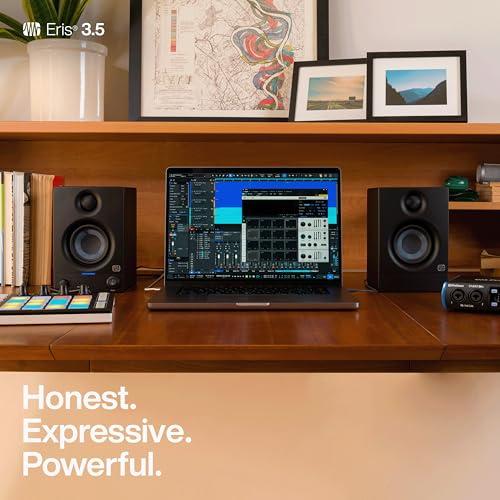
Desktop speakers essentially split into two philosophies that couldn't be more different. Studio monitors like the PreSonus Eris 3.5 are designed with one primary goal: telling you exactly what your audio sounds like, warts and all. They're the audio equivalent of a magnifying glass, revealing every detail so you can make informed decisions about your music, podcast, or video project.
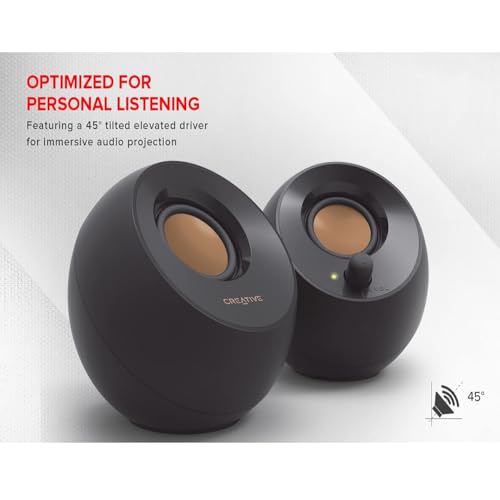
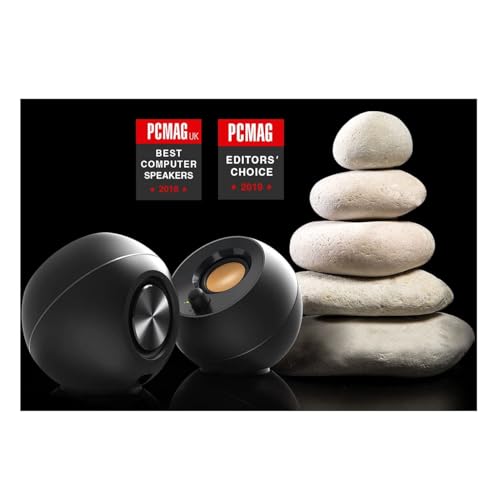
Consumer desktop speakers like the Creative Pebble V2 take the opposite approach. They're designed to make everything sound as good as possible, often enhancing certain frequencies to create a more exciting listening experience. Think of them as Instagram filters for your audio—they make things look (or sound) better, even if that's not technically accurate.
The fundamental considerations when choosing between these approaches include whether you need honest audio reproduction or enhanced listening enjoyment, how much power and volume you require, what connectivity options matter to you, and crucially, how flexible you need your speakers to be across different use cases.
The PreSonus Eris 3.5 Studio Monitors arrived on the scene around 2019 as part of PreSonus's effort to bring professional monitoring capabilities to smaller spaces and tighter budgets. At the time of writing, they typically cost about four to five times more than basic desktop speakers, positioning them as entry-level professional gear rather than consumer audio.
The Creative Pebble V2, released around 2020, represents Creative's evolution of their popular budget speaker line. The "V2" designation brought USB-C connectivity and improved power delivery compared to the original Pebble, addressing some of the limitations that held back the first generation. These speakers cost roughly what you might spend on a decent lunch, making them one of the most accessible audio upgrades available.
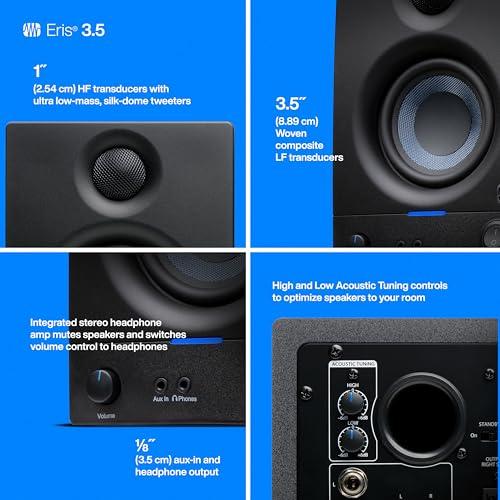
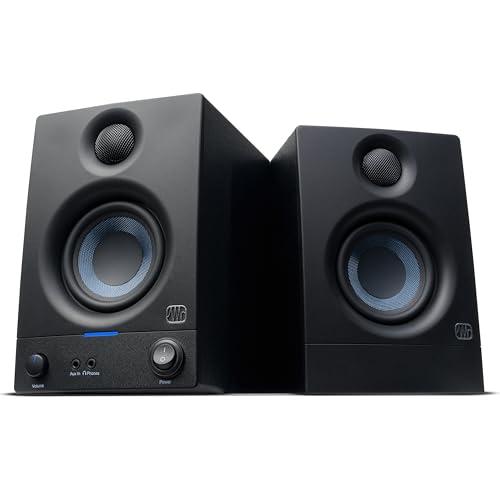
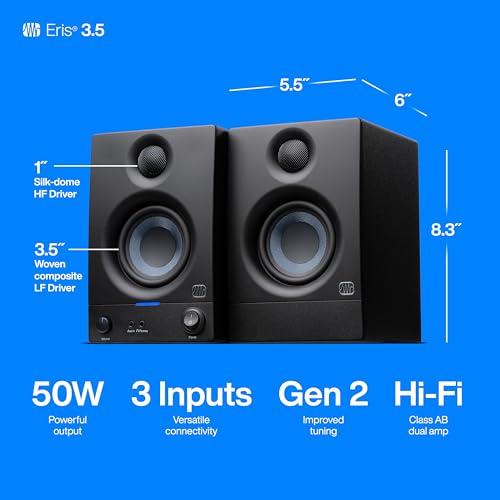
The difference in audio quality between the Eris 3.5 and Pebble V2 reveals itself immediately in their driver design—the actual speakers that convert electrical signals into sound waves. The Eris 3.5 uses what's called a two-way design, with a dedicated 3.5-inch woven composite woofer handling low and mid frequencies, and a separate 1-inch silk dome tweeter managing the highs. This division of labor means each driver can be optimized for its specific frequency range, much like having specialized tools for different jobs.
The crossover frequency—the point where the woofer hands off to the tweeter—sits at 2.8 kHz in the Eris 3.5. This crossover point is carefully chosen because it falls in a less critical area for human hearing, minimizing any potential issues where the two drivers might not perfectly align.
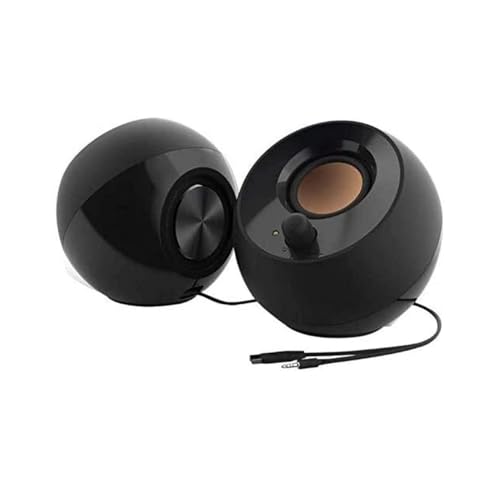
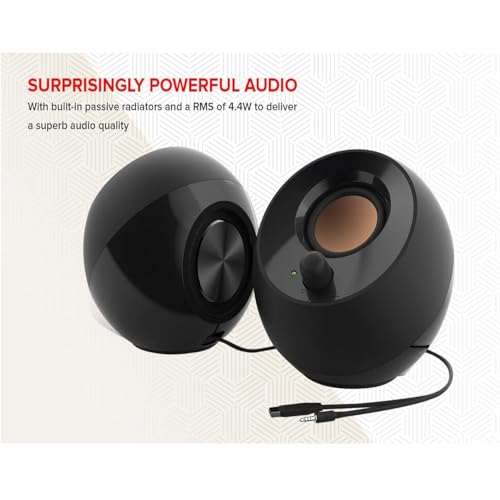
In contrast, the Pebble V2 uses full-range drivers—single speakers that attempt to reproduce the entire frequency spectrum. While this keeps costs down and simplifies the design, it means compromises across the frequency range. The Pebble V2 does include passive radiators (basically speakers without magnets that move in response to air pressure changes from the main driver) to help extend bass response, but this is fundamentally different from having dedicated drivers.
The frequency response specifications tell a revealing story about each speaker's capabilities and design goals. The Eris 3.5 covers 80 Hz to 20 kHz—nearly the full range of human hearing—with a relatively flat response curve designed for accuracy. The Pebble V2 handles 100 Hz to 17 kHz, which is respectable for its size and price but shows the limitations of its single-driver design.
More importantly, the Eris 3.5 includes acoustic tuning controls that let you adjust both high and low frequencies by ±6 decibels (dB). A decibel is a unit of sound measurement, and 6 dB represents roughly a doubling or halving of perceived volume at those frequencies. This means you can customize the sound to your room's acoustics—boosting bass if your room absorbs low frequencies, or taming harsh highs if you have a particularly reflective space.
From our research into user experiences and professional reviews, the Eris 3.5 consistently delivers more detailed midrange reproduction, cleaner bass without muddiness, and smoother high frequencies that don't become fatiguing during long listening sessions. The Pebble V2, while impressive for its price point, tends toward a brighter sound signature that can make vocals and instruments sound more exciting but less natural.
The power specifications reveal another fundamental difference in capability. The Eris 3.5 delivers 25 watts per channel through Class AB amplification—a type of amplifier design that provides good efficiency while maintaining low distortion. Class AB amplifiers switch between two different operating modes depending on the signal, combining the best aspects of Class A (high quality but inefficient) and Class B (efficient but potentially distorted) designs.
Those 50 total watts in the Eris 3.5 translate to a maximum Sound Pressure Level (SPL) of 98 dB at one meter—loud enough to fill a small to medium room without distortion. To put this in perspective, normal conversation happens around 60 dB, while 85 dB is considered the threshold where prolonged exposure can damage hearing.
The Pebble V2 manages 8 watts RMS (Root Mean Square—a measure of continuous power rather than peak power), which might seem dramatically less powerful. However, watts alone don't tell the full story. The Pebble V2 can actually achieve peak SPLs over 102 dB, but this comes with significantly more distortion as you approach maximum volume.
The practical difference becomes clear in real-world use. The Eris 3.5 maintains clean, undistorted sound even at high volumes, making it suitable for room-filling audio or situations where you need significant headroom for dynamic content like movie soundtracks or music with wide dynamic range. The Pebble V2 works best in near-field situations—essentially personal listening at your desk—where its power limitations aren't exposed.
The construction differences between these speakers reflect their different price points and intended uses, but they also significantly impact sound quality. The Eris 3.5 uses Medium Density Fiberboard (MDF) cabinets with vinyl laminate. MDF is an engineered wood product that's dense and uniform, making it excellent for speaker enclosures because it doesn't resonate at specific frequencies the way natural wood might. This means less coloration of the sound—you hear more of what's in your audio and less of the speaker cabinet itself.
The vinyl laminate serves both aesthetic and functional purposes, providing durability while maintaining the acoustic properties of the underlying MDF. Professional studio monitors often use similar materials because cabinet resonances can significantly color the sound in ways that make accurate monitoring impossible.
The Pebble V2 uses plastic construction, which keeps costs low and weight minimal but can introduce its own acoustic challenges. Plastic enclosures are more prone to resonances and vibrations that can muddy the sound, particularly at higher volumes. However, for the Pebble V2's intended use case and price point, this represents a reasonable compromise.
The physical design also affects performance. The Eris 3.5 places its drivers in a traditional front-facing configuration optimized for accurate sound reproduction. The Pebble V2 angles its drivers upward at 45 degrees, which Creative designed to direct sound toward a seated listener's ears rather than their chest. This is a clever solution for desktop use, though it limits optimal listening positions more than traditional designs.
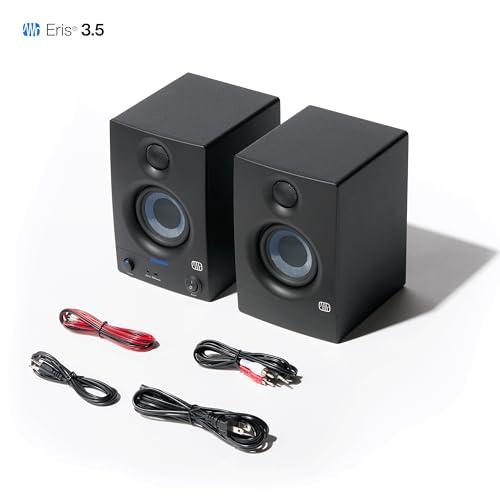
The connectivity options reveal each product's target market and use case flexibility. The Eris 3.5 offers multiple input types: balanced 1/4-inch TRS (Tip-Ring-Sleeve) inputs for professional audio equipment, unbalanced RCA inputs for consumer gear, and a front-panel 3.5mm input for convenience. Balanced connections use three conductors to cancel out electrical interference, making them preferred for professional audio where signal integrity matters.
This connectivity flexibility means the Eris 3.5 can work equally well with audio interfaces used for music production, gaming setups, or traditional stereo equipment. The front-panel headphone output that automatically mutes the speakers adds another layer of convenience for content creators who need to switch between speakers and headphones frequently.
The Pebble V2 takes a minimalist approach with USB-C power and a single 3.5mm audio input. The USB-C power connection was a smart upgrade from the original Pebble's USB-A, allowing for higher power delivery that enables the improved performance of the V2 generation. An included USB-A adapter ensures compatibility with older computers.
This simplified connectivity makes the Pebble V2 genuinely plug-and-play—connect two cables and you're done. No wall adapters, no complex setup, no decisions about which input to use. For users who just want better sound from their computer without complications, this approach has real merit.
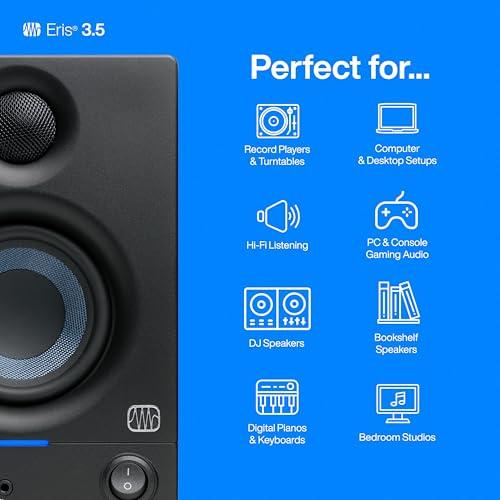
For anyone involved in music production, podcast creation, or video editing, the Eris 3.5 provides capabilities that the Pebble V2 simply cannot match. The accuracy of studio monitors allows you to make informed decisions about your mix—if your vocals sound too bright through the Eris 3.5, they probably are too bright and need adjustment. The same vocals through the Pebble V2 might sound fine due to that speaker's enhanced sound signature, but your final product won't translate well to other playback systems.
The acoustic tuning controls on the Eris 3.5 become particularly valuable in home studio situations where room treatment isn't perfect. If your room emphasizes certain frequencies due to its size, shape, or furnishings, you can compensate somewhat through these controls.
Gaming presents interesting challenges for both speakers. The Eris 3.5 excels at revealing positional audio cues in competitive games—you'll more accurately hear which direction footsteps are coming from or where that sniper is positioned. The clean, undistorted output at higher volumes also handles the dynamic range of modern game soundtracks without compression or distortion.
The Pebble V2 provides a more "exciting" gaming experience with its enhanced frequency response, making explosions more impressive and music more engaging. However, this enhancement can mask important audio details that might give you a competitive advantage.
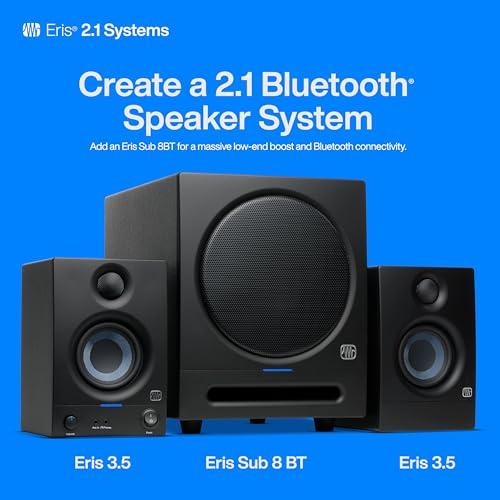
For movie watching, both speakers have limitations due to their size. The Eris 3.5 provides more accurate dialogue reproduction and better dynamic range handling, while the Pebble V2 might make action sequences more exciting through its enhanced response. Neither truly excels for home theater use—for that application, you'd want larger monitors or a proper 2.1 system with a subwoofer.
For everyday computer use—web videos, music streaming, video calls—the Pebble V2 provides excellent value. Its enhanced sound signature makes most content more enjoyable, and the simplicity of setup means it just works without thought or adjustment.
The Eris 3.5 serves casual listening well too, but its honest reproduction means poorly recorded or heavily compressed content (like many YouTube videos or streaming music at low bitrates) sounds exactly as poor as it actually is. Some users prefer this honesty, while others would rather have their speakers make everything sound as good as possible.
At the time of writing, the price difference between these speakers is substantial—the Eris 3.5 costs roughly four to five times more than the Pebble V2. This raises the critical question: does the Eris 3.5 provide four to five times the value?
The answer depends entirely on your needs and use cases. If you're creating content professionally or as a serious hobby, need accurate monitoring for mixing decisions, or want speakers that can fill a room with clean sound, the Eris 3.5 provides exceptional value despite its higher cost. The professional features, build quality, and acoustic accuracy justify the price difference for users who can utilize these capabilities.
For users who simply want better sound than their laptop's built-in speakers for casual listening, email, and web browsing, the Pebble V2 represents outstanding value. It provides a dramatic improvement over built-in audio at a price point that makes it accessible to students, casual users, or anyone setting up a temporary workspace.
Choose the PreSonus Eris 3.5 if you create any type of audio or video content, even as a hobby. If you're recording podcasts, streaming on Twitch, producing music, or editing videos, the acoustic accuracy and professional features will serve you well. They're also the better choice if you need sufficient volume for room listening, want compatibility with professional audio gear, or value the ability to customize the sound to your space.
The Creative Pebble V2 makes sense for users who primarily consume rather than create content, need the simplest possible setup, have severe budget constraints, or work in very small spaces where the compact design provides real benefits. They're perfect for students in dorm rooms, casual computer users who want better sound without complexity, or as secondary speakers for a bedroom or kitchen computer.
The fundamental question isn't really about audio quality—the Eris 3.5 clearly provides superior performance. Instead, ask yourself whether you need that superior performance and can justify the significantly higher cost. If you're serious about audio in any capacity, the Eris 3.5 represents a worthwhile long-term investment. If you just want your computer to sound better without breaking the bank, the Pebble V2 delivers exactly what you need at an unbeatable price point.
Both speakers serve their intended markets well, but they're solving fundamentally different problems. Understanding which problem you're trying to solve will lead you to the right choice for your specific situation and budget.
| PreSonus Eris 3.5 Studio Monitors Pair | Creative Pebble V2 Desktop Speakers |
|---|---|
| Power Output - Determines maximum clean volume and room-filling capability | |
| 50W total (25W per speaker) Class AB amplification | 8W RMS total (4W per speaker) |
| Driver Configuration - Affects sound quality and frequency accuracy | |
| 2-way design: 3.5" woven composite woofer + 1" silk dome tweeter | Single full-range drivers with passive radiators |
| Frequency Response - Range of sounds the speakers can reproduce | |
| 80 Hz - 20 kHz (near full human hearing range) | 100 Hz - 17 kHz (limited low-end extension) |
| Maximum SPL - How loud speakers can get without distortion | |
| 98 dB at 1 meter (room-filling volume) | 102 dB peak (higher distortion at max volume) |
| Cabinet Construction - Impacts sound accuracy and durability | |
| Vinyl-laminated MDF (reduces unwanted resonances) | Plastic construction (prone to vibrations at high volume) |
| Connectivity Options - Determines what equipment you can connect | |
| Balanced 1/4" TRS, RCA, 3.5mm input + headphone output | USB-C power + single 3.5mm audio input only |
| Acoustic Controls - Ability to customize sound to your room | |
| High/low frequency tuning (±6 dB at 10 kHz and 100 Hz) | No acoustic adjustments available |
| Design Philosophy - Fundamental approach to sound reproduction | |
| Studio monitor (flat, accurate sound for mixing/critical listening) | Consumer speaker (enhanced sound signature for enjoyment) |
| Power Source - Affects placement flexibility and setup complexity | |
| AC power (requires wall outlet but enables higher performance) | USB-C powered (convenient but limits power output) |
| Dimensions per Speaker - Desktop footprint and room compatibility | |
| 8.3" H × 5.6" W × 6.5" D (larger professional form factor) | 4.8" H × 4.6" W × 4.5" D (ultra-compact desktop design) |
| Target Use Case - Best applications for each speaker type | |
| Content creation, mixing, critical listening, room audio | Casual desktop listening, space-constrained setups |
| Protection Features - Safeguards for long-term reliability | |
| RF interference, current limiting, thermal, power-save mode | Basic protection suitable for consumer use |
The PreSonus Eris 3.5 Studio Monitors are significantly better for music production and content creation. These studio monitors provide accurate, flat frequency response that lets you hear exactly what your audio sounds like without coloration. The Creative Pebble V2 enhances certain frequencies to make music sound more exciting, but this can mislead you when making mixing decisions. For podcasts, streaming, or music production, choose the PreSonus Eris 3.5.
Studio monitors like the PreSonus Eris 3.5 are designed for accurate sound reproduction to help with professional audio work, while consumer desktop speakers like the Creative Pebble V2 are designed to make everything sound as good as possible. The Eris 3.5 tells you the truth about your audio, while the Pebble V2 makes your music more enjoyable to listen to casually.
The PreSonus Eris 3.5 Studio Monitors can get much louder without distortion thanks to their 50-watt amplification system. They can fill a small to medium room with clean sound. The Creative Pebble V2 works best for personal desktop listening and will distort if pushed to high volumes. For room-filling audio, the PreSonus Eris 3.5 is the clear winner.
Both speakers work for gaming but serve different needs. The PreSonus Eris 3.5 provides more accurate positional audio for competitive gaming, helping you pinpoint enemy locations. The Creative Pebble V2 makes games sound more exciting with enhanced bass and treble, but may mask important audio cues. Serious gamers should consider the Eris 3.5 for competitive advantage.
The Creative Pebble V2 Desktop Speakers are much easier to set up with just two cables - USB-C for power and 3.5mm for audio. The PreSonus Eris 3.5 requires a wall outlet and offers multiple input options that might overwhelm beginners. For simple plug-and-play setup, the Creative Pebble V2 wins hands down.
Neither speaker is ideal for home theater use due to their compact size and lack of a dedicated subwoofer. However, the PreSonus Eris 3.5 Studio Monitors handle movie dialogue more clearly and provide better dynamic range for film soundtracks. The Creative Pebble V2 might make action scenes more exciting but lacks the power for proper home theater use. Consider larger speakers or a 2.1 system for serious movie watching.
The PreSonus Eris 3.5 offers professional connectivity with balanced 1/4" TRS inputs, RCA inputs, front-panel 3.5mm input, and a headphone output. The Creative Pebble V2 keeps it simple with just USB-C power and a single 3.5mm audio input. The Eris 3.5 works with audio interfaces and professional equipment, while the Pebble V2 is designed purely for computer use.
The Creative Pebble V2 Desktop Speakers are perfect for small spaces with their ultra-compact design and USB power that eliminates the need for wall outlets. The PreSonus Eris 3.5 are larger and require AC power, making them less suitable for cramped dorm rooms. For students and tight spaces, the Creative Pebble V2 is the practical choice.
Both speakers handle video calls adequately, but the PreSonus Eris 3.5 Studio Monitors provide clearer voice reproduction due to their accurate midrange response. The Creative Pebble V2 works fine for casual video calls and takes up less desk space. The Eris 3.5 includes a convenient headphone output for private calls, while the Pebble V2 requires separate headphones.
Value depends on your needs. The Creative Pebble V2 offers exceptional value for casual listening and basic desktop audio improvement. The PreSonus Eris 3.5 provides better value for content creators, musicians, or anyone needing accurate audio reproduction. The Pebble V2 costs much less but the Eris 3.5 justifies its higher price with professional features and superior sound quality.
The PreSonus Eris 3.5 Studio Monitors include acoustic tuning controls that let you adjust high and low frequencies to match your room's acoustics. The Creative Pebble V2 has no sound adjustments - what you hear is what you get. The tuning controls on the PreSonus Eris 3.5 make them adaptable to different environments and personal preferences.
The PreSonus Eris 3.5 Studio Monitors use professional-grade MDF cabinets and Class AB amplification designed for extended use in studio environments. The Creative Pebble V2 uses plastic construction adequate for casual use but not built for professional durability. For long-term reliability and professional use, the PreSonus Eris 3.5 is the more robust choice, while the Creative Pebble V2 offers reliable performance for its intended casual use case.
We've done our best to create useful and informative comparisons to help you decide what product to buy. Our research uses advanced automated methods to create this comparison and perfection is not possible - please contact us for corrections or questions. These are the sites we've researched in the creation of this article: soundref.com - presonus.com - musicradar.com - presonus.com - higherhertz.com - sweetwater.com - erinsaudiocorner.com - gzhls.at - homestudiobasics.com - presonus.com - audiosciencereview.com - youtube.com - audiosciencereview.com - thomannmusic.com - georgesmusic.com - musicalgarage.com - soundonsound.com - techspinreview.com - cdw.com - youtube.com - richardtech.net - manuals.plus - audiosciencereview.com - us.creative.com - en.creative.com - youtube.com - audiosciencereview.com - lenovo.com - tomshardware.com - youtube.com - manuals.plus - youtube.com - youtube.com - walmart.com - dell.com - youtube.com - microcenter.com - cdwg.com - tvffm.org - asset.conrad.com - us.creative.com - manuals.plus - pangoly.com

Privacy Policy
Terms and Conditions - Affiliate Policy
Home Security
© Copyright 2008-2026.
11816 Inwood Rd #1211, Dallas, TX 75244